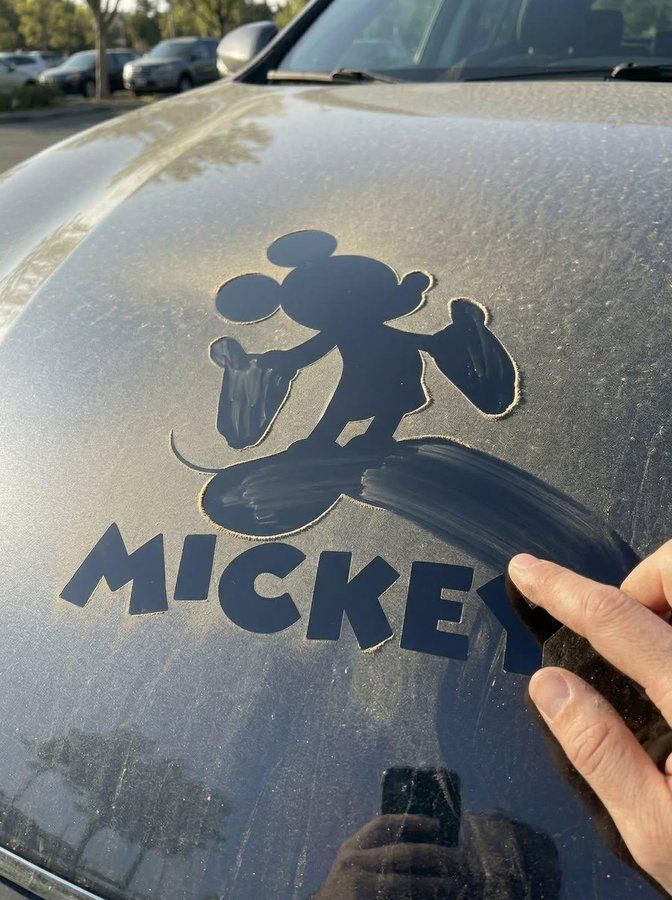
引擎盖灰尘擦出逼真logo
Prompt
Transform the uploaded logo into a realistic outdoor scene where the logo silhouette is revealed by a hand wiping dust off a dirty car hood. The logo must keep its exact shape and proportions, appearing as if someone naturally traced it through a layer of accumulated dust, leaving clean streaks that form the recognizable silhouette.

Material details:
Fine dust layer covering the car hood with uneven thickness.
Clear wiped paths forming the logo shape, with visible finger streaks, pressure variations, and slight smudging.
Dust pushed to the edges of the wiped areas, creating soft ridges and accumulation lines.
Tiny dust particles remaining inside the wiped areas for realism.

Surface interaction:
Car hood with subtle curvature, metallic paint, and micro scratches.
Dust settles naturally in surface imperfections and panel edges.
Wiped areas reveal slightly reflective paint beneath, contrasting with the matte dusty surface.

Physics behavior:
Dust removal follows realistic friction and pressure — thicker dust pushed outward, thinner areas partially cleared.
Finger paths should vary in width and opacity depending on pressure.
Some streaks overlap, showing multiple passes or corrections.
Gravity causes slight downward drag in some streaks, especially if the surface is angled.

Environment:
Outdoor parking setting with natural surroundings reflected faintly on the car surface.
Minimal background blur, focusing on the hood.

Lighting:
Natural sunlight grazing across the surface.
Highlights catching on remaining dust particles and clean paint areas.
Soft shadows enhancing texture contrast.

Atmosphere:
Casual.
Human interaction.
Everyday realism with tactile detail.

Camera & composition:
Slightly angled close-up view of the car hood.
Logo clearly visible through contrast between dusty and wiped areas.
Natural imperfections preserved.

Format:
Aspect ratio: STRICT 4:5 vertical.
No text overlays.

Style:
Hyper-real surface photography.
Physically accurate dust behavior and interaction.
- Category
- Posters & Typography
- Model
- Nano Banana 2
- Creator
- @Goodmanprotocol
- Source ID
- 13535
- Published
- Apr 22, 2026
Views227