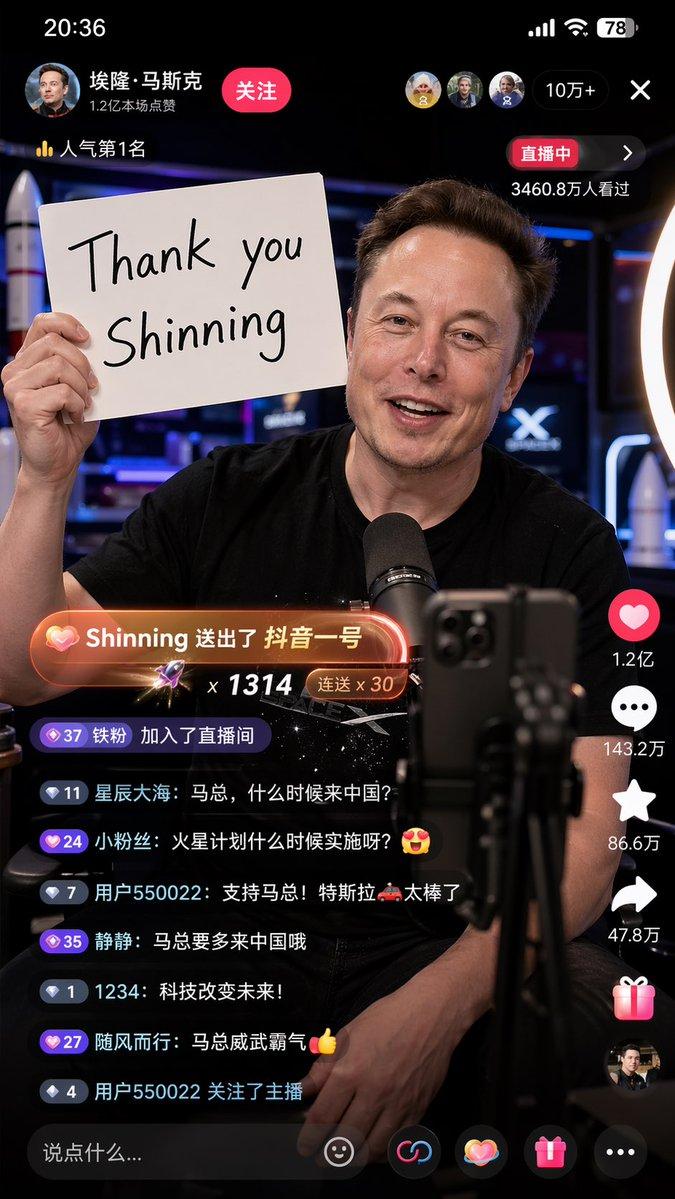
直播 App 界面模型
Prompt
{
  "type": "mobile livestream interface mockup",
  "subject": {
    "identity": "{argument name=\"subject name\" default=\"Elon Musk\"}",
    "appearance": "wearing a black t-shirt with {argument name=\"t-shirt graphic\" default=\"Starship rocket and SPACEX text\"}",
    "pose": "{argument name=\"expression\" default=\"smiling warmly, looking directly at the camera\"}, hands clasped on a dark table"
  },
  "environment": "{argument name=\"background\" default=\"SpaceX office with a rocket model and neon sign\"}",
  "layout": {
    "sections": [
      {
        "title": "Top Bar UI",
        "position": "top",
        "count": 4,
        "labels": [
          "Profile info with '埃隆·马斯克' and Follow button",
          "Viewer avatars and count '60.6万'",
          "Rank badge '全站第1名'",
          "Close button 'X'"
        ]
      },
      {
        "title": "Gift Popups",
        "position": "mid-left",
        "count": 2,
        "labels": [
          "星辰大海 送小心心 x66 (Heart icon)",
          "Dreamer 送超级火箭 x1 (Rocket icon)"
        ]
      },
      {
        "title": "Chat Stream",
        "position": "bottom-left",
        "count": 7,
        "labels": [
          "用户12345: 马斯克来了!🔥",
          "钢铁侠本侠: 特斯拉未来规划能分享一下吗?",
          "加密货币王: 会考虑接受狗狗币支付吗?🐶",
          "火星移民: 什么时候去火星?🚀",
          "银河系 来了",
          "智者无敌: 第一排支持马斯克!",
          "未来已来: 👍👍👍"
        ]
      },
      {
        "title": "Side Action Buttons",
        "position": "bottom-right",
        "count": 4,
        "labels": [
          "Host profile with +",
          "Like heart '38.7万'",
          "Comment bubble '6.2万'",
          "Share arrow '3.6万'"
        ]
      },
      {
        "title": "Bottom Input Bar",
        "position": "bottom",
        "count": 3,
        "labels": [
          "Text input '说点什么...'",
          "Gift box icon",
          "More options '...'"
        ]
      }
    ]
  }
}- Category
- Charts & Infographics
- Model
- GPT Image 2
- Creator
- LL.AI
- Source ID
- 13822
- Published
- Apr 16, 2026
Views7