13

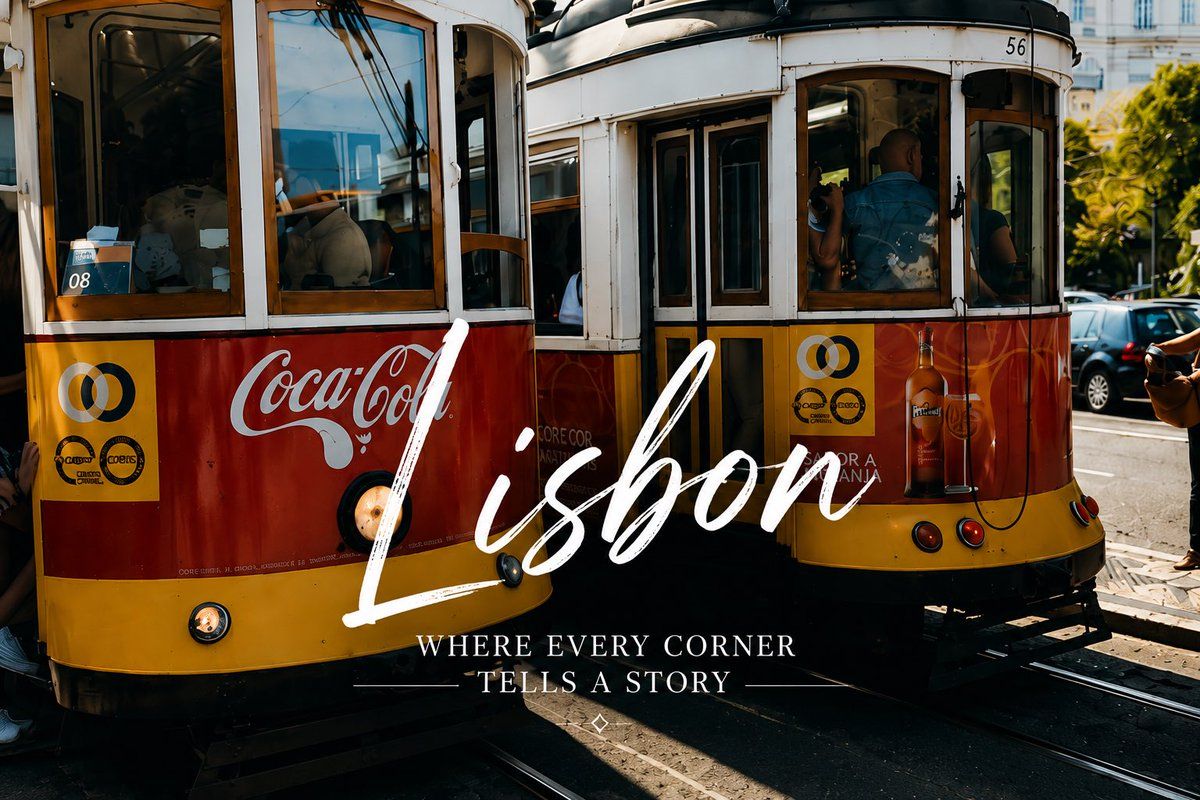
里斯本复古电车旅行海报
Enlarge

Example images

里斯本复古电车旅行海报

Prompt
Create an emotional smartphone-style travel photograph of {argument name="city name" default="Lisbon"} in warm late-afternoon sunlight, showing exactly 2 vintage yellow-and-red street trams stopped side by side on curved tram tracks in a busy European street. The left tram is cropped close in the foreground with wooden window frames, a red side panel carrying a visible Coca-Cola advertisement, a small route sign reading “08,” and passengers partially visible through reflective windows. The right tram is slightly farther back, angled toward the viewer, with the number “56” near the roof, open doors and windows, passengers inside, and a beverage advertisement on the red lower panel. Include urban background details such as parked cars, leafy trees, bright building facades, hard shadows on asphalt, metal rails, and a candid street-photography feel. Apply high-contrast cinematic color grading, deep blacks, golden highlights, realistic lens reflections, and a nostalgic travel-poster mood. Overlay large centered white handwritten brush-script text reading {argument name="main title" default="Lisbon"} across the lower middle of the trams, with a smaller elegant all-caps serif subtitle beneath it reading {argument name="subtitle" default="WHERE EVERY CORNER TELLS A STORY"}. Add thin decorative horizontal lines around the subtitle and a tiny diamond ornament below. Keep the composition horizontal 3:2, photorealistic, slightly imperfect like a good phone snapshot, with no extra text or watermark.
Category
Charts & Infographics
Model
GPT Image 2
Creator
UME AI
Views4
Source ID
20928
Published
May 16, 2026

Guide

About "里斯本复古电车旅行海报"

What is this prompt for?

"里斯本复古电车旅行海报" AI image prompt for GPT Image 2 (Charts & Infographics). 一张电影感十足的手机风格旅行海报,展示了两辆里斯本电车,并配有优雅的手写目的地字体。 Copy it on Picva and recreate the look in one…

The full copyable prompt and example visuals above are ready for AI image generation or one-click recreate in Picva.

How to use this prompt

  1. Step 1

    Open the prompt detail

    Review the example visuals, category, and full prompt text for "里斯本复古电车旅行海报".

  2. Step 2

    Copy the prompt

    Copy the prompt body from this page, or load it directly in Studio.

  3. Step 3

    Pick a model (GPT Image 2)

    Prefer GPT Image 2. If you switch models, keep subject and composition and tweak style terms.

  4. Step 4

    Generate and export

    Recreate the look in Picva, or export into your workflow for editing and publishing.

FAQ

What is the "里斯本复古电车旅行海报" prompt?
It is an AI image-generation prompt for GPT Image 2 in the Charts & Infographics category. This page includes the full prompt text, example visuals, and a one-click recreate path in Picva.
How do I use this prompt to generate an image?
Copy the prompt from this page, or use Generate / Studio. Paste it into a compatible image model, or recreate the look in Picva with optional reference images.
Which model is this prompt for?
This page lists GPT Image 2. Most descriptive prompts also transfer to nearby image models such as GPT Image, Flux, or Midjourney with light style tweaks.
Can I use the result commercially?
You can usually copy the prompt for creation, but commercial use of the final image depends on the model terms, reference-image rights, and the generated content. Follow the source author and platform rules.