17

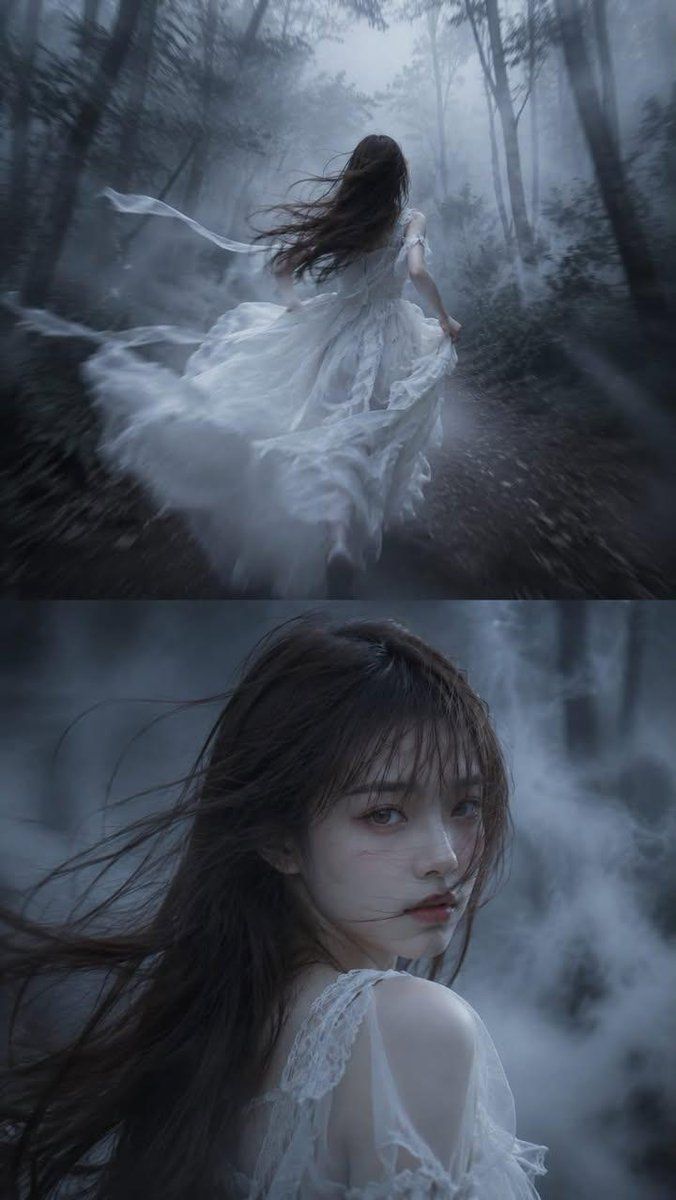
暗黑童话电影感双联画
Enlarge

Example images

暗黑童话电影感双联画

Prompt
High-detail semi-realistic dark fairytale style, cinematic diptych composition, vertical 9:16 aspect ratio.

The image is divided into two frames.

Upper Frame:

{argument name="character" default="A man"} runs alone through a forest swallowed by thick fog. He wears a flowing {argument name="outfit style" default="black gothic suit"}, running quickly along a forest path.

The camera is positioned in a tracking shot from behind.

The image primarily focuses on the man's back.

A strong wind blows his hair, and his clothes flutter violently in the air. Extremely thick white fog shrouds the forest, and distant trees are completely obscured in the sea of fog, only blurry outlines remaining.

A strong sense of speed, motion blur, afterimages in motion, and a composition conveying a sense of pursuit.

Bottom Scene:

Close-up of a half-body figure.

The man maintains a running posture, but suddenly turns to look behind him.

Expressionless, aloof, calm, and restrained, his eyes are cold and mysterious, devoid of fear, sadness, or joy.

A strong wind tousles his hair, and thick fog swirls and flows against the forest background.

Face details are clearly defined.

The gaze is direct at the camera.

A close-up of a figure with a strong cinematic feel.

Cool {argument name="color tones" default="blue-gray"} tones, a dark fairytale atmosphere, Gothic aesthetics, a mysterious forest, volumetric fog, a dreamlike quality, cinematic lighting, beautiful yet eerie, and extremely high detail.
Category
Charts & Infographics
Model
GPT Image 2
Creator
simply
Views4
Source ID
23941
Published
Jun 3, 2026

Guide

About "暗黑童话电影感双联画"

What is this prompt for?

"暗黑童话电影感双联画" AI image prompt for GPT Image 2 (Charts & Infographics). 一种多画幅的哥特式构图,展示了一名男子在浓雾笼罩的森林中奔跑,并配有神秘的特写镜头。 Copy it on Picva and recreate the look in one…

The full copyable prompt and example visuals above are ready for AI image generation or one-click recreate in Picva.

How to use this prompt

  1. Step 1

    Open the prompt detail

    Review the example visuals, category, and full prompt text for "暗黑童话电影感双联画".

  2. Step 2

    Copy the prompt

    Copy the prompt body from this page, or load it directly in Studio.

  3. Step 3

    Pick a model (GPT Image 2)

    Prefer GPT Image 2. If you switch models, keep subject and composition and tweak style terms.

  4. Step 4

    Generate and export

    Recreate the look in Picva, or export into your workflow for editing and publishing.

FAQ

What is the "暗黑童话电影感双联画" prompt?
It is an AI image-generation prompt for GPT Image 2 in the Charts & Infographics category. This page includes the full prompt text, example visuals, and a one-click recreate path in Picva.
How do I use this prompt to generate an image?
Copy the prompt from this page, or use Generate / Studio. Paste it into a compatible image model, or recreate the look in Picva with optional reference images.
Which model is this prompt for?
This page lists GPT Image 2. Most descriptive prompts also transfer to nearby image models such as GPT Image, Flux, or Midjourney with light style tweaks.
Can I use the result commercially?
You can usually copy the prompt for creation, but commercial use of the final image depends on the model terms, reference-image rights, and the generated content. Follow the source author and platform rules.