14

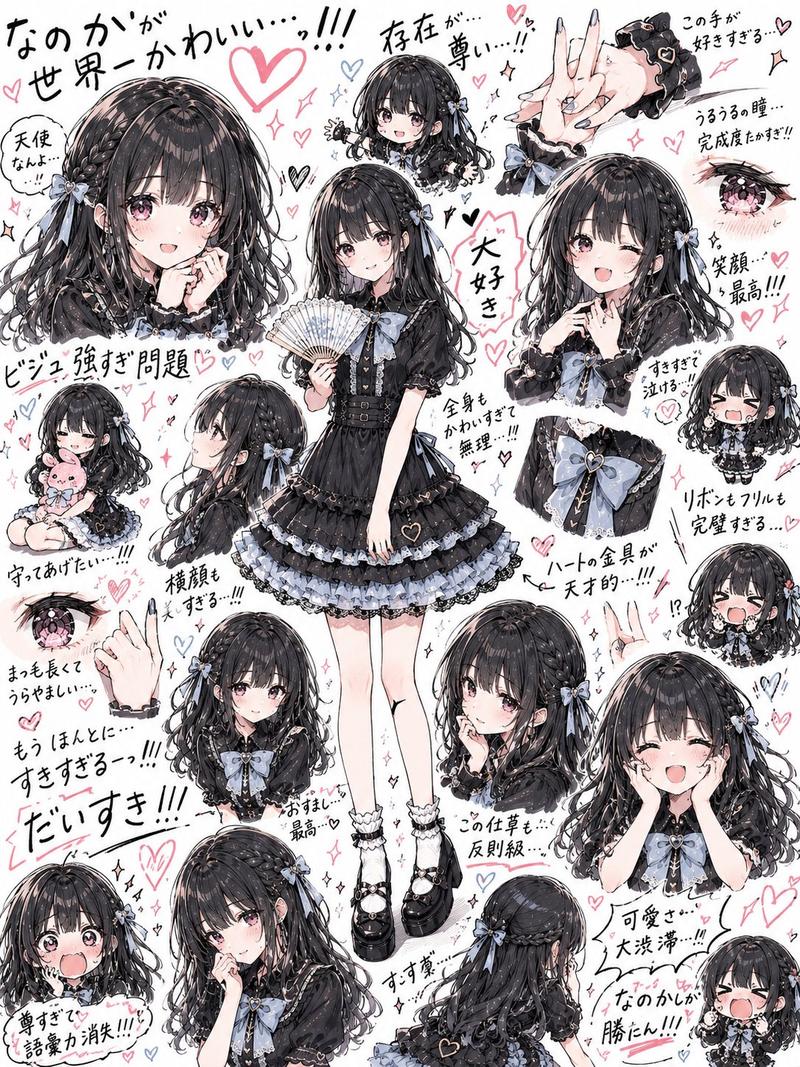
可爱唯美角色拼贴画
Enlarge

可爱唯美角色拼贴画

Prompt
An ultra-cute aesthetic character collage featuring a beautiful {argument name="subject" default="young girl"} in a {argument name="outfit" default="soft Korean-inspired school outfit"}, surrounded by adorable chibi versions of herself in different playful poses and expressions. The main character stands confidently in the center, wearing a white elegant blouse with long sleeves and a black ribbon bow tie, a brown plaid pleated skirt, white socks, and glossy black loafers. She has long soft {argument name="hair style" default="wavy black hair"}, glowing fair skin, gentle smile, soft makeup, and a sweet charming expression. Around her are multiple chibi mini versions with oversized sparkling eyes, cute blush, playful poses, sitting, waving, winking, drinking iced coffee, smiling shyly, making cute expressions. Soft pastel grey background filled with tiny doodles including stars, sparkles, hearts, smiley faces, cute animals, speech bubbles, aesthetic handwritten text, sticker-like white outlines around each character. Korean kawaii aesthetic, dreamy soft lighting, Pinterest-inspired mood board, clean composition, adorable fashion style, cozy wholesome vibe, ultra detailed, soft shadows, glossy eyes, smooth hair texture, photorealistic mixed with anime-chibi style, high quality 8k, cute sticker pack design, soft neutral tones, kawaii aesthetic poster composition.
Category
Posters & Typography
Model
GPT Image 2
Creator
S
Views6
Source ID
24130
Published
Jun 5, 2026

Guide

About "可爱唯美角色拼贴画"

What is this prompt for?

"可爱唯美角色拼贴画" AI image prompt for GPT Image 2 (Posters & Typography). 一个详细的提示词,用于创作韩系风格的角色拼贴画,画面中一位少女被她自己俏皮的 Q 版形象环绕,呈现出柔和梦幻的审美风格。 Copy it on Picva and recreate…

The full copyable prompt and example visuals above are ready for AI image generation or one-click recreate in Picva.

How to use this prompt

  1. Step 1

    Open the prompt detail

    Review the example visuals, category, and full prompt text for "可爱唯美角色拼贴画".

  2. Step 2

    Copy the prompt

    Copy the prompt body from this page, or load it directly in Studio.

  3. Step 3

    Pick a model (GPT Image 2)

    Prefer GPT Image 2. If you switch models, keep subject and composition and tweak style terms.

  4. Step 4

    Generate and export

    Recreate the look in Picva, or export into your workflow for editing and publishing.

FAQ

What is the "可爱唯美角色拼贴画" prompt?
It is an AI image-generation prompt for GPT Image 2 in the Posters & Typography category. This page includes the full prompt text, example visuals, and a one-click recreate path in Picva.
How do I use this prompt to generate an image?
Copy the prompt from this page, or use Generate / Studio. Paste it into a compatible image model, or recreate the look in Picva with optional reference images.
Which model is this prompt for?
This page lists GPT Image 2. Most descriptive prompts also transfer to nearby image models such as GPT Image, Flux, or Midjourney with light style tweaks.
Can I use the result commercially?
You can usually copy the prompt for creation, but commercial use of the final image depends on the model terms, reference-image rights, and the generated content. Follow the source author and platform rules.