20

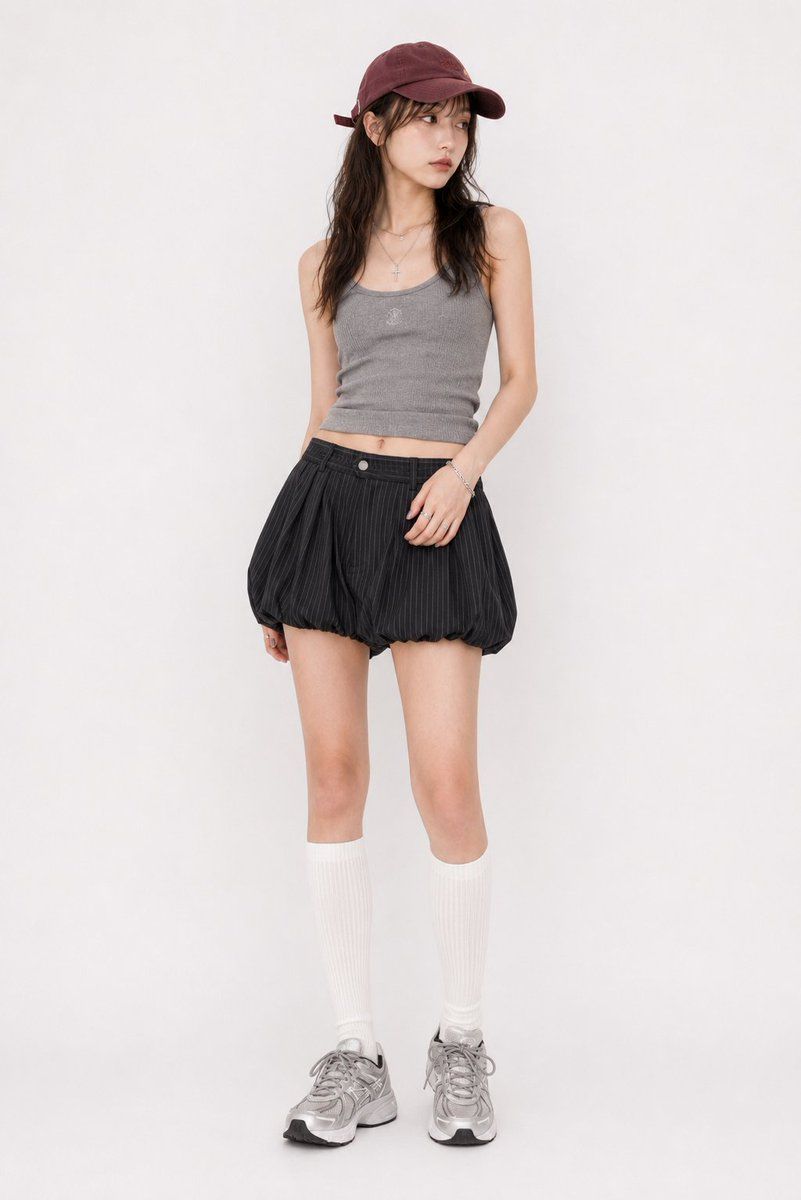
Y2K 街头风罗纹背心穿搭
Enlarge

Example images

Y2K 街头风罗纹背心穿搭

Prompt
Outfit: a casual Y2K street outfit with a fitted {argument name="top color" default="gray"} ribbed knit tank top or camisole-style top featuring a scoop neckline, compact silhouette, premium fabric texture, realistic garment construction, clean stitching, natural seam tension, believable fabric weight, subtle wrinkles, realistic drape, and refined edge finishing, paired with black to charcoal vertical pinstripe balloon mini shorts / bloomer-style mini skort in lightweight woven fabric with rounded gathered volume, visible seams, real folds, and detailed garment realism, white ribbed knee-high socks, and a {argument name="hat color" default="burgundy"} cotton twill baseball cap with metal hardware, no bag; high-quality material feel, well-made clothing details, not costume-like, not cheap-looking; add a random mix of delicate casual Y2K silver-tone accessories such as rings, bracelets, and layered necklaces that naturally match the outfit without fixing exact pieces.
Category
Creative Use Cases
Model
GPT Image 2
Views3
Source ID
28146
Published
Jul 9, 2026

Guide

About "Y2K 街头风罗纹背心穿搭"

What is this prompt for?

"Y2K 街头风罗纹背心穿搭" AI image prompt for GPT Image 2 (Creative Use Cases). 一款极简主义 Y2K 街头风提示词,包含罗纹针织背心和条纹灯笼短裙。 Copy it on Picva and recreate the look in one click.

The full copyable prompt and example visuals above are ready for AI image generation or one-click recreate in Picva.

How to use this prompt

  1. Step 1

    Open the prompt detail

    Review the example visuals, category, and full prompt text for "Y2K 街头风罗纹背心穿搭".

  2. Step 2

    Copy the prompt

    Copy the prompt body from this page, or load it directly in Studio.

  3. Step 3

    Pick a model (GPT Image 2)

    Prefer GPT Image 2. If you switch models, keep subject and composition and tweak style terms.

  4. Step 4

    Generate and export

    Recreate the look in Picva, or export into your workflow for editing and publishing.

FAQ

What is the "Y2K 街头风罗纹背心穿搭" prompt?
It is an AI image-generation prompt for GPT Image 2 in the Creative Use Cases category. This page includes the full prompt text, example visuals, and a one-click recreate path in Picva.
How do I use this prompt to generate an image?
Copy the prompt from this page, or use Generate / Studio. Paste it into a compatible image model, or recreate the look in Picva with optional reference images.
Which model is this prompt for?
This page lists GPT Image 2. Most descriptive prompts also transfer to nearby image models such as GPT Image, Flux, or Midjourney with light style tweaks.
Can I use the result commercially?
You can usually copy the prompt for creation, but commercial use of the final image depends on the model terms, reference-image rights, and the generated content. Follow the source author and platform rules.