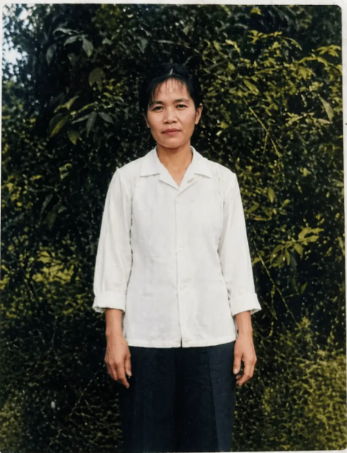
Professional Old Photo Restoration
提示词
Using the provided reference image, perform a professional old-photo restoration and realistic colorization. Keep the original composition, the single standing person, pose, clothing shape, body proportions, and background layout unchanged. Remove all visible aging damage: mold-like white patches, peeling emulsion, scratches, stains, cracks, creases, faded contrast, and worn borders. Reconstruct missing image areas naturally without inventing new objects or changing the subject's identity. Convert the black-and-white damaged photo into a clean natural-color photograph from the 1970s: green outdoor foliage, a white long-sleeve shirt, dark trousers, natural skin tones, and soft daylight. Improve clarity, exposure, and texture while preserving the original documentary look; do not beautify, slim, reshape facial features, alter clothing, change the pose, add modern effects, or make it look like a newly staged portrait.
- 分类
- 人像头像
- 模型
- GPT Image 2
- 来源作者
- Aiyutoushushu
- 来源 ID
- youmind-24173
浏览量2