Infographic icon: GPT Image 2 prompt
提示词
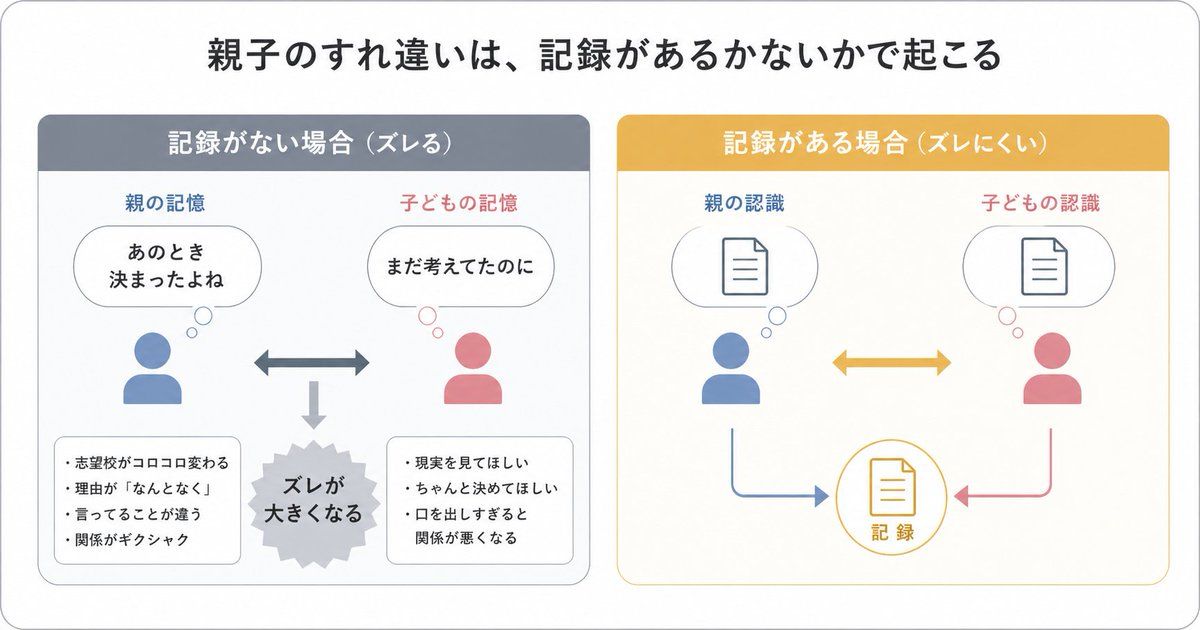
{"type":"Japanese infographic","style":"simple, easy-to-understand flat vector diagram, clean white background, rounded light-gray outer frame, minimal pastel color palette, presentation-slide design, clear hierarchy, lots of whitespace, modern sans-serif Japanese typography","canvas":{"aspect_ratio":"16:9"},"headline":{"text":"{argument name=\"headline text\" default=\"親子のすれ違いは、記録があるかないかで起こる\"}","position":"top center","size":"large bold black"},"layout":{"structure":"2 side-by-side rounded panels beneath the headline","sections":[{"title":"記録がない場合(ズレる)","position":"left","count":8,"header_color":"muted blue-gray","panel_border":"light gray","labels":["親の記憶","子どもの記憶","あのとき決まったよね","まだ考えてたのに","ズレが大きくなる","志望校がコロコロ変わる","理由が『なんとなく』","言ってることが違う","関係がギクシャク","現実を見てほしい","ちゃんと決めてほしい","口を出しすぎると関係が悪くなる"],"contents":{"top_left":{"type":"parent icon with thought bubble","icon_color":"blue","caption":"親の記憶","bubble_text":"あのとき\n決まったよね"},"top_right":{"type":"child icon with thought bubble","icon_color":"pink","caption":"子どもの記憶","bubble_text":"まだ考えてたのに"},"center":{"type":"horizontal double-headed arrow","color":"blue-gray"},"bottom_center":{"type":"downward arrow leading to burst shape","color":"light gray","burst_text":"ズレが\n大きくなる"},"bottom_left":{"type":"rounded note box","bullet_count":4,"bullets":["志望校がコロコロ変わる","理由が『なんとなく』","言ってることが違う","関係がギクシャク"]},"bottom_right":{"type":"rounded note box","bullet_count":3,"bullets":["現実を見てほしい","ちゃんと決めてほしい","口を出しすぎると関係が悪くなる"]}}},{"title":"記録がある場合(ズレにくい)","position":"right","count":7,"header_color":"mustard yellow","panel_border":"light yellow","labels":["親の認識","子どもの認識","記録"],"contents":{"top_left":{"type":"parent icon with thought bubble containing document symbol","icon_color":"blue","caption":"親の認識"},"top_right":{"type":"child icon with thought bubble containing document symbol","icon_color":"pink","caption":"子どもの認識"},"center":{"type":"horizontal double-headed arrow","color":"mustard yellow"},"bottom_center":{"type":"circular record icon with document symbol","outline_color":"mustard yellow","text":"記録"},"bottom_left_connector":{"type":"curved arrow from parent to record","color":"blue"},"bottom_right_connector":{"type":"curved arrow from child to record","color":"pink"}}}],"spacing":"balanced, symmetrical"},"visual_language":{"icons":"generic human bust icons and simple document line icons","emphasis":"contrast the left panel's misunderstanding with the right panel's shared record","mood":"educational, calm, practical"},"text_language":"Japanese","render_quality":"crisp vector edges, infographic suitable for social media educational posts"}- 分类
- 图表信息图
- 模型
- GPT Image 2
- 来源作者
- sarinaashapi
- 来源 ID
- awesome-poster-161
- 发布时间
- 2026年4月29日
浏览量2