20

Breaking Bad Cinematic Grid Poster
Enlarge

Breaking Bad Cinematic Grid Poster

Prompt
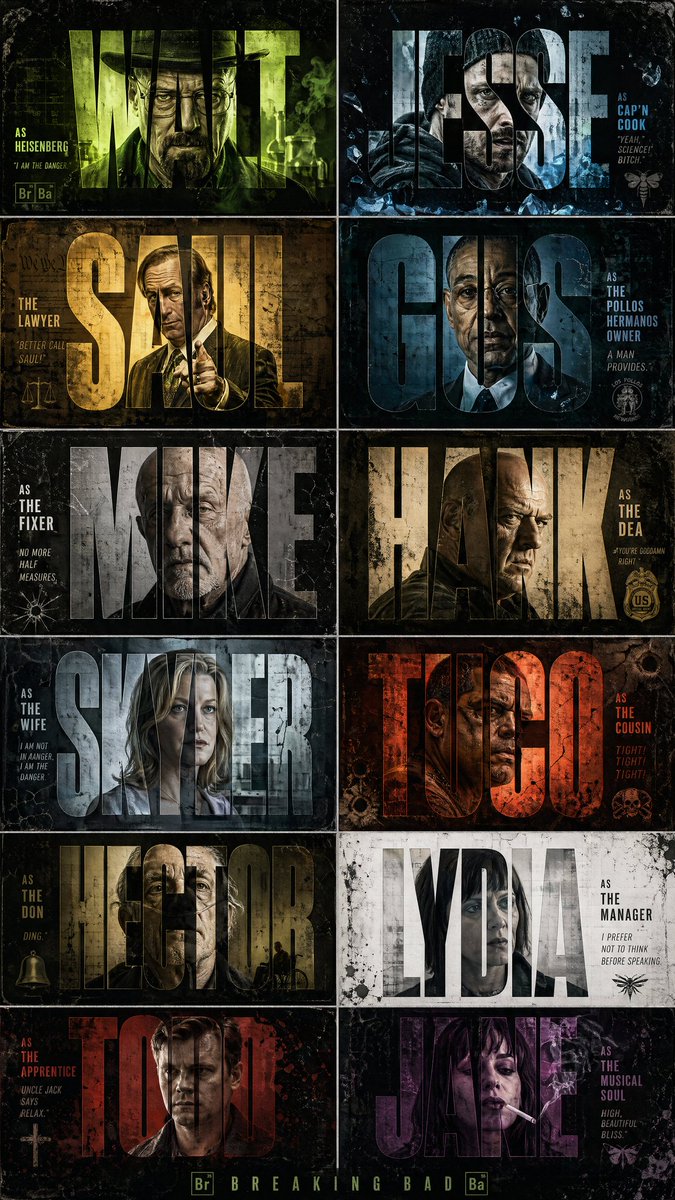
Create a high-contrast, cinematic graphic design poster inspired by the TV series 'Breaking Bad'. Use a 2x6 vertical grid to display 12 iconic character cards. Blend urban graffiti with crime thriller aesthetics, utilizing worn textures, film grain, and bold sans-serif font mask effects.

Each card features character names like 'Walter', 'Jesse', and 'Saul' highlighted in large font, with character portraits visible only within the filled text (clipping mask effect). Beneath the names, place concise movie subtitles like 'Mafia Boss', 'Lawyer', and 'Gunman'.

Characters feature realistic, gritty portraits with cold expressions: Walter in a hat and glasses, Jesse in a hoodie, Saul in a shiny suit, Gus in formal wear, Mike bald and serious, Hank in DEA style.

Apply high-contrast dramatic lighting, rim light, and shadows; some cards add green chemistry lab glows, cyan neon, magenta, and amber highlights. Backgrounds are diverse yet coordinated: weathered concrete, rusty metal, cracked walls, crumpled paper, and smoky atmospheres.

Overlay heavy ink splashes, paint drips, brushstrokes, scratches, scanlines, dust, film burns, and grain to achieve a distorted cinematic feel. The palette uses deep green, toxic fluorescent green, grayscale, dark charcoal, dirty yellow, and off-white, complemented by a green glow behind Walter, red-orange behind Tuco, blue crystals around Jesse, and pure white around Lydia.

Final result conveys the effect of a high-end Netflix crime series cast poster, featuring a raw, edgy, and highly stylized graphic design aesthetic.
Category
Scenes & Storytelling
Model
GPT Image 2
Views1
Source ID
youmind-23948

Guide

About "Breaking Bad Cinematic Grid Poster"

What is this prompt for?

"Breaking Bad Cinematic Grid Poster" AI image prompt for GPT Image 2 (Scenes & Storytelling). Create a high-contrast, cinematic graphic design poster inspired…

The full copyable prompt and example visuals above are ready for AI image generation or one-click recreate in Picva.

How to use this prompt

  1. Step 1

    Open the prompt detail

    Review the example visuals, category, and full prompt text for "Breaking Bad Cinematic Grid Poster".

  2. Step 2

    Copy the prompt

    Copy the prompt body from this page, or load it directly in Studio.

  3. Step 3

    Pick a model (GPT Image 2)

    Prefer GPT Image 2. If you switch models, keep subject and composition and tweak style terms.

  4. Step 4

    Generate and export

    Recreate the look in Picva, or export into your workflow for editing and publishing.

FAQ

What is the "Breaking Bad Cinematic Grid Poster" prompt?
It is an AI image-generation prompt for GPT Image 2 in the Scenes & Storytelling category. This page includes the full prompt text, example visuals, and a one-click recreate path in Picva.
How do I use this prompt to generate an image?
Copy the prompt from this page, or use Generate / Studio. Paste it into a compatible image model, or recreate the look in Picva with optional reference images.
Which model is this prompt for?
This page lists GPT Image 2. Most descriptive prompts also transfer to nearby image models such as GPT Image, Flux, or Midjourney with light style tweaks.
Can I use the result commercially?
You can usually copy the prompt for creation, but commercial use of the final image depends on the model terms, reference-image rights, and the generated content. Follow the source author and platform rules.