18

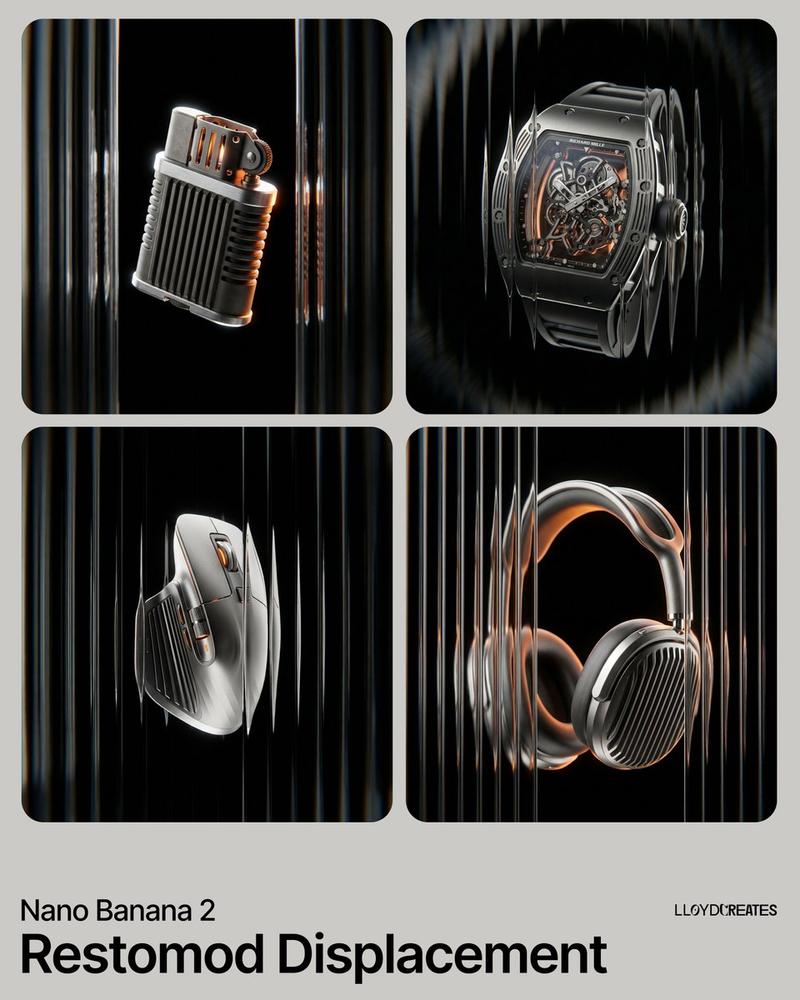
Levitating product in void: GPT Image 2 prompt
Enlarge

Levitating product in void: GPT Image 2 prompt

Prompt
{
 "image_generation_request": {
 "subject": {
 "placeholder": "[INSERT PRODUCT HERE]",
 "position": "dead center, eye-level, perfectly centered in frame",
 "presentation": "levitating, floating in a weightless void, no stands, no platforms, no pedestals, no visible supports"
 },
 "environment": {
 "background": "absolute solid pitch black, hex code #000000, infinite void",
 "lighting": "rim lighting, cinematic chiaroscuro, high-contrast glints on metallic edges, soft orange glow from internal recesses"
 },
 "aesthetic_style": {
 "textures": [
 "shot-blasted matte titanium",
 "brushed aerospace-grade aluminum",
 "anodized dark grey metal",
 "ribbed industrial vertical cooling fins"
 ],
 "optical_effects": "viewed through vertical fluted reeded glass, subtle chromatic distortion, refractive glass warping, radial motion blur on outer edges",
 "color_palette": {
 "primary_background": "#000000",
 "secondary_metal": "#8E8E8E",
 "accent_glow": "#FF8C00",
 "highlights": "#FFFFFF"
 }
 },
 "composition_constraints": {
 "framing": "ensure full product visibility, do not cut off edges, wide safety margins around the subject",
 "elements_to_exclude": [
 "text",
 "logos",
 "watermarks",
 "softboxes",
 "light stands",
 "floor",
 "horizon line",
 "props",
 "human hands",
 "shadows on surfaces"
 ]
 },
 "technical_specs": {
 "focal_length": "85mm macro lens",
 "depth_of_field": "deep focus on product, blurred refractive foreground glass",
 "render_engine": "photorealistic octane render, 8k resolution, ray-traced reflections"
 }
 }
}
Category
Brand & Logos
Model
GPT Image 2
Views1
Source ID
2027745604600811970
Published
Feb 28, 2026

Guide

About "Levitating product in void: GPT Image 2 prompt"

What is this prompt for?

"Levitating product in void: GPT Image 2 prompt" AI image prompt for GPT Image 2 (Brand & Logos). { "image_generation_request": { "subject": { "placeholder": "…

The full copyable prompt and example visuals above are ready for AI image generation or one-click recreate in Picva.

How to use this prompt

  1. Step 1

    Open the prompt detail

    Review the example visuals, category, and full prompt text for "Levitating product in void: GPT Image 2 prompt".

  2. Step 2

    Copy the prompt

    Copy the prompt body from this page, or load it directly in Studio.

  3. Step 3

    Pick a model (GPT Image 2)

    Prefer GPT Image 2. If you switch models, keep subject and composition and tweak style terms.

  4. Step 4

    Generate and export

    Recreate the look in Picva, or export into your workflow for editing and publishing.

FAQ

What is the "Levitating product in void: GPT Image 2 prompt" prompt?
It is an AI image-generation prompt for GPT Image 2 in the Brand & Logos category. This page includes the full prompt text, example visuals, and a one-click recreate path in Picva.
How do I use this prompt to generate an image?
Copy the prompt from this page, or use Generate / Studio. Paste it into a compatible image model, or recreate the look in Picva with optional reference images.
Which model is this prompt for?
This page lists GPT Image 2. Most descriptive prompts also transfer to nearby image models such as GPT Image, Flux, or Midjourney with light style tweaks.
Can I use the result commercially?
You can usually copy the prompt for creation, but commercial use of the final image depends on the model terms, reference-image rights, and the generated content. Follow the source author and platform rules.