Infographic icon: GPT Image 2 prompt
Prompt
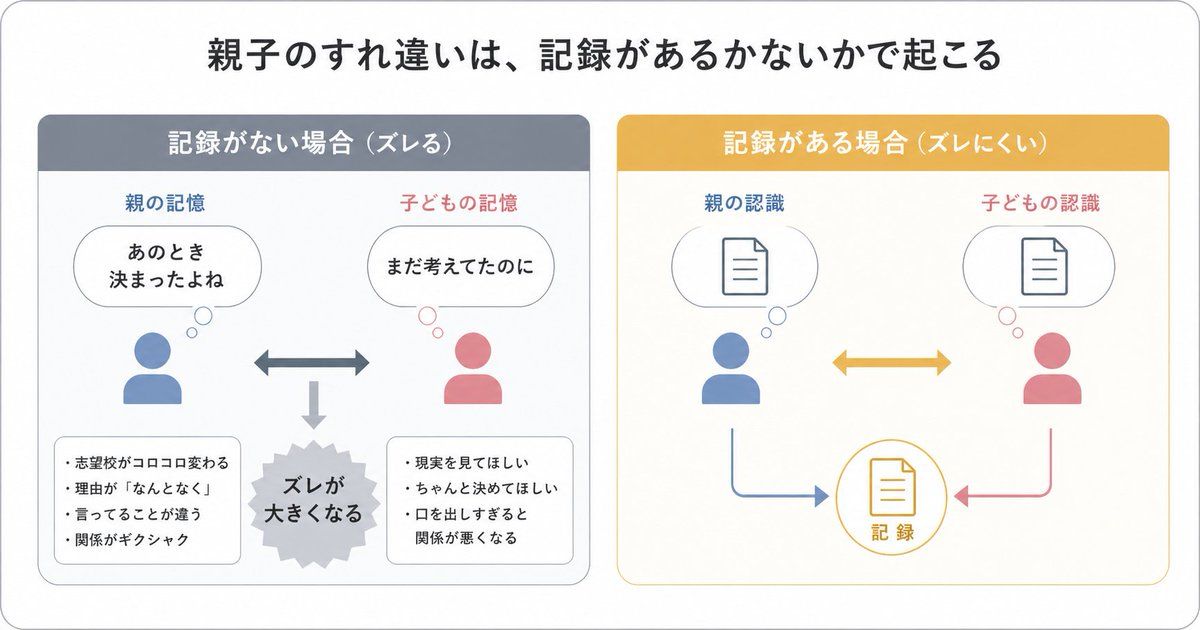
{"type":"Japanese infographic","style":"simple, easy-to-understand flat vector diagram, clean white background, rounded light-gray outer frame, minimal pastel color palette, presentation-slide design, clear hierarchy, lots of whitespace, modern sans-serif Japanese typography","canvas":{"aspect_ratio":"16:9"},"headline":{"text":"{argument name=\"headline text\" default=\"Parent-child mismatch happens depending on whether records exist\"}","position":"top center","size":"large bold black"},"layout":{"structure":"2 side-by-side rounded panels beneath the headline","sections":[{"title":"No record (mismatch)","position":"left","count":8,"header_color":"muted blue-gray","panel_border":"light gray","labels":["Parent's memory","Child's memory","That was decided then, right?","I was still thinking about it","The gap widens","School choice keeps changing","Reasons are 'just because'","They keep saying different things","The relationship gets awkward","I want them to face reality","I want them to decide properly","Speaking up too much harms the relationship"],"contents":{"top_left":{"type":"parent icon with thought bubble","icon_color":"blue","caption":"Parent's memory","bubble_text":"That was\ndecided then"},"top_right":{"type":"child icon with thought bubble","icon_color":"pink","caption":"Child's memory","bubble_text":"I was still thinking about it"},"center":{"type":"horizontal double-headed arrow","color":"blue-gray"},"bottom_center":{"type":"downward arrow leading to burst shape","color":"light gray","burst_text":"The gap\nwidens"},"bottom_left":{"type":"rounded note box","bullet_count":4,"bullets":["School choice keeps changing","Reasons are 'just because'","They keep saying different things","The relationship gets awkward"]},"bottom_right":{"type":"rounded note box","bullet_count":3,"bullets":["I want them to face reality","I want them to decide properly","Speaking up too much harms the relationship"]}}},{"title":"With record (less mismatch)","position":"right","count":7,"header_color":"mustard yellow","panel_border":"light yellow","labels":["Parent's understanding","Child's understanding","Record"],"contents":{"top_left":{"type":"parent icon with thought bubble containing document symbol","icon_color":"blue","caption":"Parent's understanding"},"top_right":{"type":"child icon with thought bubble containing document symbol","icon_color":"pink","caption":"Child's understanding"},"center":{"type":"horizontal double-headed arrow","color":"mustard yellow"},"bottom_center":{"type":"circular record icon with document symbol","outline_color":"mustard yellow","text":"Record"},"bottom_left_connector":{"type":"curved arrow from parent to record","color":"blue"},"bottom_right_connector":{"type":"curved arrow from child to record","color":"pink"}}}],"spacing":"balanced, symmetrical"},"visual_language":{"icons":"generic human bust icons and simple document line icons","emphasis":"contrast the left panel's misunderstanding with the right panel's shared record","mood":"educational, calm, practical"},"text_language":"Japanese","render_quality":"crisp vector edges, infographic suitable for social media educational posts"}- Category
- Charts & Infographics
- Model
- GPT Image 2
- Creator
- sarinaashapi
- Source ID
- awesome-poster-161
- Published
- Apr 29, 2026
Views0