20

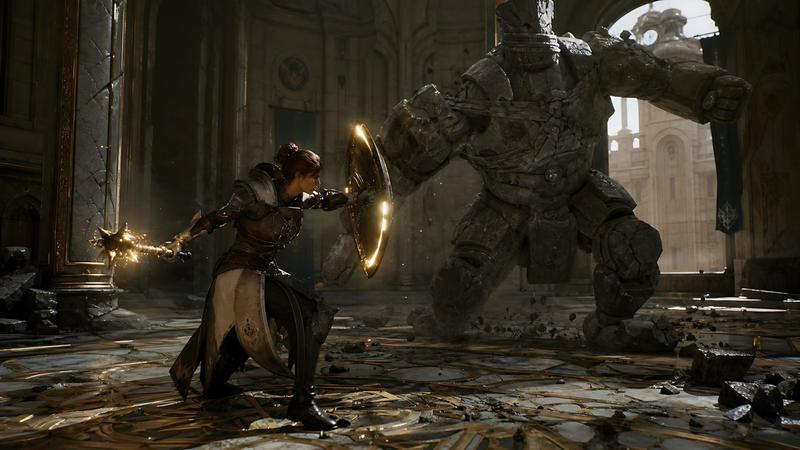
骑士法师大战石像魔像
Enlarge

骑士法师大战石像魔像

Prompt
Create a cinematic dark fantasy action scene in a ruined cathedral hall: a {argument name="hero type" default="female armored knight-mage"} crouches in a defensive lunge on the left foreground, wearing ornate dark steel and leather plate armor with a long cream-and-black tabard, one arm extended behind her gripping a spiked mace or morning star crackling with golden magic sparks, the other arm braced forward behind a round glowing shield rimmed with warm light. Opposite her in the right midground is a massive {argument name="enemy type" default="headless stone golem"}, built from cracked gray masonry plates and bound with broken chains, charging with one huge fist raised and rubble falling from its body. Set the battle inside a grand, damaged palace-cathedral interior with towering arches, carved stone columns, tall broken windows, gold-trimmed marble floor in circular geometric patterns, scattered chunks of stone, dust, and debris. Use dramatic backlighting from a bright arched window behind the golem, warm golden magical highlights on the shield and weapon, deep shadows, volumetric dust beams, realistic textures, high-detail armor and stone, dynamic low-angle wide composition, shallow cinematic depth, epic game-cinematic realism, 16:9 widescreen, no text, no UI.
Category
Scenes & Storytelling
Model
GPT Image 2
Views4
Source ID
395

Guide

About "骑士法师大战石像魔像"

What is this prompt for?

"骑士法师大战石像魔像" AI image prompt for GPT Image 2 (Scenes & Storytelling). Create a cinematic dark fantasy action scene in a ruined cathedral hall: a {argument name…

The full copyable prompt and example visuals above are ready for AI image generation or one-click recreate in Picva.

How to use this prompt

  1. Step 1

    Open the prompt detail

    Review the example visuals, category, and full prompt text for "骑士法师大战石像魔像".

  2. Step 2

    Copy the prompt

    Copy the prompt body from this page, or load it directly in Studio.

  3. Step 3

    Pick a model (GPT Image 2)

    Prefer GPT Image 2. If you switch models, keep subject and composition and tweak style terms.

  4. Step 4

    Generate and export

    Recreate the look in Picva, or export into your workflow for editing and publishing.

FAQ

What is the "骑士法师大战石像魔像" prompt?
It is an AI image-generation prompt for GPT Image 2 in the Scenes & Storytelling category. This page includes the full prompt text, example visuals, and a one-click recreate path in Picva.
How do I use this prompt to generate an image?
Copy the prompt from this page, or use Generate / Studio. Paste it into a compatible image model, or recreate the look in Picva with optional reference images.
Which model is this prompt for?
This page lists GPT Image 2. Most descriptive prompts also transfer to nearby image models such as GPT Image, Flux, or Midjourney with light style tweaks.
Can I use the result commercially?
You can usually copy the prompt for creation, but commercial use of the final image depends on the model terms, reference-image rights, and the generated content. Follow the source author and platform rules.