11

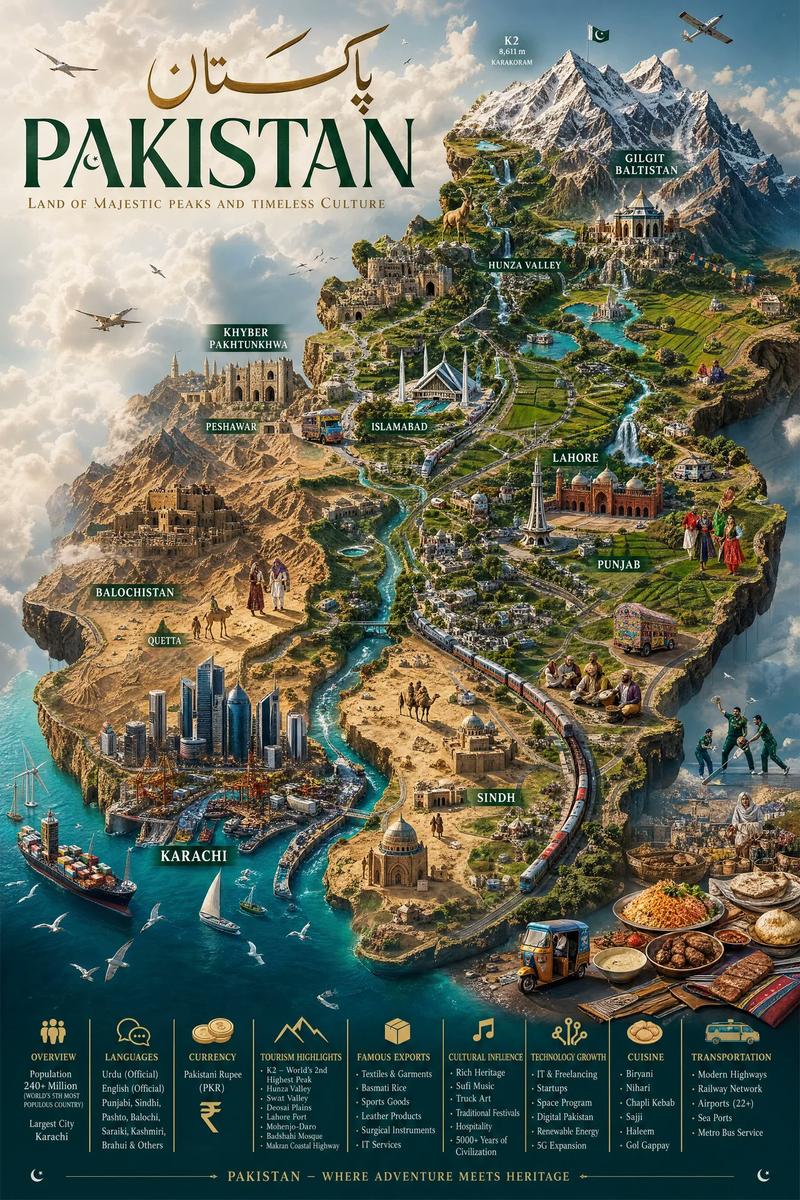
Pakistan Miniature World Map Poster
Enlarge

Pakistan Miniature World Map Poster

Prompt
Create an ultra-detailed hyper-realistic 9:16 cinematic miniature world map of Pakistan, designed as a premium luxury travel-poster masterpiece where the entire country appears as a massive handcrafted floating island civilization suspended in soft atmospheric clouds. The terrain must showcase dramatic elevation and geographic diversity, including the towering snow-covered peaks of the Karakoram and Himalayas (featuring K2), lush green valleys of Hunza and Swat, dense forests, glowing rivers like the Indus, crystal-blue coastlines along the Arabian Sea, cascading waterfalls, expansive deserts like Thar and Cholistan, fertile farmland of Punjab, and serene lakes. Include futuristic cities blended with historical richness: Karachi as a sprawling coastal megacity with glowing harbor lights.
Category
Photography & Realism
Model
GPT Image 2
Creator
EvoLinkAI
Views8
Source ID
portrait-245

Guide

About "Pakistan Miniature World Map Poster"

What is this prompt for?

"Pakistan Miniature World Map Poster" AI image prompt for GPT Image 2 (Photography & Realism). Create an ultra-detailed hyper-realistic 9:16 cinematic miniatur…

The full copyable prompt and example visuals above are ready for AI image generation or one-click recreate in Picva.

How to use this prompt

  1. Step 1

    Open the prompt detail

    Review the example visuals, category, and full prompt text for "Pakistan Miniature World Map Poster".

  2. Step 2

    Copy the prompt

    Copy the prompt body from this page, or load it directly in Studio.

  3. Step 3

    Pick a model (GPT Image 2)

    Prefer GPT Image 2. If you switch models, keep subject and composition and tweak style terms.

  4. Step 4

    Generate and export

    Recreate the look in Picva, or export into your workflow for editing and publishing.

FAQ

What is the "Pakistan Miniature World Map Poster" prompt?
It is an AI image-generation prompt for GPT Image 2 in the Photography & Realism category. This page includes the full prompt text, example visuals, and a one-click recreate path in Picva.
How do I use this prompt to generate an image?
Copy the prompt from this page, or use Generate / Studio. Paste it into a compatible image model, or recreate the look in Picva with optional reference images.
Which model is this prompt for?
This page lists GPT Image 2. Most descriptive prompts also transfer to nearby image models such as GPT Image, Flux, or Midjourney with light style tweaks.
Can I use the result commercially?
You can usually copy the prompt for creation, but commercial use of the final image depends on the model terms, reference-image rights, and the generated content. Follow the source author and platform rules.