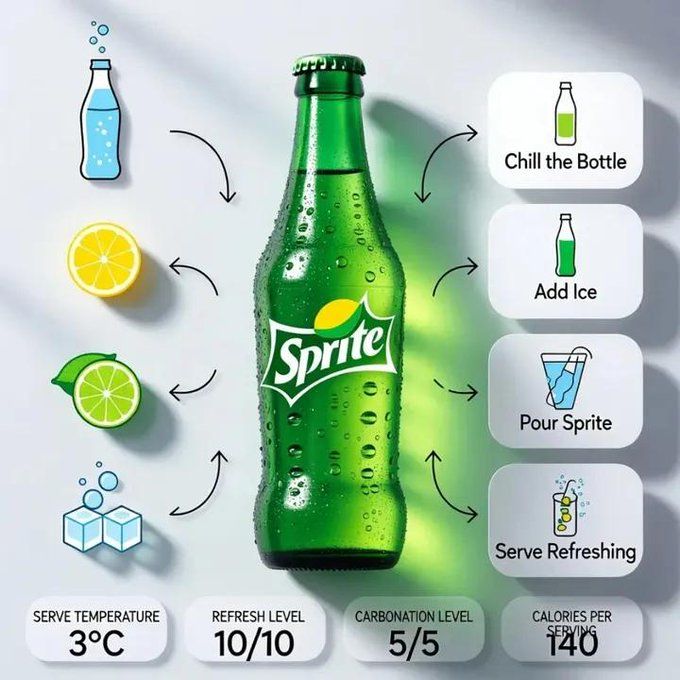
冰镇雪碧信息图
Prompt
A modern, clean product infographic featuring a chilled Sprite bottle at the center of the composition. The bottle stands upright on a minimal surface, covered with icy condensation droplets and light frost. The iconic green Sprite label is bright, fresh, and vibrant. Crisp lemon-lime tones dominate the scene. Background is soft light grey with subtle gradients and soft shadows, giving a refreshing, premium commercial look.

Surrounding the central Sprite bottle are neatly arranged ingredient and element icons in a minimal flat-illustration style: carbonated water, lemon slice, lime slice, ice cubes, bubbles, and glass bottle icon. Thin curved arrows flow from each icon toward the bottle, creating a clean, balanced infographic layout.

*On the right side, rounded white step cards with soft shadows display the process:

1. Chill the Bottle

2. Add Ice

3. Pour Sprite

4. Serve Refreshing*

Each step includes small, simple illustrations (ice bucket, pouring soda, glass with ice and bubbles) and short clean text.

At the bottom corner, minimal infographic badges show: serve temperature, refresh level, carbonation level, calories per serving, and serving size.

Minimal UI design, modern typography, balanced spacing, high-end beverage advertising style, photorealistic bottle texture, glossy highlights, ultra-high resolution, editorial soda infographic, Instagram-ready.

Aspect Ratio: 1:1

Image Size: 1080 × 1080 pixels
- Category
- Charts & Infographics
- Model
- Nano Banana Pro
- Creator
- @Strength04_X
- Source ID
- 2138
- Published
- Jan 21, 2026
Views121


![[BRAND NAME] Act as a Zine Art Director recreating the aesthetic of a 1990s stre](https://i.pixshop.app/storage/v1/render/image/public/prompt-source-media/promptsref/work-21205/image-1-26f0980a5a8feef6.png?width=800&quality=75&resize=contain)


![Create a premium advertising poster for [BRAND] featuring [PRODUCT]](https://i.pixshop.app/storage/v1/render/image/public/prompt-source-media/promptsref/work-36804/image-1-0c6d3610d10b0191.png?width=800&quality=75&resize=contain)