15

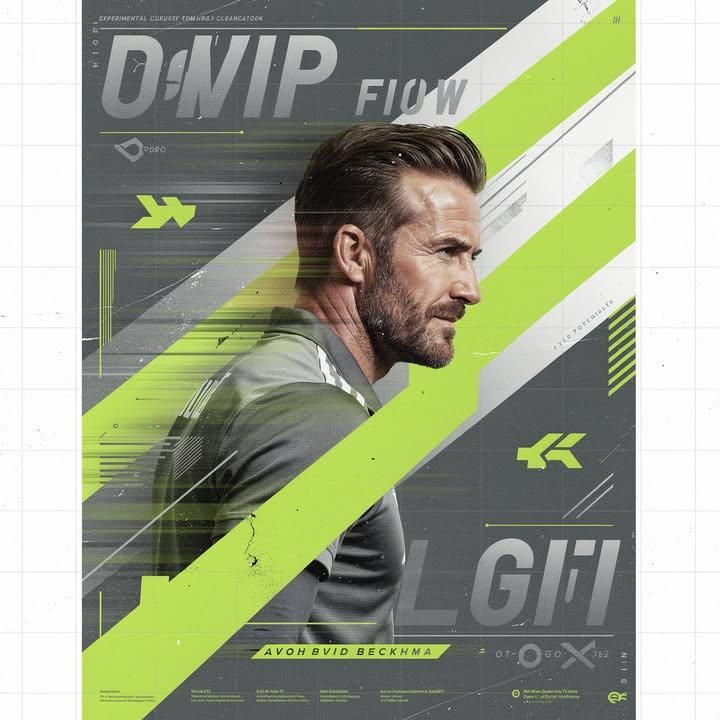
大卫贝克汉姆实验性侧颜运动海报
Enlarge

大卫贝克汉姆实验性侧颜运动海报

Prompt
Create an experimental David Beckham poster built around a striking side-profile portrait captured during motion. Beckham appears to be moving through the frame while the design language follows his movement. The composition should feel energetic, youthful, and highly contemporary.

The color palette is built around graphite grey, metallic silver, fluorescent acid lime, and clean white. Acid lime functions as the visual identity of the poster, appearing through oversized graphic shapes, editorial highlights, abstract typography, and design interventions. Large asymmetrical structures cut across the composition, creating visual tension and movement.

The portrait should be integrated with risograph-inspired textures, offset-print imperfections, layered transparency effects, and premium editorial treatments. The final artwork should feel like a future-facing sports campaign created for a luxury streetwear collaboration rather than a football poster. Bold, experimental, and instantly recognizable
Category
Charts & Infographics
Model
ChatGPT
Views23
Source ID
16271
Published
Jun 18, 2026

Guide

About "大卫贝克汉姆实验性侧颜运动海报"

What is this prompt for?

"大卫贝克汉姆实验性侧颜运动海报" AI image prompt for ChatGPT (Charts & Infographics). 创建一个以运动中捕捉到的醒目侧脸肖像为核心的实验性大卫·贝克汉姆海报。贝克汉姆看起来正在画面中移动,而设计语言则追随他的动作。构图应该让人感到充满活力、年轻且极具现代感。 色调…

The full copyable prompt and example visuals above are ready for AI image generation or one-click recreate in Picva.

How to use this prompt

  1. Step 1

    Open the prompt detail

    Review the example visuals, category, and full prompt text for "大卫贝克汉姆实验性侧颜运动海报".

  2. Step 2

    Copy the prompt

    Copy the prompt body from this page, or load it directly in Studio.

  3. Step 3

    Pick a model (ChatGPT)

    Prefer ChatGPT. If you switch models, keep subject and composition and tweak style terms.

  4. Step 4

    Generate and export

    Recreate the look in Picva, or export into your workflow for editing and publishing.

FAQ

What is the "大卫贝克汉姆实验性侧颜运动海报" prompt?
It is an AI image-generation prompt for ChatGPT in the Charts & Infographics category. This page includes the full prompt text, example visuals, and a one-click recreate path in Picva.
How do I use this prompt to generate an image?
Copy the prompt from this page, or use Generate / Studio. Paste it into a compatible image model, or recreate the look in Picva with optional reference images.
Which model is this prompt for?
This page lists ChatGPT. Most descriptive prompts also transfer to nearby image models such as GPT Image, Flux, or Midjourney with light style tweaks.
Can I use the result commercially?
You can usually copy the prompt for creation, but commercial use of the final image depends on the model terms, reference-image rights, and the generated content. Follow the source author and platform rules.