16

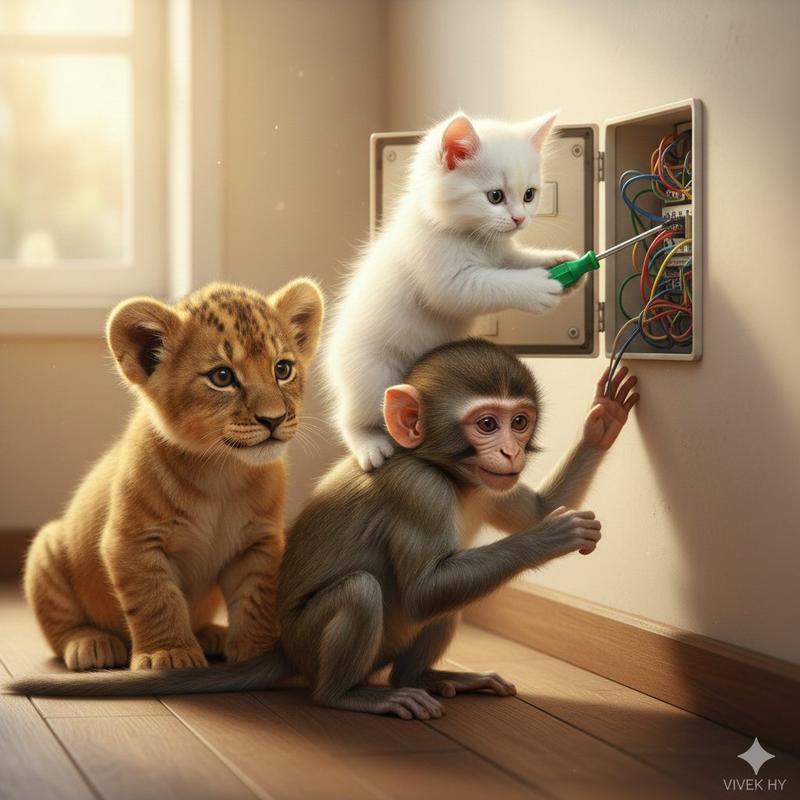
小猫踩猴肩专注修电路的滑稽团队合作
Enlarge

小猫踩猴肩专注修电路的滑稽团队合作

Prompt
{ "image_prompt": { "quality": "8K hyper-realistic, ultra-detailed", "style": "clean indoor scene, soft warm lighting, playful humorous moment", "face_preservation": { "use_reference_face": true, "accuracy": "match exactly" }, "scene": { "description": "a small white kitten holding a green screwdriver, standing on the shoulders of a young monkey while fixing an open electric switch box on a wall, a baby lion cub sitting beside them watching curiously", "environment": "smooth cream-colored wall, exposed colorful wires, wooden floor texture", "mood": "funny teamwork, cute animal collaboration" }, "camera": { "angle": "eye-level medium shot", "lens": "35mm natural depth", "focus": "sharp on animals and switch box, soft background" }, "enhancements": { "fur_texture": "high clarity", "lighting": "soft diffusion", "colors": "balanced and natural" }, "signature": "VIVEK HY" } }
Category
Architecture & Spaces
Model
Nano Banana Pro
Creator
@Vivekhy
Views136
Source ID
4606
Published
Mar 9, 2026

Guide

About "小猫踩猴肩专注修电路的滑稽团队合作"

What is this prompt for?

"小猫踩猴肩专注修电路的滑稽团队合作" AI image prompt for Nano Banana Pro (Architecture & Spaces). json { "image_prompt": { "quality": "8K 超写实,超精细", "style": "干净的室内场景,柔和温暖的灯光,俏皮…

The full copyable prompt and example visuals above are ready for AI image generation or one-click recreate in Picva.

How to use this prompt

  1. Step 1

    Open the prompt detail

    Review the example visuals, category, and full prompt text for "小猫踩猴肩专注修电路的滑稽团队合作".

  2. Step 2

    Copy the prompt

    Copy the prompt body from this page, or load it directly in Studio.

  3. Step 3

    Pick a model (Nano Banana Pro)

    Prefer Nano Banana Pro. If you switch models, keep subject and composition and tweak style terms.

  4. Step 4

    Generate and export

    Recreate the look in Picva, or export into your workflow for editing and publishing.

FAQ

What is the "小猫踩猴肩专注修电路的滑稽团队合作" prompt?
It is an AI image-generation prompt for Nano Banana Pro in the Architecture & Spaces category. This page includes the full prompt text, example visuals, and a one-click recreate path in Picva.
How do I use this prompt to generate an image?
Copy the prompt from this page, or use Generate / Studio. Paste it into a compatible image model, or recreate the look in Picva with optional reference images.
Which model is this prompt for?
This page lists Nano Banana Pro. Most descriptive prompts also transfer to nearby image models such as GPT Image, Flux, or Midjourney with light style tweaks.
Can I use the result commercially?
You can usually copy the prompt for creation, but commercial use of the final image depends on the model terms, reference-image rights, and the generated content. Follow the source author and platform rules.