深夜赶稿崩溃与自动保存救赎
Prompt
{
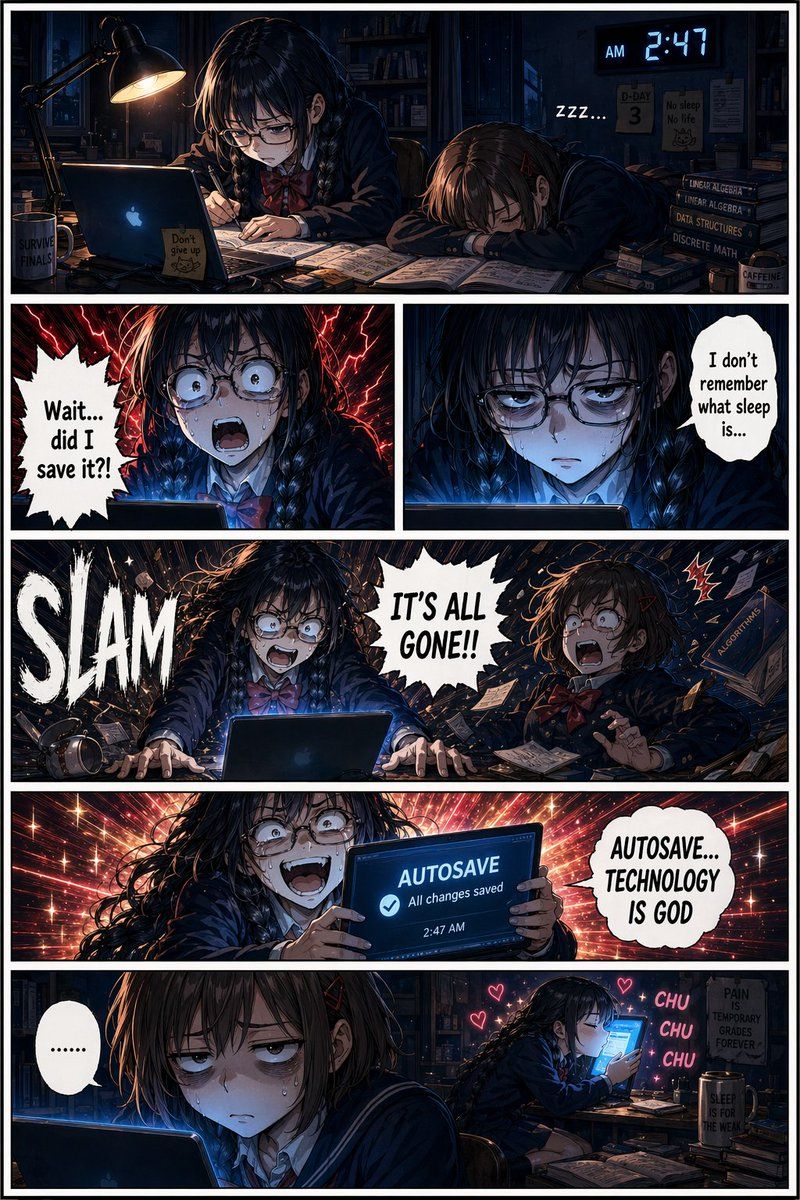
  "type": "6-panel manga page",
  "aspect_ratio": "2:3 vertical portrait",
  "art_style": "detailed anime manga, high contrast, cinematic lighting",
  "panel_borders": "thick white panel divider lines clearly separating each panel, visible white gutters between every panel, hard black border outline around each individual panel, traditional manga page grid layout",
  "color_palette": {
    "primary": "deep navy blue (not pure black) dark room background",
    "secondary": "warm amber/orange desk lamp glow",
    "accent": "cool blue laptop screen light",
    "effects": "bright red panic effects, white speech bubbles",
    "panel_gutters": "clean bright white divider lines between panels"
  },
  "characters": {
    "character_A": "girl with twin braids and glasses, dark school uniform, red bow",
    "character_B": "girl with short brown hair, dark school uniform, asleep on desk initially"
  },
  "setting": "dark bedroom study desk at 2:47am, single warm desk lamp, open laptop, scattered notes and textbooks, navy blue background",
  "layout": {
    "sections": [
      {
        "panel": 1,
        "position": "top, wide",
        "description": "Dark navy room. Warm lamp light from above, cool blue laptop glow from below. Character A hunched over desk studying. Character B asleep face-down beside her. Digital clock clearly shows 2:47 AM. Dramatic shadow contrast. White panel border visible."
      },
      {
        "panel": 2,
        "position": "upper middle left",
        "description": "Close-up of Character A's face lit from below by blue laptop glow, eyes wide in horror. Red lightning panic effects. Speech bubble says 'Wait... did I save it?!' White panel border clearly visible around frame."
      },
      {
        "panel": 3,
        "position": "upper middle right",
        "description": "Close-up of Character A, hollow bloodshot eyes, dead stare, lit by cold blue glow. Speech bubble says 'I don't remember what sleep is...' White panel border clearly visible."
      },
      {
        "panel": 4,
        "position": "lower middle, wide",
        "description": "Character A SLAMS both hands on desk screaming 'IT'S ALL GONE!!'. Huge white SLAM sound effect on left side. Character B jolts awake violently. Books fly everywhere. Navy background. Thick white panel borders on all sides."
      },
      {
        "panel": 5,
        "position": "upper bottom, wide",
        "description": "Character A holds laptop showing AUTOSAVE notification, unhinged manic grin, red and gold sparkle effects radiating behind her. Speech bubble says 'AUTOSAVE... TECHNOLOGY IS GOD'. Clear white panel border."
      },
      {
        "panel": 6,
        "position": "lower bottom, wide",
        "description": "Character B in foreground deadpan done-with-life expression, heavy dark bags under eyes. Background shows Character A kissing the laptop with CHU CHU CHU sparkle effects. Small '......' speech bubble from Character B. White panel border clearly visible."
      }
    ]
  },
  "global_notes": "CRITICAL: All 6 panels must be clearly separated by medium sized bright white gutter lines. No panels should bleed into each other. The page background between panels is white. Dark navy blue should be used instead of pure black to keep depth visible."
}- Category
- Posters & Typography
- Model
- ChatGPT
- Creator
- @TechieBySA
- Source ID
- 13650
- Published
- Apr 26, 2026
Views103