20

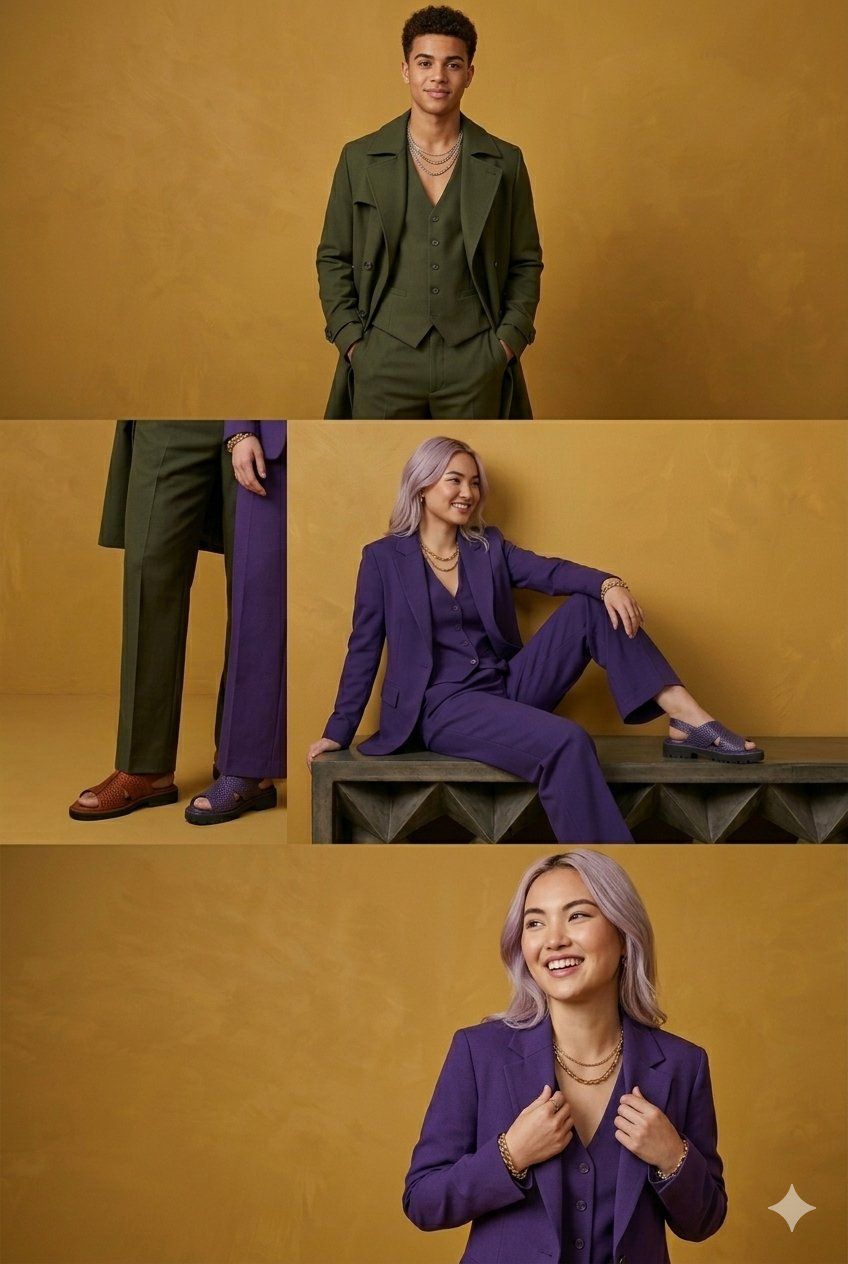
芥末黄背景高端单色三件套时装画报
Enlarge

Example images

芥末黄背景高端单色三件套时装画报

Prompt
A professional fashion lookbook photography collection featuring models in sophisticated, monochromatic three-piece tailored suits against a warm, textured mustard-yellow backdrop. The wardrobe showcases a rich autumnal and jewel-toned color palette, including deep olive green, vibrant royal purple, rich terracotta rust, dark navy blue, and hunter green. Each outfit consists of a tailored blazer or long trench coat layered over a matching buttoned vest and wide-leg trousers, styled with chunky gold layered chain necklaces and platform slingback sandals. The composition features a mix of full-body shots, sitting poses on a dark textured bench, and close-up details highlighting the fabric textures and footwear. The lighting is warm and even, creating a clean, high-end editorial aesthetic with a joyful and confident mood.
Category
Photography & Realism
Model
Nano Banana 2
Views3
Source ID
15482
Published
Jun 7, 2026

Guide

About "芥末黄背景高端单色三件套时装画报"

What is this prompt for?

"芥末黄背景高端单色三件套时装画报" AI image prompt for Nano Banana 2 (Photography & Realism). 一组专业的时尚画报摄影合集,模特穿着精致的单色三件套定制西装,背景是温暖且有质感的芥末黄。服装展示了丰富的秋季和宝石色调,包括深橄榄绿、亮丽的皇家紫、浓郁的陶土红…

The full copyable prompt and example visuals above are ready for AI image generation or one-click recreate in Picva.

How to use this prompt

  1. Step 1

    Open the prompt detail

    Review the example visuals, category, and full prompt text for "芥末黄背景高端单色三件套时装画报".

  2. Step 2

    Copy the prompt

    Copy the prompt body from this page, or load it directly in Studio.

  3. Step 3

    Pick a model (Nano Banana 2)

    Prefer Nano Banana 2. If you switch models, keep subject and composition and tweak style terms.

  4. Step 4

    Generate and export

    Recreate the look in Picva, or export into your workflow for editing and publishing.

FAQ

What is the "芥末黄背景高端单色三件套时装画报" prompt?
It is an AI image-generation prompt for Nano Banana 2 in the Photography & Realism category. This page includes the full prompt text, example visuals, and a one-click recreate path in Picva.
How do I use this prompt to generate an image?
Copy the prompt from this page, or use Generate / Studio. Paste it into a compatible image model, or recreate the look in Picva with optional reference images.
Which model is this prompt for?
This page lists Nano Banana 2. Most descriptive prompts also transfer to nearby image models such as GPT Image, Flux, or Midjourney with light style tweaks.
Can I use the result commercially?
You can usually copy the prompt for creation, but commercial use of the final image depends on the model terms, reference-image rights, and the generated content. Follow the source author and platform rules.