15

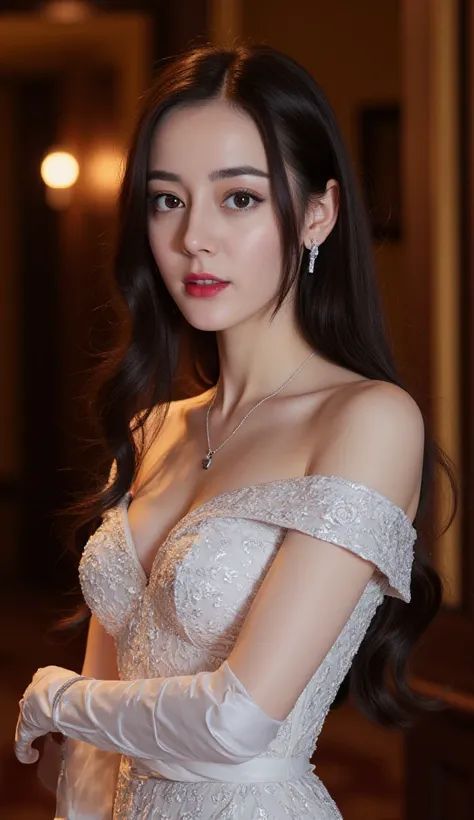
红毯女神闪耀亮片白裙
Enlarge

红毯女神闪耀亮片白裙

Prompt
{ "subject": { "identity": "Ana de Armas", "facial_features": { "eyes": "hazel, expressive, soft gaze", "makeup": "natural 'clean girl' aesthetic, shimmering champagne eyeshadow, soft winged eyeliner, groomed eyebrows", "complexion": "luminous, dewy skin with soft peach blush on cheekbones", "lips": "glossy muted pink" }, "hair": { "color": "dark brown", "style": "elegant textured ponytail, sleek at the top, wispy strands framing the face" } }, "attire_and_accessories": { "dress": "white high-neck sleeveless gown, densely embellished with reflective silver and gold sequins and crystals, intricate beadwork pattern", "jewelry": [ "delicate diamond drop earrings", "matching diamond tennis bracelet on left wrist" ] }, "composition_and_pose": { "shot_type": "medium close-up, portrait", "pose": "left arm raised with hand near the temple, head tilted slightly, elegant and poised", "lighting": "soft, warm glamorous event lighting, golden hour glow, backlighting from a glowing logo" }, "environment": { "background": "soft-focus luxury setting, cream-colored vertical pleated curtains, glowing warm-toned golden signage or letters", "atmosphere": "red carpet gala, high-fashion event, sophisticated" }, "technical_style": { "camera_feel": "professional DSLR photography, shallow depth of field (bokeh background), sharp focus on subject, clean highlights, 8k resolution" } }
Category
Posters & Typography
Model
Nano Banana Pro
Views34
Source ID
11426
Published
Apr 24, 2026

Guide

About "红毯女神闪耀亮片白裙"

What is this prompt for?

"红毯女神闪耀亮片白裙" AI image prompt for Nano Banana Pro (Posters & Typography). { "subject": { "identity": "{argument name=\"celebrity\" default=\"Ana de Armas\"}", "…

The full copyable prompt and example visuals above are ready for AI image generation or one-click recreate in Picva.

How to use this prompt

  1. Step 1

    Open the prompt detail

    Review the example visuals, category, and full prompt text for "红毯女神闪耀亮片白裙".

  2. Step 2

    Copy the prompt

    Copy the prompt body from this page, or load it directly in Studio.

  3. Step 3

    Pick a model (Nano Banana Pro)

    Prefer Nano Banana Pro. If you switch models, keep subject and composition and tweak style terms.

  4. Step 4

    Generate and export

    Recreate the look in Picva, or export into your workflow for editing and publishing.

FAQ

What is the "红毯女神闪耀亮片白裙" prompt?
It is an AI image-generation prompt for Nano Banana Pro in the Posters & Typography category. This page includes the full prompt text, example visuals, and a one-click recreate path in Picva.
How do I use this prompt to generate an image?
Copy the prompt from this page, or use Generate / Studio. Paste it into a compatible image model, or recreate the look in Picva with optional reference images.
Which model is this prompt for?
This page lists Nano Banana Pro. Most descriptive prompts also transfer to nearby image models such as GPT Image, Flux, or Midjourney with light style tweaks.
Can I use the result commercially?
You can usually copy the prompt for creation, but commercial use of the final image depends on the model terms, reference-image rights, and the generated content. Follow the source author and platform rules.