超宽科学科普长卷生成指南
Prompt
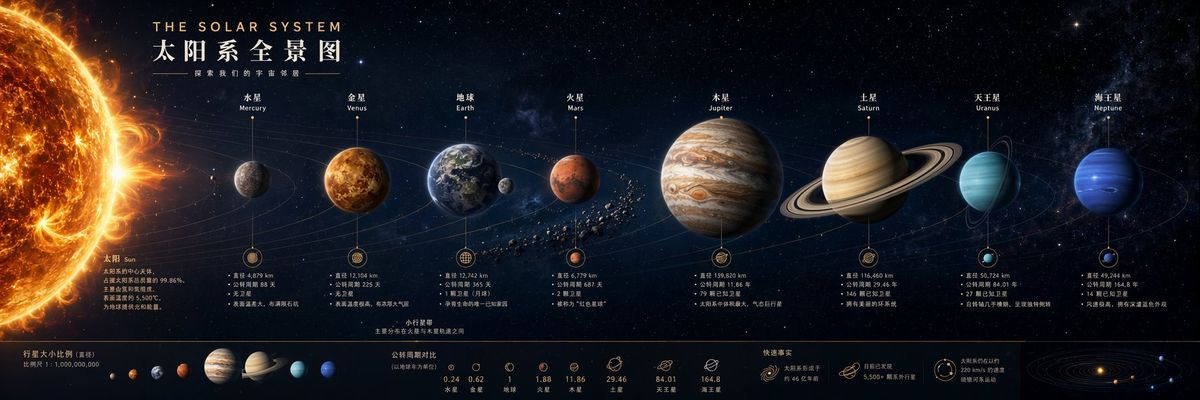
Please generate an [Ultra-wide Science Popularization Long Scroll], a single complete image, no collage, no multi-grid, no columns.

Dimensions: Horizontal 3:1, suitable for science posters, exhibition board visuals, knowledge visualization long images, and content creation references.

[Theme Type]: Solar system planets / Evolution of life on Earth / Evolution of human civilization / Evolution of science
[Main Title]: Fill in the title of this long scroll
[Expansion Logic]: Expand horizontally in sequence / Expand by timeline / Expand by evolution chain / Expand by progressive knowledge structure
[Main Content]: Fill in the core stages, objects, or knowledge points to be displayed in this image
[Style Direction]: High-end science exhibition board / Museum long scroll / Science museum infographic / Knowledge visualization poster
[Color Tone]: Fill in according to the theme, such as deep space blue, natural earth colors, museum neutrals, tech blue-gray, etc.
[Supplementary Requirements]: Fill in content to be emphasized

The overall image must be a single complete ultra-wide horizontal long scroll, adopting a left-to-right reading logic. The key is not ordinary illustration, nor simple collage, but clearly visualizing continuous knowledge structures, time progression, evolutionary relationships, or scale changes in one long image.

The image should have a strong sense of structure, a strong sense of information, and high collection value. Small titles, labels, time nodes, name descriptions, small notes, arrows, orbital lines, structural lines, or stage separation prompts can be added, but the layout must be neat and restrained, cannot be too full of text, and cannot be like a densely packed textbook page. The overall style is more like a high-end museum board, science museum long scroll, or knowledge visualization poster.

The image should highlight a core advantage:
The ultra-wide horizontal format is particularly suitable for clearly explaining complex content that "unfolds continuously from left to right," accommodating a large amount of knowledge structures and visual information at once, an effect that is difficult for ordinary aspect ratios to achieve.

Overall style requirements: Clear, rational, professional, possessing visual tension and reading rhythm, with both ornamental value and a sense of science popularization. Backgrounds and color schemes can change according to the theme, but the overall must be unified, coherent, and readable.

Avoid: Collage feel, multi-grids, columns, children's cartoon feel, pure wallpaper feel, messy information, overcrowded text, element piling, unclear structure, chaotic stage order, low resolution, irrelevant decorative text.
- Category
- Charts & Infographics
- Model
- ChatGPT
- Creator
- @MrLarus
- Source ID
- 16408
- Published
- Jun 20, 2026
Views22