16

线框图转高保真设计稿提示词
Enlarge

Example images

线框图转高保真设计稿提示词

Prompt
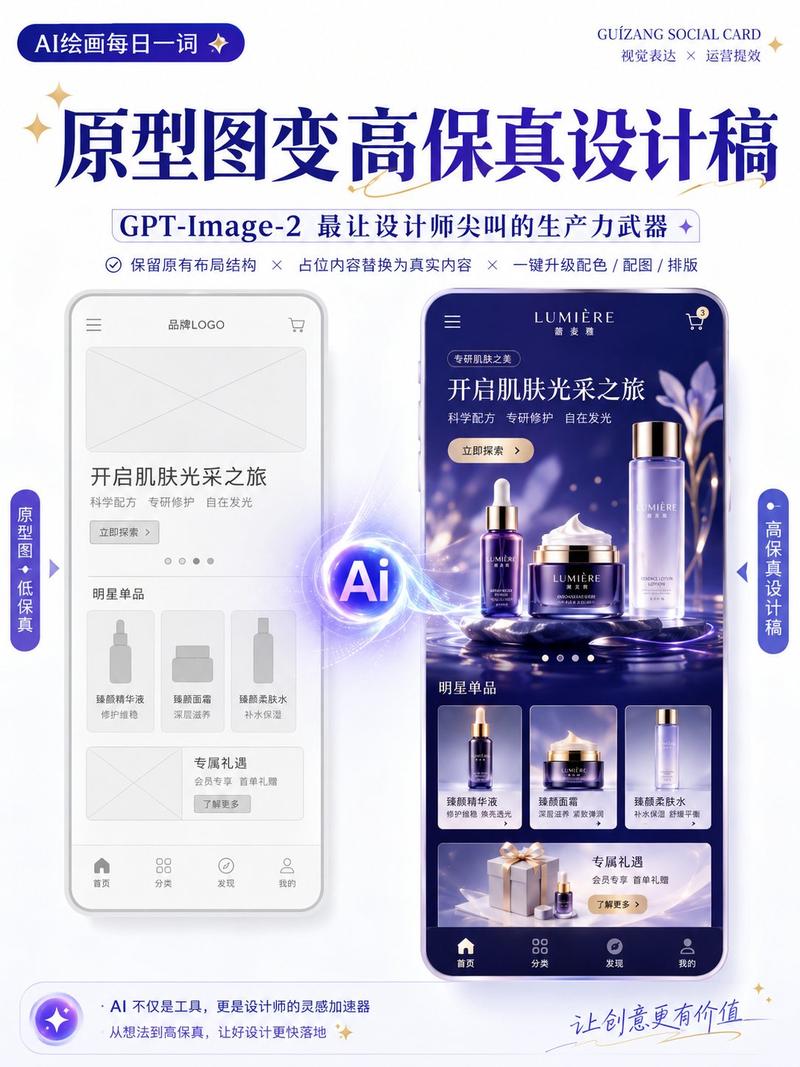
Use the uploaded wireframe / prototype as a reference to generate a high-fidelity design draft.

Design Type: [Marketing Campaign Page / App Interface / H5 Page / E-commerce Detail Page / Official Website Page / Infographic]

Requirements:
1. Preserve the original page's layout structure, information hierarchy, and module division
2. Replace placeholders in the wireframe with real content
3. Automatically add color schemes, images, icons, and typography details
4. Enhance the page's visual hierarchy, whitespace, alignment, and module relationships
5. The overall output should be a highly completed high-fidelity design draft.

Visual Style: [Minimalist Modern / Tech / Skeuomorphic / Fresh / Branded / Premium]
Primary Color: [Fill in color]
Secondary Color: [Fill in color]
Aspect Ratio: [e.g., 9:16 / 4:3 / 16:9]

Note:
Retain the original structure, do not rearrange module order arbitrarily.
Focus on optimizing visual presentation and real content display to make it like a complete design draft suitable for proposal presentations.
Category
Charts & Infographics
Model
ChatGPT
Views0
Source ID
17554
Published
Jul 8, 2026

Guide

About "线框图转高保真设计稿提示词"

What is this prompt for?

"线框图转高保真设计稿提示词" AI image prompt for ChatGPT (Charts & Infographics). 以上传的线框图 / 原型图为参考,生成一张高保真设计稿。 设计类型:【运营活动页 / App界面 / H5页面 / 电商详情页 / 官网页面 / 信息图】 要求: 1. 保留原始页…

The full copyable prompt and example visuals above are ready for AI image generation or one-click recreate in Picva.

How to use this prompt

  1. Step 1

    Open the prompt detail

    Review the example visuals, category, and full prompt text for "线框图转高保真设计稿提示词".

  2. Step 2

    Copy the prompt

    Copy the prompt body from this page, or load it directly in Studio.

  3. Step 3

    Pick a model (ChatGPT)

    Prefer ChatGPT. If you switch models, keep subject and composition and tweak style terms.

  4. Step 4

    Generate and export

    Recreate the look in Picva, or export into your workflow for editing and publishing.

FAQ

What is the "线框图转高保真设计稿提示词" prompt?
It is an AI image-generation prompt for ChatGPT in the Charts & Infographics category. This page includes the full prompt text, example visuals, and a one-click recreate path in Picva.
How do I use this prompt to generate an image?
Copy the prompt from this page, or use Generate / Studio. Paste it into a compatible image model, or recreate the look in Picva with optional reference images.
Which model is this prompt for?
This page lists ChatGPT. Most descriptive prompts also transfer to nearby image models such as GPT Image, Flux, or Midjourney with light style tweaks.
Can I use the result commercially?
You can usually copy the prompt for creation, but commercial use of the final image depends on the model terms, reference-image rights, and the generated content. Follow the source author and platform rules.