16

Nano Banana Pro 迷因风格服装剪裁线插画提示
Enlarge

Nano Banana Pro 迷因风格服装剪裁线插画提示

Prompt
【目的】
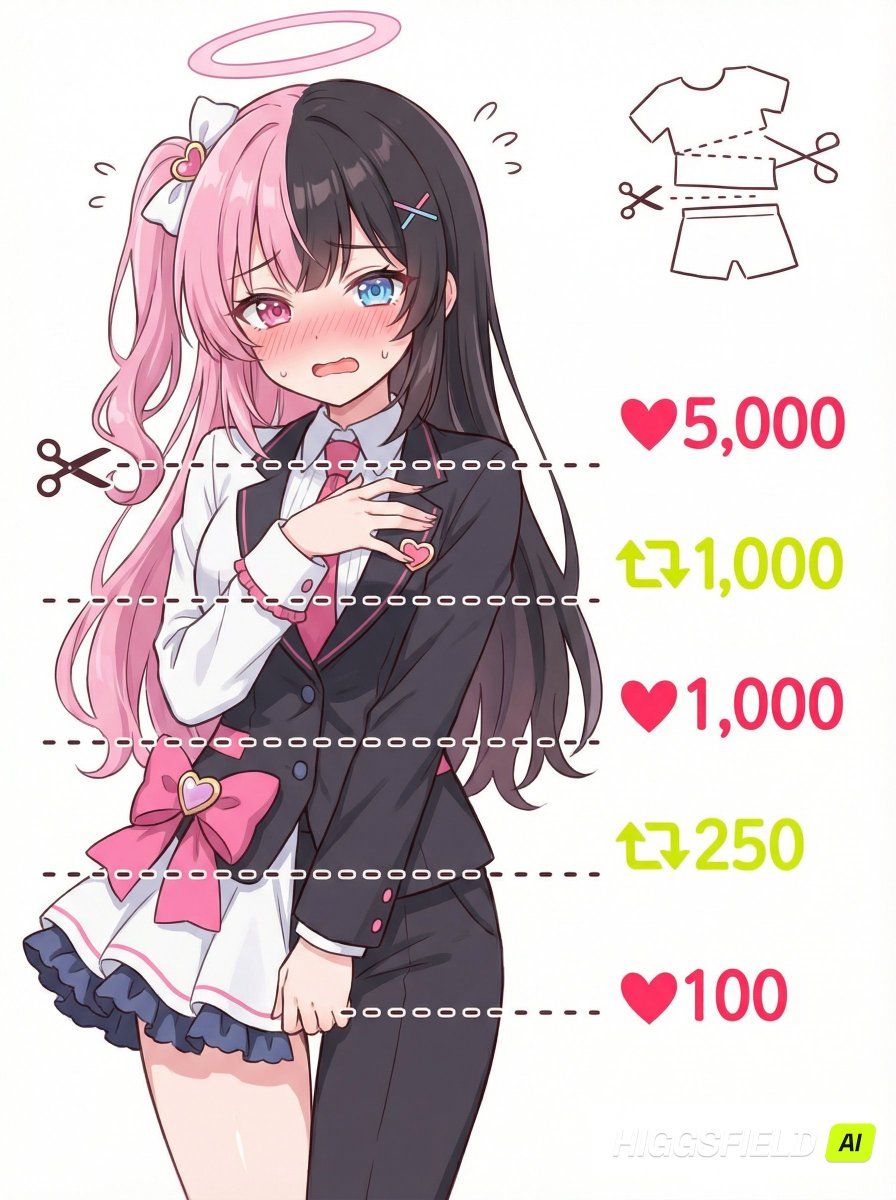
ユーザーがアップロードしたキャラクター画像を参照し、デザイン要素だけ引き継ぎつつ、表情・ポーズを描き直した「♥&🔄で服がカットされていくミーム風イラスト」を作成する。

【参照の扱い】
・髪型・色・衣装・雰囲気のみ参照
・表情とポーズは必ず新規描き直し
・参照画像の完全コピーは行わない

【構図】
・正面寄りのバストアップ〜腰まで
・キャラクターは左側に配置
・背景は白でシンプル
・キャラクターの前面に、**短い点線の水平ラインを5本**配置(画面全体には伸ばさない。キャラ幅より少し長い程度)
・5本の水平線は肩、胸元、腹部、腰、股下で分割。必ず5本の水平線を描く
・一番上の水平点線の左側に✂アイコン
・水平線の右側には、各点線と“中央の高さを完全に揃える”形で♥/🔄+数字を配置。
・画面右上に「衣装が切れていく図解」を小さく追加(文字は書かない)

【右側の表示(上から順)】
1. ♥5,000(明るい赤)
2. 🔄1,000(明るい黄緑)
3. ♥1,000(明るい赤)
4. 🔄250(明るい黄緑)
5. ♥100(明るい赤)
・🔄はXのリポストアイコン風
・フォントは全て可愛い手書きスタイル

【キャラクター描写】
・参照キャラと分かる外見の特徴(髪・目・色・衣装など)
・赤面して困り+照れの混ざった表情
・体を隠す恥じらいのあるポーズ
・衣装は参照ベースで変更せず、切ったり脱がしたりしない

【イラストスタイル】
・ポップで可愛い二次元アニメ調
・柔らかくゆるい線画と明るい色
・ミーム画像として視認性を重視
・余計な装飾は入れず、清潔でシンプルな構成
Category
创意图片
Model
Nano Banana Pro
Views0
Source ID
3eee2e04-5edf-4116-8c43-0610872161f3
Published
Mar 8, 2026

Guide

About "Nano Banana Pro 迷因风格服装剪裁线插画提示"

What is this prompt for?

"Nano Banana Pro 迷因风格服装剪裁线插画提示" AI image prompt for Nano Banana Pro (创意图片). 一个结构化的日语提示,用于 Nano Banana Pro,它将一个角色重新绘制成模因风格的插图,显示虚线剪切线以及点赞和转发计数,同时仅保留参考图像中的设计元素。…

The full copyable prompt and example visuals above are ready for AI image generation or one-click recreate in Picva.

How to use this prompt

  1. Step 1

    Open the prompt detail

    Review the example visuals, category, and full prompt text for "Nano Banana Pro 迷因风格服装剪裁线插画提示".

  2. Step 2

    Copy the prompt

    Copy the prompt body from this page, or load it directly in Studio.

  3. Step 3

    Pick a model (Nano Banana Pro)

    Prefer Nano Banana Pro. If you switch models, keep subject and composition and tweak style terms.

  4. Step 4

    Generate and export

    Recreate the look in Picva, or export into your workflow for editing and publishing.

FAQ

What is the "Nano Banana Pro 迷因风格服装剪裁线插画提示" prompt?
It is an AI image-generation prompt for Nano Banana Pro in the 创意图片 category. This page includes the full prompt text, example visuals, and a one-click recreate path in Picva.
How do I use this prompt to generate an image?
Copy the prompt from this page, or use Generate / Studio. Paste it into a compatible image model, or recreate the look in Picva with optional reference images.
Which model is this prompt for?
This page lists Nano Banana Pro. Most descriptive prompts also transfer to nearby image models such as GPT Image, Flux, or Midjourney with light style tweaks.
Can I use the result commercially?
You can usually copy the prompt for creation, but commercial use of the final image depends on the model terms, reference-image rights, and the generated content. Follow the source author and platform rules.