15

3x3大头贴风格拼贴画
Enlarge

Example images

3x3大头贴风格拼贴画

Prompt
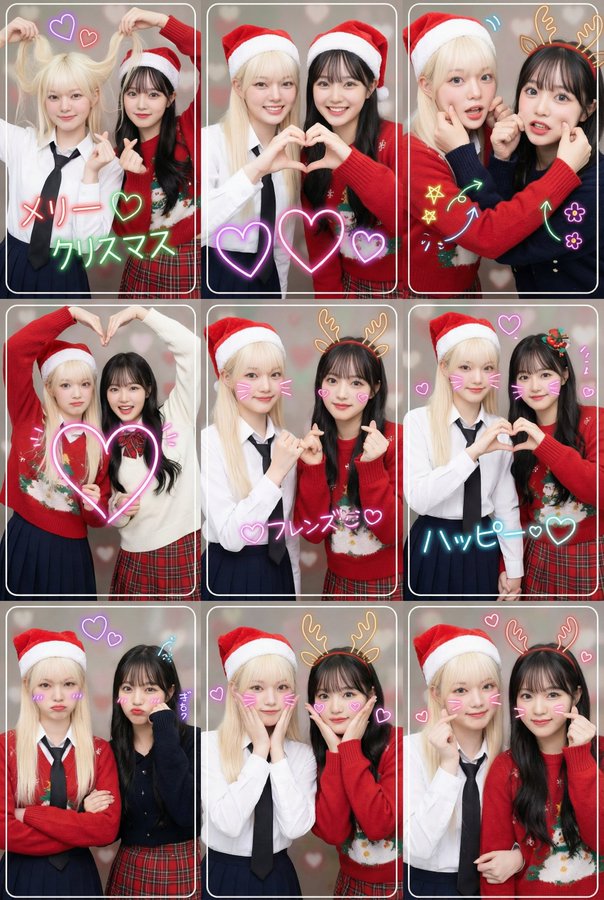
主题和形式:两位年轻女性朋友创作的高分辨率现代日本大头贴风格拼贴画。
布局:由 3x3 网格组成的单个图像(共 9 帧)。
主题:圣诞节 风格:生动、全彩、明亮、动感地再现现代日本大头贴灯光效果。
背景:简单的纯色或主题色背景(带有小爱心等精致装饰)。
摄影特点:每幅画面都有一条细细的白色或装饰性边框。景深浅(虚化)。

主题和姿势:
两位年轻的女性朋友,穿着符合主题的搭配服装。
生动、活泼、明快的表达。
这九张图清晰地描绘了以下列表中九种不同的流行大头贴姿势。

9 种不同的姿势(3x3 网格):
第一行:
“抓头发爱心”姿势:一人俏皮地抓着头发,另一人用双手比出一个小爱心。两人都面带笑容。
“双手心形”姿势:两位伴侣用双手在中心形成一个大大的心形。脸上洋溢着灿烂快乐的笑容。
“捏手臂”姿势:两人双臂交叉,其中一人或两人都轻轻捏着对方的脸颊或手臂。表情生动活泼,充满喜悦。特写镜头展现对方的脸部。

第二排:4.“双臂交叉大爱心”姿势:两人双臂交叉,用空着的那只手比出一个大大的爱心。笑容灿烂而充满活力。5.“承诺之心”姿势:一人做出“手指发誓”的手势,另一人用手比出一个小爱心。笑容俏皮而温暖。6.“手牵手爱心”姿势:两人手牵手,各自用空着的那只手比出半个爱心,组成一个完整的爱心。笑容温柔甜美。

第三排:7.“双臂交叉撅嘴”姿势:两人双臂交叉,略带夸张的撅嘴或“得意”(或严肃)的表情,似乎在强忍着笑意。8.“双手合十,脸颊贴心”姿势:两人手牵着手,双手分别放在脸颊上,在脸颊周围画出一个心形。笑容可爱迷人。9.“双臂交叉,手心相印”姿势:两人双臂交叉,每人用一只手分别画出一个小的心形。笑容自信而时尚。特写镜头展现了他们的脸部。

其他装饰:
多个发光的霓虹心形图案叠加。
每一帧画面上,都以霓虹灯风格,沿着脸部的外轮廓写着与主题相关的字母。
在每个面板上添加多个符合主题的不同霓虹线条艺术涂鸦(例如星星、箭头、饱和线条、花朵、动物耳朵等)。
主要限制:所有9张照片必须保持主体、服装、背景风格和光线的严格一致性。浅景深,这是大头贴的典型特征。
请勿:添加任何文字、徽标、标签、水印、符号、数字或其他任何类型的文本元素(上述指定的文本元素和霓虹线条艺术涂鸦除外)。
Category
creative_scene
Model
Nano Banana Pro
Creator
@KusoPhoto
Views2
Source ID
b2d14eee-281a-4911-b699-8beb1ada930f
Published
Dec 27, 2025

Guide

About "3x3大头贴风格拼贴画"

What is this prompt for?

"3x3大头贴风格拼贴画" AI image prompt for Nano Banana Pro (creative_scene). creative_scene Copy it on Picva and recreate the look in one click.

The full copyable prompt and example visuals above are ready for AI image generation or one-click recreate in Picva.

How to use this prompt

  1. Step 1

    Open the prompt detail

    Review the example visuals, category, and full prompt text for "3x3大头贴风格拼贴画".

  2. Step 2

    Copy the prompt

    Copy the prompt body from this page, or load it directly in Studio.

  3. Step 3

    Pick a model (Nano Banana Pro)

    Prefer Nano Banana Pro. If you switch models, keep subject and composition and tweak style terms.

  4. Step 4

    Generate and export

    Recreate the look in Picva, or export into your workflow for editing and publishing.

FAQ

What is the "3x3大头贴风格拼贴画" prompt?
It is an AI image-generation prompt for Nano Banana Pro in the creative_scene category. This page includes the full prompt text, example visuals, and a one-click recreate path in Picva.
How do I use this prompt to generate an image?
Copy the prompt from this page, or use Generate / Studio. Paste it into a compatible image model, or recreate the look in Picva with optional reference images.
Which model is this prompt for?
This page lists Nano Banana Pro. Most descriptive prompts also transfer to nearby image models such as GPT Image, Flux, or Midjourney with light style tweaks.
Can I use the result commercially?
You can usually copy the prompt for creation, but commercial use of the final image depends on the model terms, reference-image rights, and the generated content. Follow the source author and platform rules.