Create a premium square “reference-style motorcycle infographic” centered around
Prompt
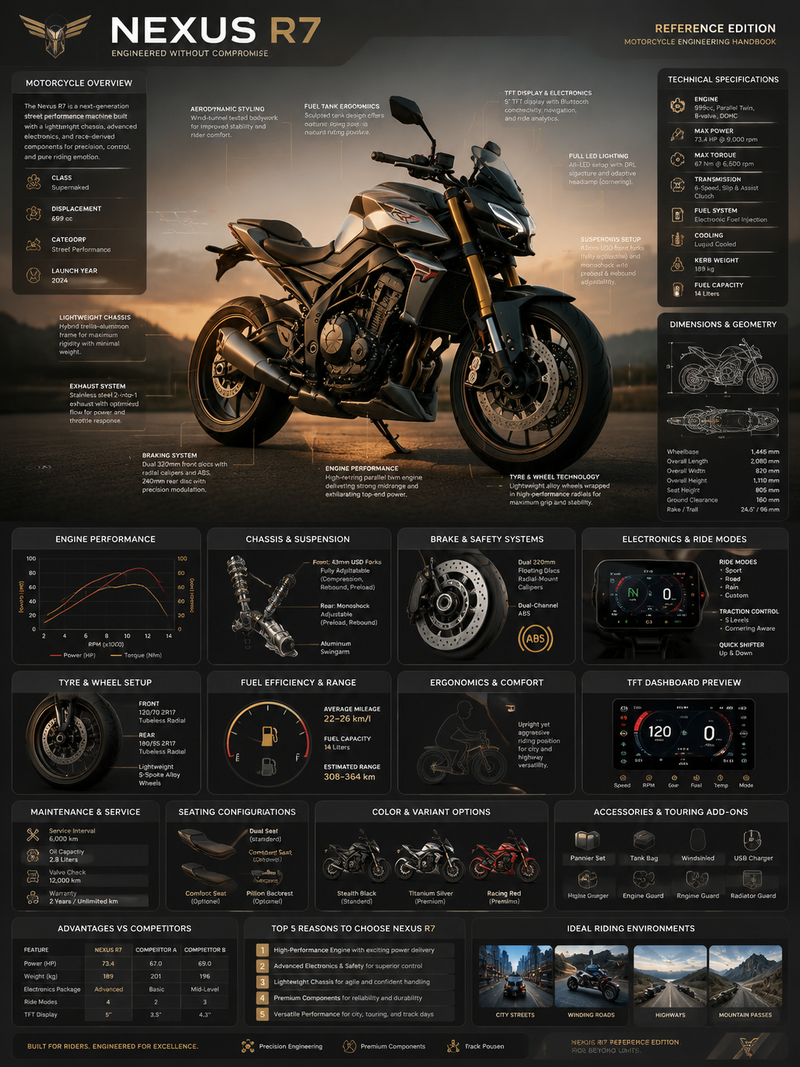
Create a premium square “reference-style motorcycle infographic” centered around a stylish modern motorbike called the {MOTORBIKE_NAME}, designed as a beautifully curated motorcycle engineering handbook page rather than a commercial advertisement.
The composition should feel like a modern visual encyclopedia mixed with an elite rider’s field guide and high-end editorial infographic system.
Visual Direction:
• 1:1 square composition
• Soft industrial-toned background with subtle blueprint textures, mechanical schematics, and premium technical overlays
• Elegant muted palette using matte black, titanium gray, brushed steel, deep charcoal, warm metallic accents, and soft neutral highlights
• Refined editorial typography hierarchy
• Rounded modular information cards with clean spacing
• Gentle realistic shadows and premium UI-style dividers
• Minimal motorcycle engineering iconography
• Extremely detailed central motorcycle render viewed in dramatic three-quarter perspective during cinematic golden-hour lighting
• Thin precision annotation lines pointing toward performance systems and mechanical features
• Clean, organized “knowledge-first” layout with high information density but breathable spacing
Main Subject Presentation:
A stunning ultra-detailed realistic render of the {MOTORBIKE_NAME} placed at the center, featuring realistic metallic reflections, premium paint finish, exposed engine detailing, aerodynamic bodywork, suspension systems, sporty tyres, LED lighting, and high-end motorcycle photography realism.
Surround the motorbike with scientific and engineering callouts explaining:
• engine and exhaust system
• fuel tank ergonomics
• lightweight chassis design
• braking system
• suspension setup
• tyre and wheel technology
• TFT display and electronics
• riding modes & traction control
• aerodynamic styling
• seating and rider ergonomics
Include modular infographic sections such as:
• Motorcycle Overview
• Technical Specifications
• Dimensions & Geometry
• Engine Performance
• Chassis & Suspension
• Brake & Safety Systems
• Electronics & Ride Modes
• Lighting Technology
• Tyre & Wheel Setup
• Fuel Efficiency & Range
• Maintenance & Service Information
• Seating Configurations
• Color & Variant Options
• Accessories & Touring Add-ons
• Advantages vs Competitor Bikes
• “Top 5 Reasons to Choose” section
• Ideal Riding Environments
Add small premium visualization modules like:
• engine performance graphs
• top/side blueprint diagrams
• suspension cutaway illustrations
• braking system graphics
• riding ergonomics charts
• wheel & tyre close-up visuals
• TFT dashboard UI previews
• fuel economy gauges
• component material breakdowns
• motorcycle comparison tables
Style Keywords:
“premium motorcycle encyclopedia”
“editorial superbike handbook”
“high-end motorcycle infographic”
“scientific motorcycle poster”
“museum-quality bike reference page”
“modular automotive knowledge system”
“clean rider-focused editorial design”
“ultra-detailed motorcycle visualization”
Avoid:
• racing crash scenes
• cluttered commercial advertisement aesthetics
• cartoon or futuristic sci-fi bikes
• dark grunge-heavy poster styling
• unrealistic motorcycle anatomy
• excessive neon cyberpunk effects
The final result should resemble a professionally published motorcycle engineering reference-book page created for riders, collectors, automotive designers, mechanics, and enthusiast educational archives.- Category
- Charts & Infographics
- Model
- Nano Banana Pro
- Creator
- xie underwood
- Source ID
- 3123
- Published
- May 12, 2026
Views166