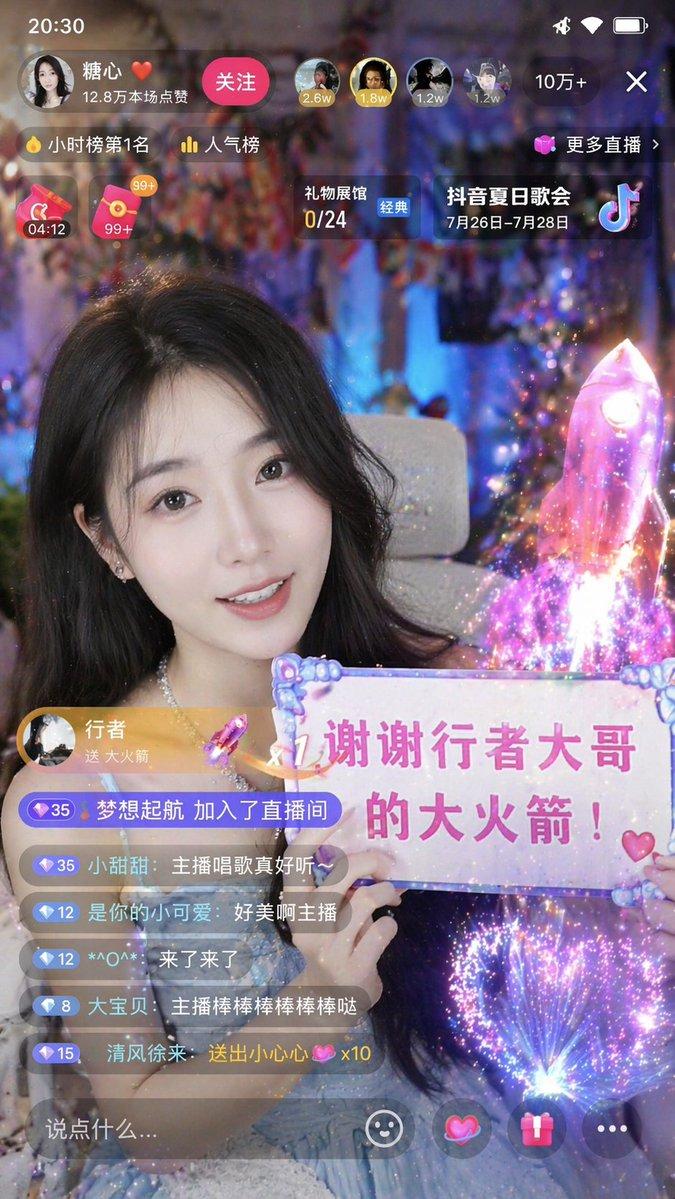
直播 App 截图生成器
Prompt
{
  "type": "mobile live stream app screenshot",
  "aspect_ratio": "9:16",
  "subject": {
    "description": "{argument name=\"subject description\" default=\"beautiful young Asian woman with long dark hair wearing an off-the-shoulder white top\"}",
    "action": "smiling warmly at the camera, holding up a white paper sign with both hands",
    "sign_content": "{argument name=\"sign text\" default=\"谢谢 渣猫大哥 的大火箭!\"} with a small hand-drawn heart"
  },
  "background": "cozy softly lit bedroom, warm fairy lights, shelves with a teddy bear and decorative lamps",
  "ui_elements": {
    "top_header": {
      "broadcaster_profile": {
        "avatar": "female portrait",
        "name": "{argument name=\"broadcaster name\" default=\"小雅\"}",
        "subtitle": "23.5万本场点赞"
      },
      "follow_button": "关注",
      "top_viewers_count": 3,
      "total_viewers": "2.6万",
      "close_button": "X"
    },
    "floating_badges": [
      "小时榜",
      "更多直播 >",
      "礼物展馆 0/24"
    ],
    "gift_overlay": {
      "position": "middle left",
      "style": "purple pill shape",
      "content": "{argument name=\"gift sender name\" default=\"渣猫大哥\"} 送 {argument name=\"gift name\" default=\"大火箭\"}",
      "icon": "3D rocket",
      "multiplier": "x1"
    },
    "chat_area": {
      "position": "bottom left",
      "message_count": 6,
      "messages": [
        "小甜心: 唱歌好听!",
        "快乐每一天: 美美哒",
        "{argument name=\"gift sender name\" default=\"渣猫大哥\"} 送出 {argument name=\"gift name\" default=\"大火箭\"} 🚀 x1",
        "可爱多: 主播真漂亮",
        "宝宝爱你哟: 支持支持支持",
        "高冷男神: 来了"
      ]
    },
    "bottom_toolbar": {
      "input_placeholder": "说点什么...",
      "icon_count": 5,
      "icons": ["microphone", "ellipsis", "heart", "gift box", "ellipsis"]
    }
  }
}- Category
- UI & Interfaces
- Model
- GPT Image 2
- Creator
- 渣猫看世界🦭/acc
- Source ID
- 13772
- Published
- Apr 16, 2026
Views3