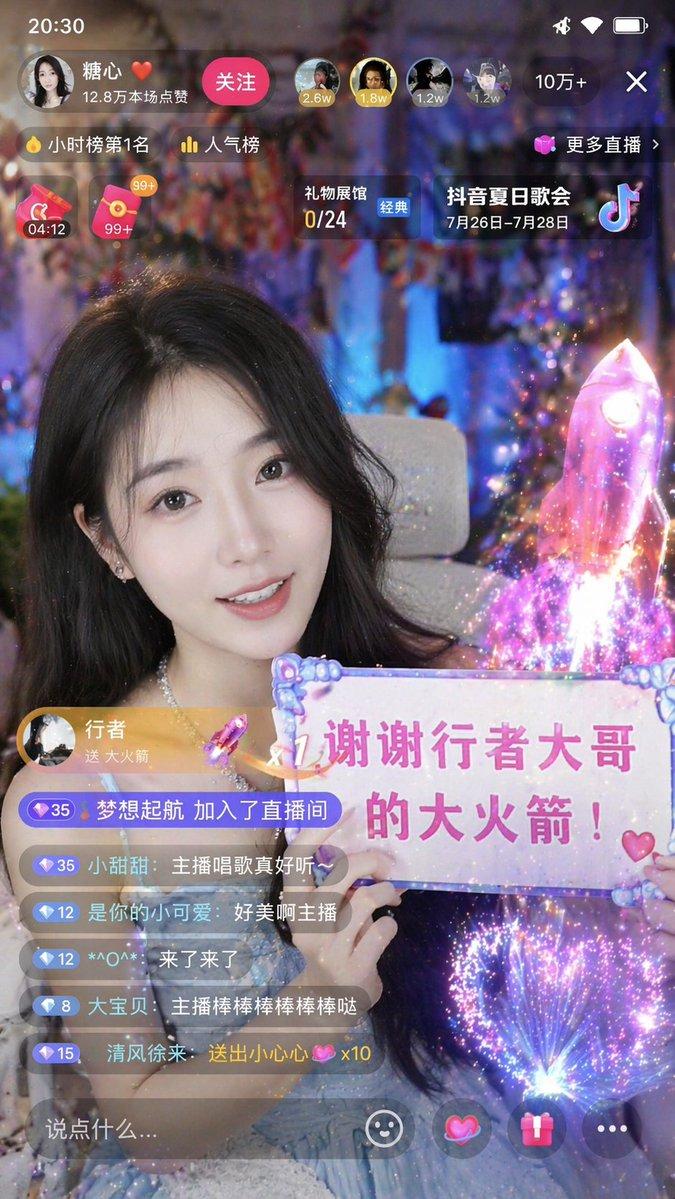
直播 App 界面模型
Prompt
{
  "type": "mobile live streaming app interface mockup",
  "subject": {
    "description": "{argument name=\"broadcaster appearance\" default=\"young Asian woman with long dark hair wearing a white ruffled top\"}",
    "action": "holding a white paper sign with handwritten text and drawn hearts",
    "sign_text": "{argument name=\"sign text\" default=\"谢谢 Gorden Sun 的大火箭!\"}",
    "background": "cozy room with a teddy bear, framed picture, and warm glowing lamp on a shelf, microphone visible on the right"
  },
  "ui_layout": {
    "top_bar": {
      "left": {
        "broadcaster_info": {
          "name": "{argument name=\"broadcaster name\" default=\"小甜心✨\"}",
          "stats": "28.6万本场点赞",
          "button": "关注",
          "rank_badge": "小时榜第 3 名"
        }
      },
      "right": {
        "viewers": {
          "avatars_count": 3,
          "total_count": "1.2万"
        },
        "controls": [
          "close button",
          "更多直播 >",
          "礼物展馆 24/28"
        ]
      }
    },
    "mid_screen": {
      "gift_notification_banner": {
        "sender": "{argument name=\"gift sender name\" default=\"Gorden Sun\"}",
        "action": "送了",
        "gift": "{argument name=\"gift name\" default=\"大火箭\"}",
        "quantity": "x1",
        "icon": "rocket"
      }
    },
    "bottom_area": {
      "chat_overlay": {
        "message_count": 7,
        "messages": [
          "Gorden Sun 送出大火箭 🚀 x1",
          "小飞侠: 哇哦,大火箭!",
          "甜甜圈: 主播好美呀~",
          "爱你呦: 666666",
          "一路向北: 支持支持!",
          "粉红色的回忆: 主播棒棒哒~",
          "用户12345678910 关注了主播"
        ]
      },
      "interaction_bar": {
        "input_placeholder": "说点什么...",
        "icons_count": 5,
        "icons": [
          "smiley face",
          "link",
          "heart",
          "gift box",
          "three dots"
        ]
      },
      "floating_animation": "column of colorful floating hearts on the bottom right"
    }
  }
}- Category
- UI & Interfaces
- Model
- GPT Image 2
- Creator
- finaltasy
- Source ID
- 13847
- Published
- Apr 16, 2026
Views1