11

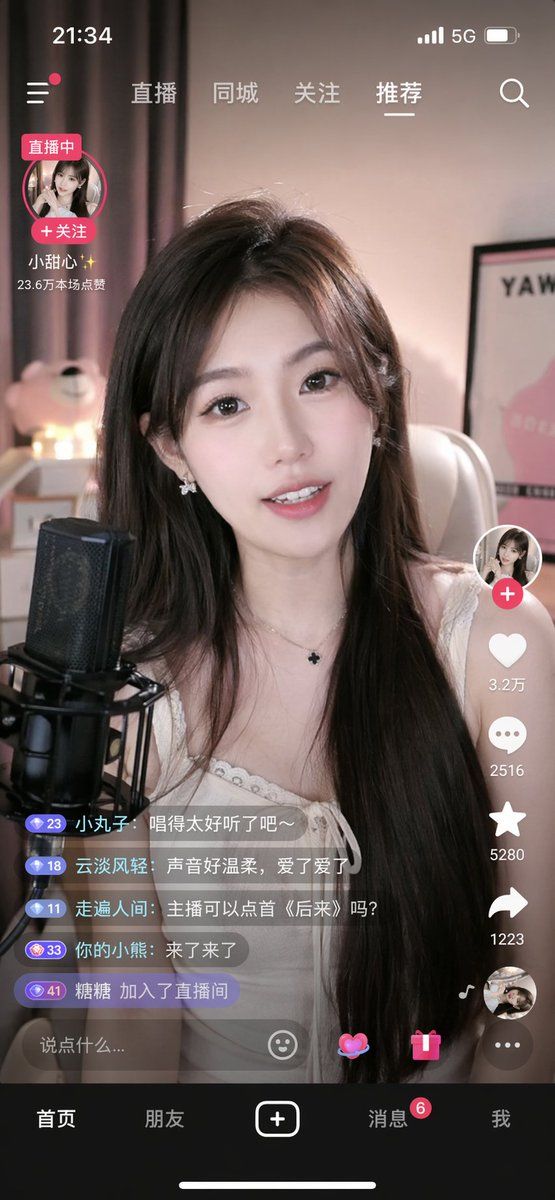
移动端直播 App 界面
Enlarge

移动端直播 App 界面

Prompt
{
  "type": "mobile live streaming app interface mockup",
  "subject": "young Asian woman streamer, long dark hair, white top, smiling, speaking into a black studio microphone",
  "background": "cozy room, soft pink lighting, teddy bear, framed poster",
  "ui_elements": {
    "status_bar": "time 21:34, cellular, 5G, battery icons",
    "top_navigation": ["直播", "同城", "关注", "{argument name=\"active tab\" default=\"推荐\"}", "search icon"],
    "streamer_info": {
      "name": "{argument name=\"streamer name\" default=\"小甜心✨\"}",
      "status": "直播中",
      "likes": "23.6万本场点赞"
    },
    "right_action_buttons": {
      "count": 6,
      "items": ["profile with plus", "heart with 3.2万", "speech bubble with 2516", "star with 5280", "share arrow with 1223", "spinning record album"]
    },
    "chat_overlay": {
      "count": 5,
      "messages": [
        "小丸子: {argument name=\"chat message 1\" default=\"唱得太好听了吧~\"}",
        "云淡风轻: {argument name=\"chat message 2\" default=\"声音好温柔,爱了爱了\"}",
        "走遍人间: 主播可以点首《后来》吗?",
        "你的小熊: 来了来了",
        "糖糖 加入了直播间"
      ]
    },
    "bottom_input": "text field saying {argument name=\"input placeholder\" default=\"说点什么...\"}, emoji, heart, gift, menu icons",
    "bottom_navigation": {
      "count": 5,
      "tabs": ["首页", "朋友", "plus button", "消息", "我"]
    }
  }
}
Category
UI & Interfaces
Model
GPT Image 2
Creator
酱紫表
Views5
Source ID
13777
Published
Apr 16, 2026

Guide

About "移动端直播 App 界面"

What is this prompt for?

"移动端直播 App 界面" AI image prompt for GPT Image 2 (UI & Interfaces). 生成一个逼真的移动端直播 App 界面模型,包含主播画面和交互式 UI 覆盖层。 Copy it on Picva and recreate the look in one click.

The full copyable prompt and example visuals above are ready for AI image generation or one-click recreate in Picva.

How to use this prompt

  1. Step 1

    Open the prompt detail

    Review the example visuals, category, and full prompt text for "移动端直播 App 界面".

  2. Step 2

    Copy the prompt

    Copy the prompt body from this page, or load it directly in Studio.

  3. Step 3

    Pick a model (GPT Image 2)

    Prefer GPT Image 2. If you switch models, keep subject and composition and tweak style terms.

  4. Step 4

    Generate and export

    Recreate the look in Picva, or export into your workflow for editing and publishing.

FAQ

What is the "移动端直播 App 界面" prompt?
It is an AI image-generation prompt for GPT Image 2 in the UI & Interfaces category. This page includes the full prompt text, example visuals, and a one-click recreate path in Picva.
How do I use this prompt to generate an image?
Copy the prompt from this page, or use Generate / Studio. Paste it into a compatible image model, or recreate the look in Picva with optional reference images.
Which model is this prompt for?
This page lists GPT Image 2. Most descriptive prompts also transfer to nearby image models such as GPT Image, Flux, or Midjourney with light style tweaks.
Can I use the result commercially?
You can usually copy the prompt for creation, but commercial use of the final image depends on the model terms, reference-image rights, and the generated content. Follow the source author and platform rules.