16

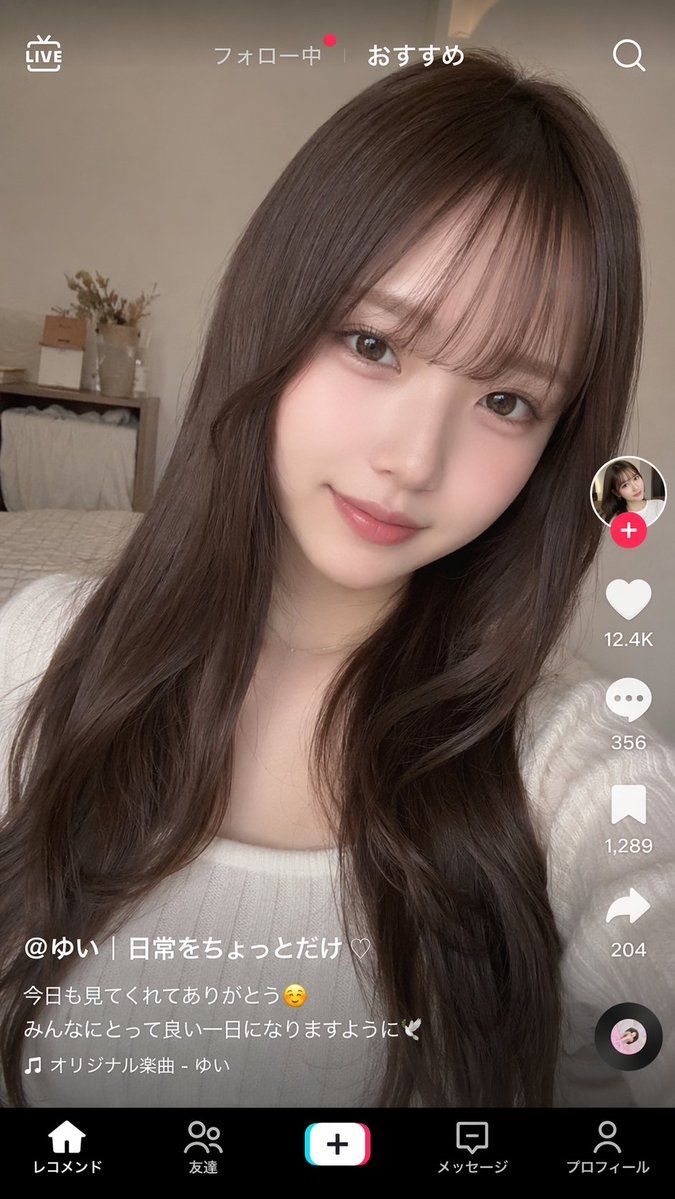
TikTok 风格视频界面模型
Enlarge

TikTok 风格视频界面模型

Prompt
{
  "type": "short-form video app interface mockup",
  "background_image": {
    "subject": "{argument name=\"subject description\" default=\"young Japanese woman with long wavy dark brown hair and see-through bangs, wearing a white ribbed top, soft natural makeup, smiling gently at the camera\"}",
    "setting": "cozy bedroom with a bed, wooden shelf, and dried flowers in the background, soft natural lighting, selfie angle"
  },
  "ui_overlay": {
    "top_bar": {
      "left": "LIVE icon",
      "center": "フォロー中 | {argument name=\"active tab\" default=\"おすすめ\"}",
      "right": "Search icon"
    },
    "right_sidebar": {
      "count": 6,
      "elements": [
        "Profile picture with pink plus badge",
        "Heart icon with {argument name=\"like count\" default=\"12.4K\"}",
        "Speech bubble icon with 356",
        "Bookmark icon with 1,289",
        "Share arrow icon with 204",
        "Spinning vinyl record icon"
      ]
    },
    "bottom_left_caption": {
      "username": "{argument name=\"username\" default=\"@ゆい | 日常をちょっとだけ♡\"}",
      "description": "{argument name=\"caption text\" default=\"今日も見てくれてありがとう☺️ みんなにとって良い一日になりますように🕊️\"}",
      "audio_track": "🎵 オリジナル楽曲 - ゆい"
    },
    "bottom_navigation": {
      "count": 5,
      "labels": [
        "レコメンド",
        "友達",
        "Create button",
        "メッセージ",
        "プロフィール"
      ]
    }
  }
}
Category
Charts & Infographics
Model
GPT Image 2
Views6
Source ID
13918
Published
Apr 17, 2026

Guide

About "TikTok 风格视频界面模型"

What is this prompt for?

"TikTok 风格视频界面模型" AI image prompt for GPT Image 2 (Charts & Infographics). 生成一个逼真的短视频应用界面,并叠加在可自定义的自拍或肖像照片上。 Copy it on Picva and recreate the look in one clic…

The full copyable prompt and example visuals above are ready for AI image generation or one-click recreate in Picva.

How to use this prompt

  1. Step 1

    Open the prompt detail

    Review the example visuals, category, and full prompt text for "TikTok 风格视频界面模型".

  2. Step 2

    Copy the prompt

    Copy the prompt body from this page, or load it directly in Studio.

  3. Step 3

    Pick a model (GPT Image 2)

    Prefer GPT Image 2. If you switch models, keep subject and composition and tweak style terms.

  4. Step 4

    Generate and export

    Recreate the look in Picva, or export into your workflow for editing and publishing.

FAQ

What is the "TikTok 风格视频界面模型" prompt?
It is an AI image-generation prompt for GPT Image 2 in the Charts & Infographics category. This page includes the full prompt text, example visuals, and a one-click recreate path in Picva.
How do I use this prompt to generate an image?
Copy the prompt from this page, or use Generate / Studio. Paste it into a compatible image model, or recreate the look in Picva with optional reference images.
Which model is this prompt for?
This page lists GPT Image 2. Most descriptive prompts also transfer to nearby image models such as GPT Image, Flux, or Midjourney with light style tweaks.
Can I use the result commercially?
You can usually copy the prompt for creation, but commercial use of the final image depends on the model terms, reference-image rights, and the generated content. Follow the source author and platform rules.