15

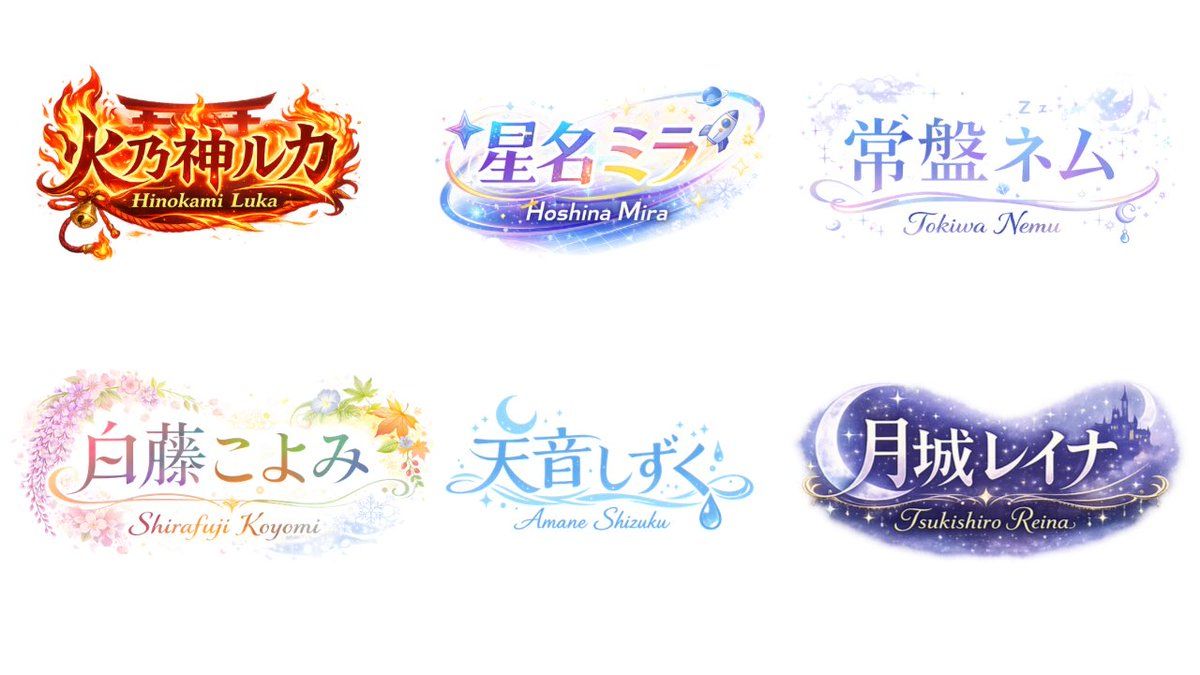
VTuber Logo 概念网格
Enlarge

VTuber Logo 概念网格

Prompt
{
  "type": "logo design concept sheet",
  "style": "{argument name=\"overall style\" default=\"anime VTuber typography, highly decorative, gradient text\"}",
  "background": "solid white",
  "layout": {
    "arrangement": "2 rows by 3 columns",
    "count": 6
  },
  "logos": [
    {
      "main_text": "{argument name=\"logo 1 text\" default=\"火乃神ルカ\"}",
      "sub_text": "Hinokami Luka",
      "theme": "{argument name=\"logo 1 theme\" default=\"fire, shrine gate, bell, intense red and gold\"}"
    },
    {
      "main_text": "{argument name=\"logo 2 text\" default=\"星名ミラ\"}",
      "sub_text": "Hoshina Mira",
      "theme": "{argument name=\"logo 2 theme\" default=\"space, stars, rocket, shooting star, blue and purple gradient\"}"
    },
    {
      "main_text": "常盤ネム",
      "sub_text": "Tokiwa Nemu",
      "theme": "sleep, night sky, clouds, crescent moon, Zzz, soft pastel blue and purple"
    },
    {
      "main_text": "白藤こよみ",
      "sub_text": "Shirafuji Koyomi",
      "theme": "four seasons, wisteria, cherry blossoms, autumn leaves, soft pastel colors"
    },
    {
      "main_text": "天音しずく",
      "sub_text": "Amane Shizuku",
      "theme": "water, rain drops, crescent moon, clear blue colors"
    },
    {
      "main_text": "月城レイナ",
      "sub_text": "Tsukishiro Reina",
      "theme": "night, castle silhouette, large crescent moon, stars, dark purple galaxy colors"
    }
  ]
}
Category
Charts & Infographics
Model
GPT Image 2
Views2
Source ID
13939
Published
Apr 17, 2026

Guide

About "VTuber Logo 概念网格"

What is this prompt for?

"VTuber Logo 概念网格" AI image prompt for GPT Image 2 (Charts & Infographics). 生成一个包含六个独特、极具装饰性的动漫风格 VTuber Logo 的网格,并配有主题排版和英文副标题。 Copy it on Picva and recreate…

The full copyable prompt and example visuals above are ready for AI image generation or one-click recreate in Picva.

How to use this prompt

  1. Step 1

    Open the prompt detail

    Review the example visuals, category, and full prompt text for "VTuber Logo 概念网格".

  2. Step 2

    Copy the prompt

    Copy the prompt body from this page, or load it directly in Studio.

  3. Step 3

    Pick a model (GPT Image 2)

    Prefer GPT Image 2. If you switch models, keep subject and composition and tweak style terms.

  4. Step 4

    Generate and export

    Recreate the look in Picva, or export into your workflow for editing and publishing.

FAQ

What is the "VTuber Logo 概念网格" prompt?
It is an AI image-generation prompt for GPT Image 2 in the Charts & Infographics category. This page includes the full prompt text, example visuals, and a one-click recreate path in Picva.
How do I use this prompt to generate an image?
Copy the prompt from this page, or use Generate / Studio. Paste it into a compatible image model, or recreate the look in Picva with optional reference images.
Which model is this prompt for?
This page lists GPT Image 2. Most descriptive prompts also transfer to nearby image models such as GPT Image, Flux, or Midjourney with light style tweaks.
Can I use the result commercially?
You can usually copy the prompt for creation, but commercial use of the final image depends on the model terms, reference-image rights, and the generated content. Follow the source author and platform rules.