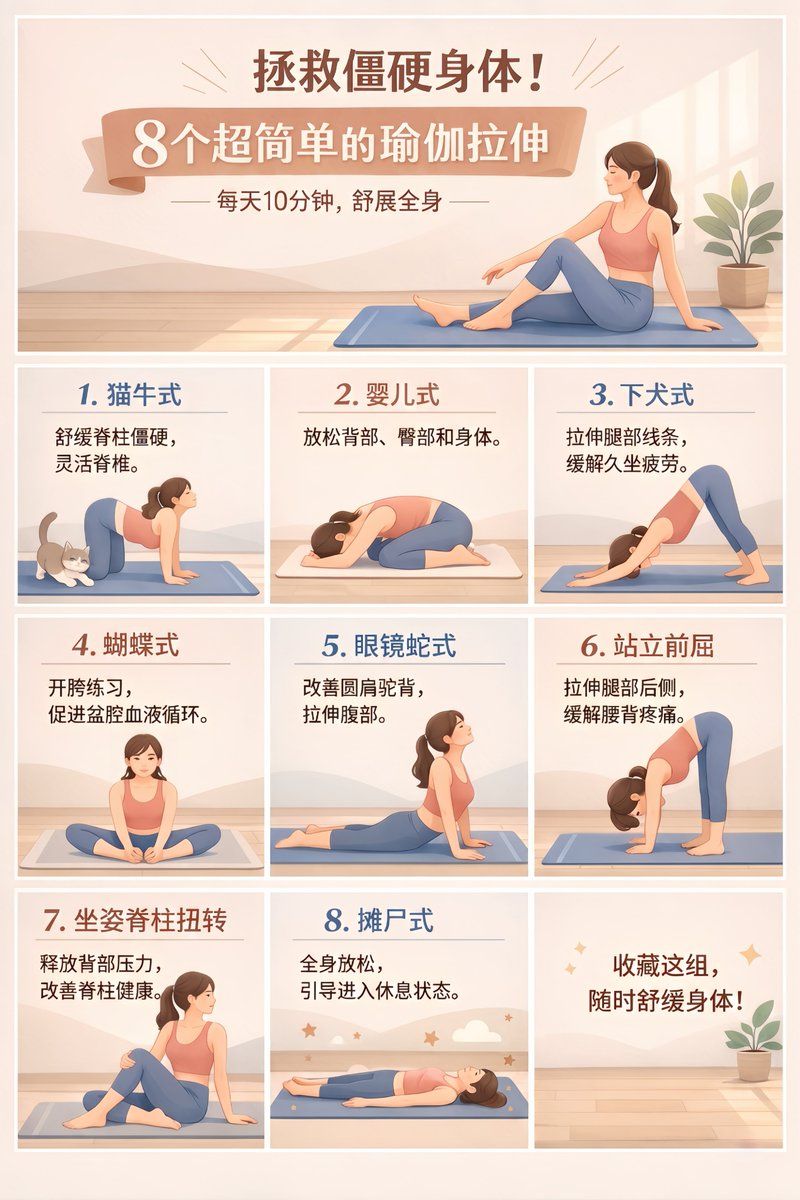
9 宫格瑜伽信息图海报
Prompt
{
  "type": "9-panel grid infographic poster",
  "style": "flat vector illustration, clean typography, {argument name=\"color palette\" default=\"Morandi colors, soft peach, warm beige, muted blue\"}",
  "subject": "{argument name=\"subject description\" default=\"woman in pink tank top and blue leggings\"}",
  "layout": {
    "header": {
      "title": "{argument name=\"main title\" default=\"拯救僵硬身体!\"}",
      "banner": "{argument name=\"banner title\" default=\"8个超简单的瑜伽拉伸\"}",
      "subtitle": "—— 每天10分钟,舒展全身 ——",
      "visual": "subject sitting on blue yoga mat stretching, potted plant"
    },
    "grid": {
      "format": "3x3 grid",
      "count": 9,
      "panels": [
        { "label": "1. 猫牛式", "text": "舒缓脊柱僵硬,灵活脊椎。", "visual": "cat-cow pose, small cat nearby" },
        { "label": "2. 婴儿式", "text": "放松背部、臀部和身体。", "visual": "child's pose" },
        { "label": "3. 下犬式", "text": "拉伸腿部线条,缓解久坐疲劳。", "visual": "downward dog pose" },
        { "label": "4. 蝴蝶式", "text": "开胯练习,促进盆腔血液循环。", "visual": "butterfly pose" },
        { "label": "5. 眼镜蛇式", "text": "改善圆肩驼背,拉伸腹部。", "visual": "cobra pose" },
        { "label": "6. 站立前屈", "text": "拉伸腿部后侧,缓解腰背疼痛。", "visual": "standing forward bend" },
        { "label": "7. 坐姿脊柱扭转", "text": "释放背部压力,改善脊柱健康。", "visual": "seated spinal twist" },
        { "label": "8. 摊尸式", "text": "全身放松,引导进入休息状态。", "visual": "corpse pose, stars and moon background" },
        { "label": "{argument name=\"closing text\" default=\"收藏这组,随时舒缓身体!\"}", "visual": "empty yoga mat, potted plant, sparkles" }
      ]
    }
  }
}- Category
- Charts & Infographics
- Model
- GPT Image 2
- Creator
- 无限 LOOP
- Source ID
- 14160
- Published
- Apr 20, 2026
Views6