11

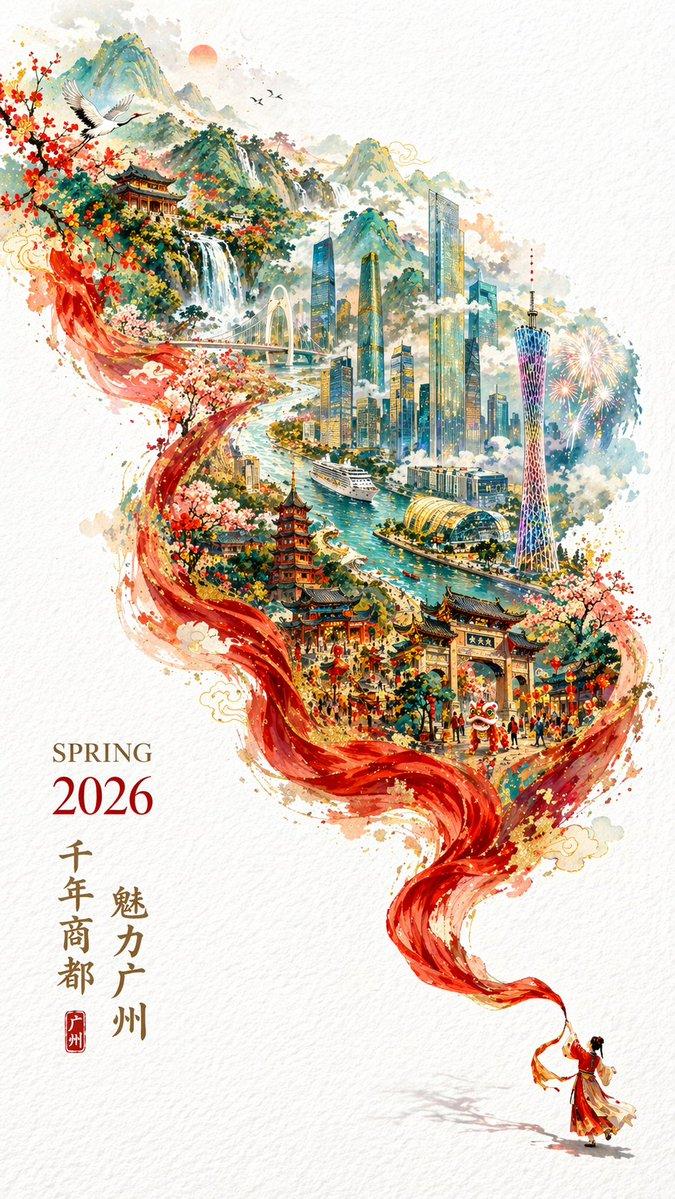
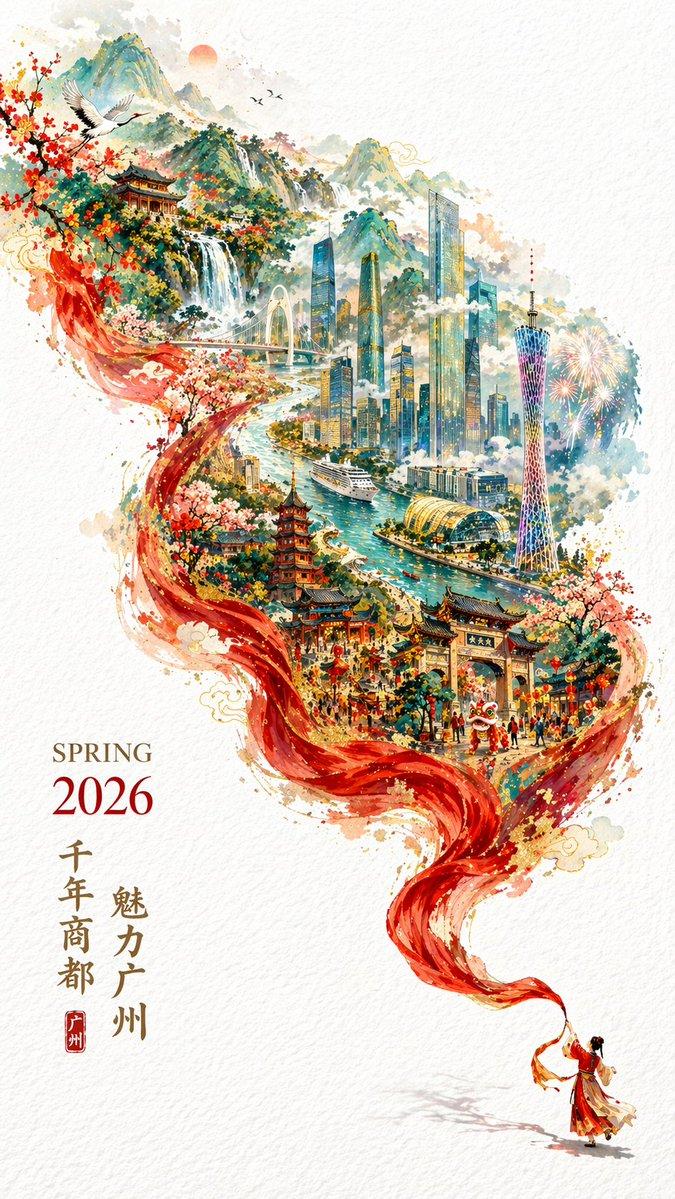
史诗级中国城市风光丝带海报
Enlarge

史诗级中国城市风光丝带海报

Prompt
A stunning vertical poster illustration on a textured cream paper background, featuring a massive, flowing translucent red silk ribbon that spirals diagonally from the bottom right to the top left. At the bottom right, one woman in a flowing traditional red dress holds the end of the ribbon. The ribbon frames a highly detailed, sprawling cityscape that transitions from historic to modern. The lower and middle sections showcase traditional Chinese temples, pagodas, and historic arcade buildings adorned with red lanterns, alongside blooming peonies and golden clouds. Integrated into the left side of the ribbon's flow are three traditional Yingge dancers with painted faces in dynamic poses. The upper section reveals a sweeping teal coastal bay with modern skyscrapers, one long suspension bridge, three ships navigating the water, distant mountains, and seagulls flying near a golden sun. The bottom left corner features elegant typography: "{argument name="season and year" default="SPRING 2026"}" in a serif font, large golden Chinese calligraphy reading "{argument name="main city name" default="汕头"}", smaller vertical text "{argument name="subtitle" default="百载商埠 · 魅力汕头"}", and "{argument name="english location" default="SHANTOU CHINA"}" with a small red seal stamp. The art style is a breathtaking fusion of traditional Chinese ink wash painting and modern digital fantasy art, utilizing a vibrant palette of crimson, teal, and gold.
Category
Charts & Infographics
Model
GPT Image 2
Views0
Source ID
14266
Published
Apr 20, 2026

Guide

About "史诗级中国城市风光丝带海报"

What is this prompt for?

"史诗级中国城市风光丝带海报" AI image prompt for GPT Image 2 (Charts & Infographics). 生成一张令人惊叹且富有文化底蕴的海报,包含飘逸的红色丝带、传统与现代城市元素,以及可自定义的排版。 Copy it on Picva and recreate the lo…

The full copyable prompt and example visuals above are ready for AI image generation or one-click recreate in Picva.

How to use this prompt

  1. Step 1

    Open the prompt detail

    Review the example visuals, category, and full prompt text for "史诗级中国城市风光丝带海报".

  2. Step 2

    Copy the prompt

    Copy the prompt body from this page, or load it directly in Studio.

  3. Step 3

    Pick a model (GPT Image 2)

    Prefer GPT Image 2. If you switch models, keep subject and composition and tweak style terms.

  4. Step 4

    Generate and export

    Recreate the look in Picva, or export into your workflow for editing and publishing.

FAQ

What is the "史诗级中国城市风光丝带海报" prompt?
It is an AI image-generation prompt for GPT Image 2 in the Charts & Infographics category. This page includes the full prompt text, example visuals, and a one-click recreate path in Picva.
How do I use this prompt to generate an image?
Copy the prompt from this page, or use Generate / Studio. Paste it into a compatible image model, or recreate the look in Picva with optional reference images.
Which model is this prompt for?
This page lists GPT Image 2. Most descriptive prompts also transfer to nearby image models such as GPT Image, Flux, or Midjourney with light style tweaks.
Can I use the result commercially?
You can usually copy the prompt for creation, but commercial use of the final image depends on the model terms, reference-image rights, and the generated content. Follow the source author and platform rules.