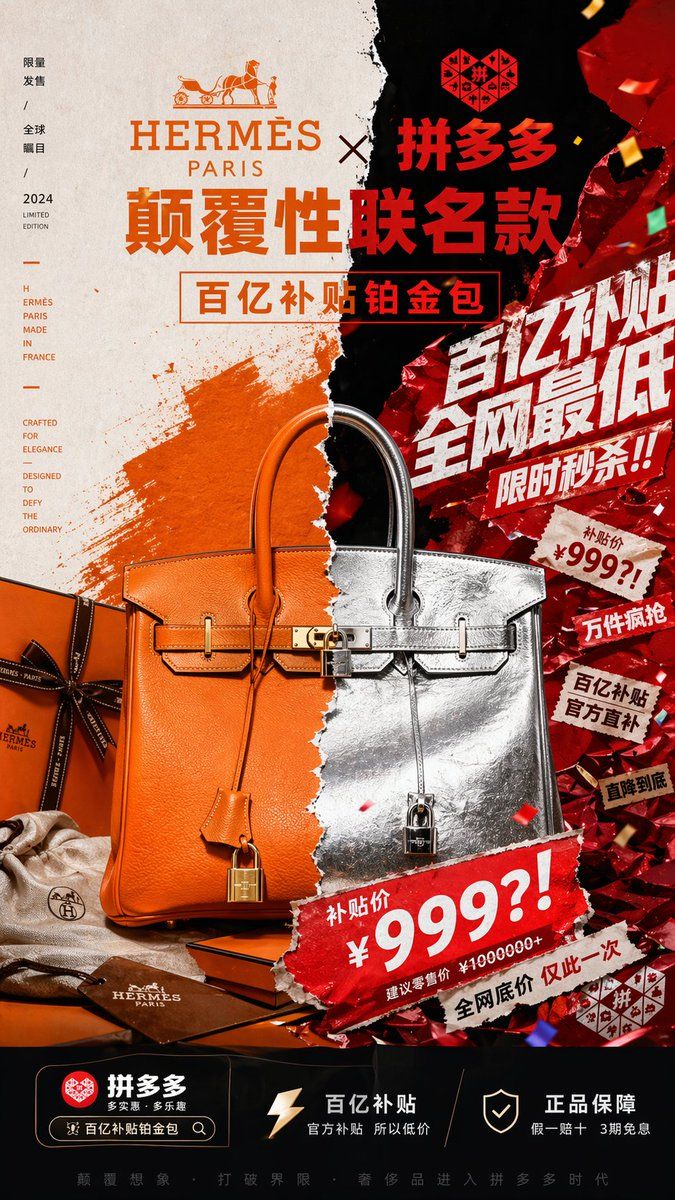
奢华 x 电商风格对撞海报
Prompt
Create a vertical 9:16 luxury-campaign poster for a fictional crossover product, a disruptive co-branded handbag advertisement between {argument name="brand one" default="HERMÈS PARIS"} and {argument name="brand two" default="拼多多"}. The composition is a violently split, collage-style fashion key visual with a torn-paper seam running vertically down the center, dividing two clashing aesthetics: on the left, refined premium luxury branding in warm Hermes orange, cream paper, and elegant editorial minimalism; on the right, aggressive Chinese e-commerce promotion energy in black and metallic red foil, with loud sale graphics, confetti, ripped stickers, and explosive discount typography. At the top center, place both brands prominently with a large collaboration headline in Chinese, the left logo area styled like a classic luxury house with serif typography and horse-and-carriage emblem, the right logo area in bold red Chinese branding. Below that, add the main headline text in huge Chinese characters: {argument name="headline text" default="颠覆性联名款"}, and a boxed subheadline: {argument name="subheadline text" default="百亿补贴铂金包"}. The centerpiece is one Birkin-style luxury handbag shown front-facing and large, perfectly centered but visually split in half along the torn seam: the left half is orange pebbled leather with gold hardware, the right half is crinkled metallic silver leather with silver hardware, both halves seamlessly merged into one surreal bag. The bag should include 5 clearly visible accessory/product elements around or on it: 1 orange clochette hanging on the left, 1 metallic silver hanging strap with lock on the right, 1 central turn-lock closure with padlock, 1 orange Hermes-style gift box with dark ribbon at lower left, and 1 beige dust bag with small logo near the bottom left. Behind the bag on the left is a painterly orange brushstroke on textured cream paper; behind the bag on the right is a crushed reflective red metallic wrapper surface with spark-like highlights and falling confetti. On the right half, add 8 aggressive promotional text bursts and stickers layered diagonally like an online shopping festival poster: 1 giant white Chinese slogan "百亿补贴 全网最低", 2 "限时秒杀!!", 3 a torn price sticker reading "补贴价 ¥999?!", 4 "万件疯抢", 5 "百亿补贴 官方直补", 6 "直降到底", 7 a large bottom torn banner repeating "补贴价 ¥999?!", and 8 small text "建议零售价 ¥1000000+". On the left margin, add a slim vertical editorial text column with 4 grouped text blocks in a luxury layout: 1 "限量发售 / 全球瞩目 / 2024 LIMITED EDITION", 2 "HERMÈS PARIS MADE IN FRANCE", 3 "CRAFTED FOR ELEGANCE", and 4 "DESIGNED TO DEFY THE ORDINARY". At the bottom, create a black app-like information bar with 3 feature blocks from left to right: 1 a red brand icon with "拼多多" and a search-bar style pill containing "百亿补贴铂金包", 2 a lightning icon with the text "百亿补贴 官方补贴 所以低价", and 3 a shield icon with the text "正品保障 假一赔十 3期免息". Add a thin final slogan line across the very bottom in small Chinese text. Use hyper-detailed commercial product photography, premium graphic design, sharp lighting, embossed textures, foil reflections, paper tears, and strong depth. The overall mood must feel like a world-class art director forced a heritage luxury campaign and a chaotic discount-shopping poster to collide in one image, producing extreme visual tension, irony, and high-impact contrast.- Category
- Charts & Infographics
- Model
- GPT Image 2
- Creator
- 阿杰快跑CL
- Source ID
- 14882
- Published
- Apr 22, 2026
Views6













