19

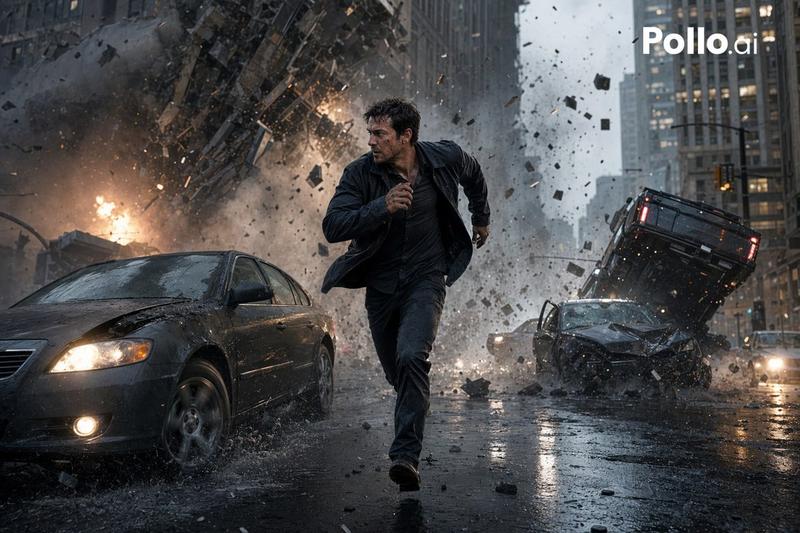
电影级城市撞击爆炸场景
Enlarge

电影级城市撞击爆炸场景

Prompt
A cinematic ultra-realistic action scene on a rain-soaked urban street at dusk, showing a sudden multi-car crash and explosion in the middle of a modern city. In the foreground, one adult man with a blurred, indistinct face is running toward the camera between lanes, wearing a dark jacket and dark pants, his posture urgent and off-balance as if escaping danger. To his left is a dark gray sedan with headlights on, splashing through wet pavement. In the midground on the right, 2 wrecked cars are colliding: 1 silver sedan with its driver-side door open and 1 dark vehicle flipping upside down in midair, surrounded by shattered glass, torn metal, and flying debris. Count 2 visible fireballs in the background, one on the far left street and one large explosion on the right side, both sending sparks and black smoke into the sky. Show heavy smoke plumes rising above a dense downtown skyline of tall, slightly out-of-focus buildings. Include wet reflective asphalt, scattered car parts across the road, glowing streetlights, utility poles, overhead power lines, and a moody blue-gray storm atmosphere with orange firelight reflecting in puddles. Framing should be wide-angle and low to the street, with strong motion, dramatic perspective, cinematic depth of field, realistic physics, volumetric smoke, flying embers, and high-detail disaster-movie lighting. Add a white {argument name="watermark text" default="Pollo.ai"} watermark in the top-right corner.
Category
Posters & Typography
Model
GPT Image 2
Creator
GugoXAi
Views3
Source ID
15283
Published
Apr 23, 2026

Guide

About "电影级城市撞击爆炸场景"

What is this prompt for?

"电影级城市撞击爆炸场景" AI image prompt for GPT Image 2 (Posters & Typography). 该提示词可生成逼真的灾难电影街道场景,包含逃跑的男子、翻滚的汽车和多处爆炸,适用于戏剧性的动作艺术创作或 AI 图像模型对比。 Copy it on Picva and recr…

The full copyable prompt and example visuals above are ready for AI image generation or one-click recreate in Picva.

How to use this prompt

  1. Step 1

    Open the prompt detail

    Review the example visuals, category, and full prompt text for "电影级城市撞击爆炸场景".

  2. Step 2

    Copy the prompt

    Copy the prompt body from this page, or load it directly in Studio.

  3. Step 3

    Pick a model (GPT Image 2)

    Prefer GPT Image 2. If you switch models, keep subject and composition and tweak style terms.

  4. Step 4

    Generate and export

    Recreate the look in Picva, or export into your workflow for editing and publishing.

FAQ

What is the "电影级城市撞击爆炸场景" prompt?
It is an AI image-generation prompt for GPT Image 2 in the Posters & Typography category. This page includes the full prompt text, example visuals, and a one-click recreate path in Picva.
How do I use this prompt to generate an image?
Copy the prompt from this page, or use Generate / Studio. Paste it into a compatible image model, or recreate the look in Picva with optional reference images.
Which model is this prompt for?
This page lists GPT Image 2. Most descriptive prompts also transfer to nearby image models such as GPT Image, Flux, or Midjourney with light style tweaks.
Can I use the result commercially?
You can usually copy the prompt for creation, but commercial use of the final image depends on the model terms, reference-image rights, and the generated content. Follow the source author and platform rules.