19

废墟之城的孤胆哨兵
Enlarge

废墟之城的孤胆哨兵

Prompt
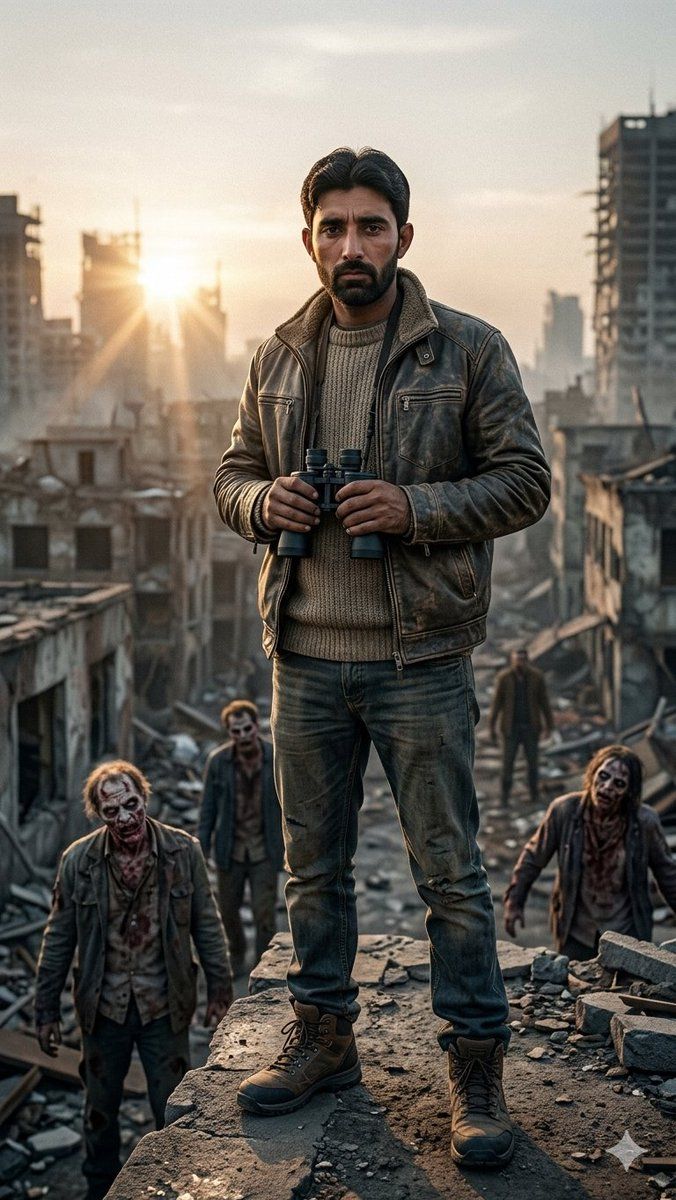
Create a hyper-detailed cinematic vertical portrait of {argument name="character name" default="a lone sentinel"} standing full-body at the center of the frame on the broken edge of a ruined concrete rooftop, overlooking a devastated city at dawn. The main figure is an adult man with short dark hair, a serious forward-facing stance, and a face left unobstructed for identity detail; he wears a heavy distressed brown leather jacket with a shearling-style collar, a thick beige knitted sweater, worn blue jeans, and rugged brown lace-up boots. He holds one pair of black binoculars with both hands at chest height. Show exactly 4 visible people total: 1 central hero in sharp focus, plus 3 smaller background figures below him among the rubble, dirty and post-apocalyptic, walking through the ruins with somber zombie-survivor energy. The environment is a war-torn collapsed urban district with shattered buildings on both sides, debris, broken concrete slabs, dust, smoke haze, and a long ruined street receding into the distance. Place the low rising sun behind the hero on the left side of the horizon, creating strong golden lens flare, rim lighting, long shadows, and atmospheric dust beams. Use realistic cinematic photography, ultra-detailed textures, dramatic depth of field, sharp clarity on the hero, softly blurred background, muted gray-brown color grading with warm sunrise highlights, 35mm movie still composition, high contrast, no text, no watermark.
Category
Charts & Infographics
Model
GPT Image 2
Views3
Source ID
20950
Published
May 16, 2026

Guide

About "废墟之城的孤胆哨兵"

What is this prompt for?

"废墟之城的孤胆哨兵" AI image prompt for GPT Image 2 (Charts & Infographics). 一幅电影质感的末日英雄肖像,描绘了一位手持双筒望远镜的哨兵在黎明时分俯瞰满目疮痍的城市。 Copy it on Picva and recreate the look in one…

The full copyable prompt and example visuals above are ready for AI image generation or one-click recreate in Picva.

How to use this prompt

  1. Step 1

    Open the prompt detail

    Review the example visuals, category, and full prompt text for "废墟之城的孤胆哨兵".

  2. Step 2

    Copy the prompt

    Copy the prompt body from this page, or load it directly in Studio.

  3. Step 3

    Pick a model (GPT Image 2)

    Prefer GPT Image 2. If you switch models, keep subject and composition and tweak style terms.

  4. Step 4

    Generate and export

    Recreate the look in Picva, or export into your workflow for editing and publishing.

FAQ

What is the "废墟之城的孤胆哨兵" prompt?
It is an AI image-generation prompt for GPT Image 2 in the Charts & Infographics category. This page includes the full prompt text, example visuals, and a one-click recreate path in Picva.
How do I use this prompt to generate an image?
Copy the prompt from this page, or use Generate / Studio. Paste it into a compatible image model, or recreate the look in Picva with optional reference images.
Which model is this prompt for?
This page lists GPT Image 2. Most descriptive prompts also transfer to nearby image models such as GPT Image, Flux, or Midjourney with light style tweaks.
Can I use the result commercially?
You can usually copy the prompt for creation, but commercial use of the final image depends on the model terms, reference-image rights, and the generated content. Follow the source author and platform rules.