12

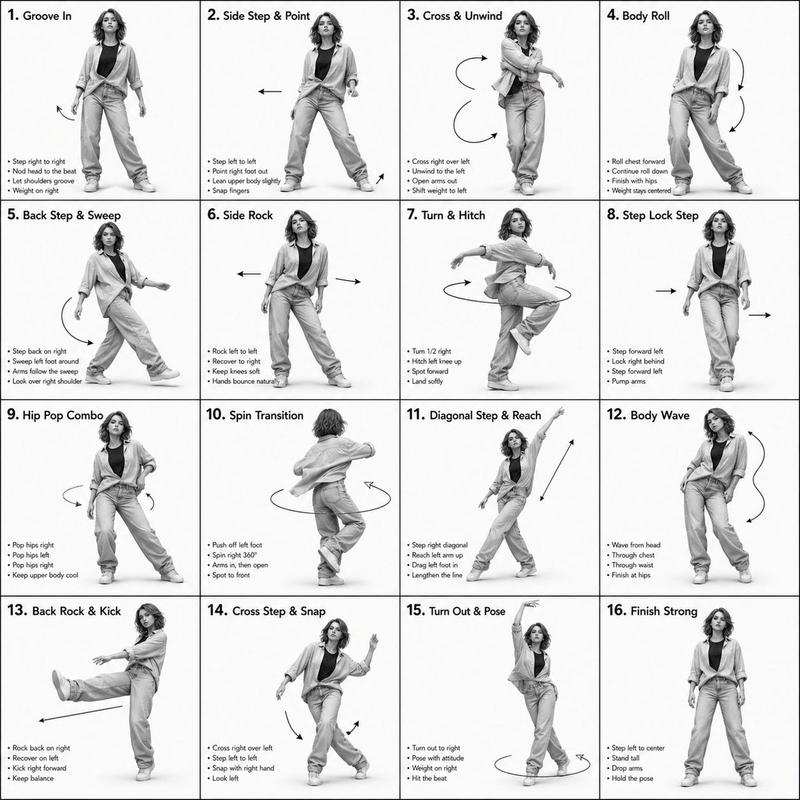
舞蹈动作参考表
Enlarge

舞蹈动作参考表

Prompt
[STYLE]
单色灰度插图,3D 渲染角色,简洁的教学参考表,
白色背景,漫画风格网格布局,技术图表美学

[LAYOUT]
4x4 网格布局,共 16 个面板,每个面板由细黑边框分隔,
从 1 到 16 的编号单元格,面板尺寸一致

[CHARACTER]
{argument name="character" default="年轻女舞者,运动型身材,马尾发型,短款上衣和宽松长裤,运动鞋"},所有面板中的角色保持一致

[PANEL STRUCTURE - per cell]
左上角:粗体数字徽章 + {argument name="title" default="韩文标题文本"}
中心:全身角色姿势插图
左下角:{argument name="description" default="韩文描述文本(3-4 行)"}
叠加层:指示运动方向的箭头

[ARROWS / MOTION INDICATORS]
曲线箭头、直线箭头、圆形旋转指示器,
放置在角色周围以显示运动流程和方向

[RENDERING STYLE]
高细节 3D 雕刻风格,柔和的摄影棚灯光,微妙的阴影,
无色彩,灰度渲染,干净的线条,游戏概念艺术品质

[NEGATIVE]
无背景场景,无色调,无额外角色,
无杂乱背景
Category
Charts & Infographics
Model
GPT Image 2
Creator
Ciri
Views3
Source ID
15866
Published
Apr 25, 2026

Guide

About "舞蹈动作参考表"

What is this prompt for?

"舞蹈动作参考表" AI image prompt for GPT Image 2 (Charts & Infographics). 一个用于生成 4x4 角色动作参考表的技术提示词,采用单色 3D 渲染风格,非常适合动画和游戏概念艺术。 Copy it on Picva and recreate the look…

The full copyable prompt and example visuals above are ready for AI image generation or one-click recreate in Picva.

How to use this prompt

  1. Step 1

    Open the prompt detail

    Review the example visuals, category, and full prompt text for "舞蹈动作参考表".

  2. Step 2

    Copy the prompt

    Copy the prompt body from this page, or load it directly in Studio.

  3. Step 3

    Pick a model (GPT Image 2)

    Prefer GPT Image 2. If you switch models, keep subject and composition and tweak style terms.

  4. Step 4

    Generate and export

    Recreate the look in Picva, or export into your workflow for editing and publishing.

FAQ

What is the "舞蹈动作参考表" prompt?
It is an AI image-generation prompt for GPT Image 2 in the Charts & Infographics category. This page includes the full prompt text, example visuals, and a one-click recreate path in Picva.
How do I use this prompt to generate an image?
Copy the prompt from this page, or use Generate / Studio. Paste it into a compatible image model, or recreate the look in Picva with optional reference images.
Which model is this prompt for?
This page lists GPT Image 2. Most descriptive prompts also transfer to nearby image models such as GPT Image, Flux, or Midjourney with light style tweaks.
Can I use the result commercially?
You can usually copy the prompt for creation, but commercial use of the final image depends on the model terms, reference-image rights, and the generated content. Follow the source author and platform rules.