16

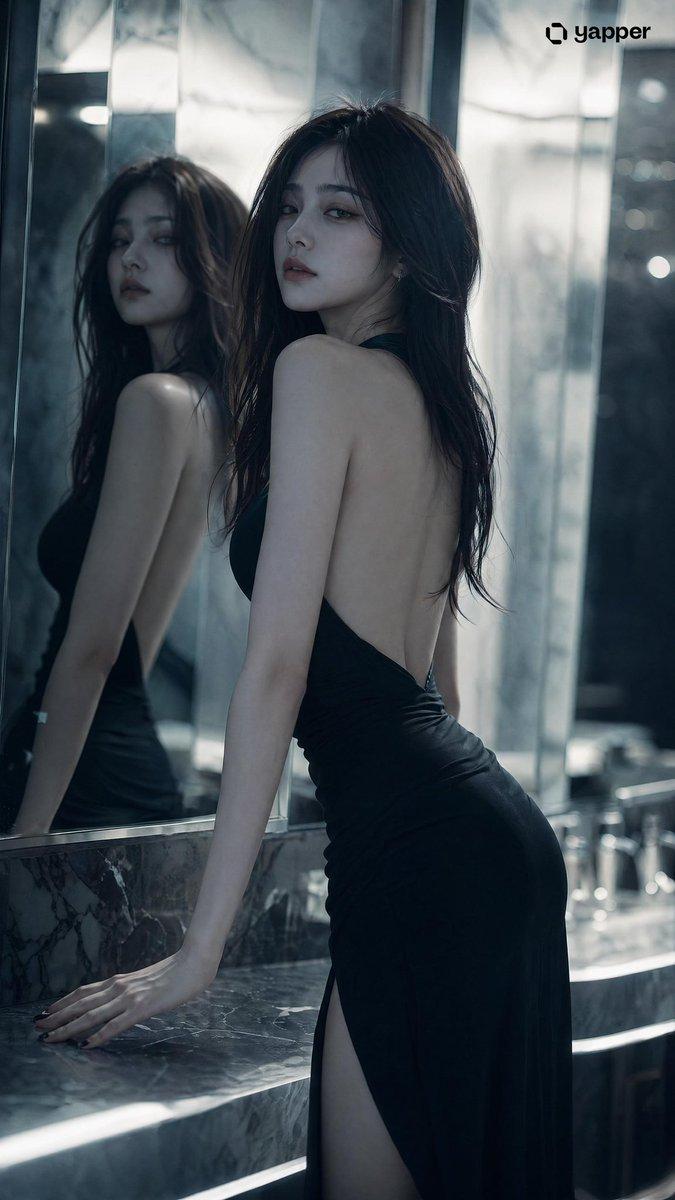
镜面反射下的冷艳肖像
Enlarge

镜面反射下的冷艳肖像

Prompt
{argument name="subject" default="Stunningly beautiful woman"} with a cool, aloof atmospheric vibe, exquisite and refined facial features, cold and glamorous high-end face, long flowing hair, graceful and alluring figure, (character features completely locked and consistent) Scene: Indoor space with {argument name="setting" default="mirrors (bathroom or mirrored wall)"}, multiple reflections, layered depth in the space Pose: Standing in front of the mirror, one hand lightly touching the mirror surface or resting on the countertop, body slightly angled, head gently turned toward the camera Expression: Calm and emotionless, with a hint of cold indifference and detachment Camera angle: Low angle or slight side angle shot, with the mirror reflection clearly visible in the frame Lighting: {argument name="lighting" default="Cool white light"} as the main source, with localized shadows, emphasizing structural contours and three-dimensionality Style: High-end fashion editorial, subtle film grain, low contrast Details: Delicately realistic skin texture, clear yet softly layered and slightly blurred mirror reflections Atmosphere: Restrained, rational, distant, with a touch of surreal unreality Quality: Ultra-sharp 8K, extreme details, cinematic lighting and shadows, beautiful depth-of-field bokeh.
Category
Charts & Infographics
Model
GPT Image 2
Creator
yusra.
Views2
Source ID
15909
Published
Apr 25, 2026

Guide

About "镜面反射下的冷艳肖像"

What is this prompt for?

"镜面反射下的冷艳肖像" AI image prompt for GPT Image 2 (Charts & Infographics). 一个用于高端女性肖像摄影的时尚编辑提示词,包含复杂的镜面反射效果和电影级布光。 Copy it on Picva and recreate the look in one cli…

The full copyable prompt and example visuals above are ready for AI image generation or one-click recreate in Picva.

How to use this prompt

  1. Step 1

    Open the prompt detail

    Review the example visuals, category, and full prompt text for "镜面反射下的冷艳肖像".

  2. Step 2

    Copy the prompt

    Copy the prompt body from this page, or load it directly in Studio.

  3. Step 3

    Pick a model (GPT Image 2)

    Prefer GPT Image 2. If you switch models, keep subject and composition and tweak style terms.

  4. Step 4

    Generate and export

    Recreate the look in Picva, or export into your workflow for editing and publishing.

FAQ

What is the "镜面反射下的冷艳肖像" prompt?
It is an AI image-generation prompt for GPT Image 2 in the Charts & Infographics category. This page includes the full prompt text, example visuals, and a one-click recreate path in Picva.
How do I use this prompt to generate an image?
Copy the prompt from this page, or use Generate / Studio. Paste it into a compatible image model, or recreate the look in Picva with optional reference images.
Which model is this prompt for?
This page lists GPT Image 2. Most descriptive prompts also transfer to nearby image models such as GPT Image, Flux, or Midjourney with light style tweaks.
Can I use the result commercially?
You can usually copy the prompt for creation, but commercial use of the final image depends on the model terms, reference-image rights, and the generated content. Follow the source author and platform rules.