16

Google Maps UI 界面模型
Enlarge

Google Maps UI 界面模型

Prompt
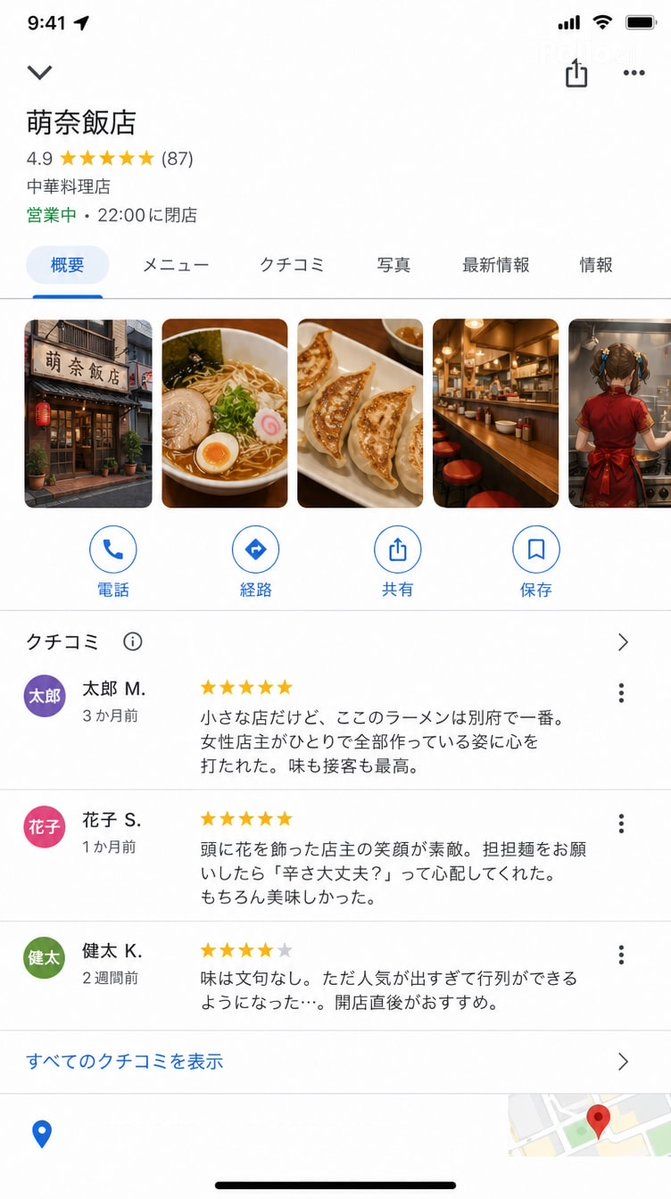
Google Maps iOS 应用商店详情页截图(9:16)。

具备精准的 Google Maps UI:

店铺名称:"{argument name="store name" default="Mona Hanten"}"
评分:★★★★★ 4.9(87 条评价)
类别:"中餐厅"
状态:"营业中 · 22:00 结束营业"

照片部分(横向滚动):
店铺外观 / 拉面照片 / 饺子 / 吧台 / {argument name="photo content" default="一位年轻女孩正在烹饪的背影"}

评价部分(部分内容可见):

★★★★★ "这是一家小店,但这里的拉面是别府最好吃的。女店主独自打理一切,让我非常感动。味道和服务都是一流的。" — {argument name="reviewer" default="Taro M."}(3 个月前)

★★★★★ "店主发间别着花朵,笑容非常灿烂。当我点担担面时,她问我‘你能吃辣吗?’,非常贴心。当然,味道也很棒。" — Hanako S.(1 个月前)

★★★★☆ "味道无可挑剔。不过因为太受欢迎,总是需要排队……建议刚开门时就去。" — Kenta K.(2 周前)

底部的 Google Maps UI 元素(路线、通话、保存按钮)。

UI 精确度极高,足以以假乱真,看起来就像真实的 Google Maps 截图。
Category
Charts & Infographics
Model
GPT Image 2
Views3
Source ID
16281
Published
Apr 26, 2026

Guide

About "Google Maps UI 界面模型"

What is this prompt for?

"Google Maps UI 界面模型" AI image prompt for GPT Image 2 (Charts & Infographics). 一个复杂的提示词,用于为一家虚构餐厅重现 Google Maps iOS 应用界面,并保持高度的 UI 精确度。 Copy it on Picva and re…

The full copyable prompt and example visuals above are ready for AI image generation or one-click recreate in Picva.

How to use this prompt

  1. Step 1

    Open the prompt detail

    Review the example visuals, category, and full prompt text for "Google Maps UI 界面模型".

  2. Step 2

    Copy the prompt

    Copy the prompt body from this page, or load it directly in Studio.

  3. Step 3

    Pick a model (GPT Image 2)

    Prefer GPT Image 2. If you switch models, keep subject and composition and tweak style terms.

  4. Step 4

    Generate and export

    Recreate the look in Picva, or export into your workflow for editing and publishing.

FAQ

What is the "Google Maps UI 界面模型" prompt?
It is an AI image-generation prompt for GPT Image 2 in the Charts & Infographics category. This page includes the full prompt text, example visuals, and a one-click recreate path in Picva.
How do I use this prompt to generate an image?
Copy the prompt from this page, or use Generate / Studio. Paste it into a compatible image model, or recreate the look in Picva with optional reference images.
Which model is this prompt for?
This page lists GPT Image 2. Most descriptive prompts also transfer to nearby image models such as GPT Image, Flux, or Midjourney with light style tweaks.
Can I use the result commercially?
You can usually copy the prompt for creation, but commercial use of the final image depends on the model terms, reference-image rights, and the generated content. Follow the source author and platform rules.