17

工程草图美学
Enlarge

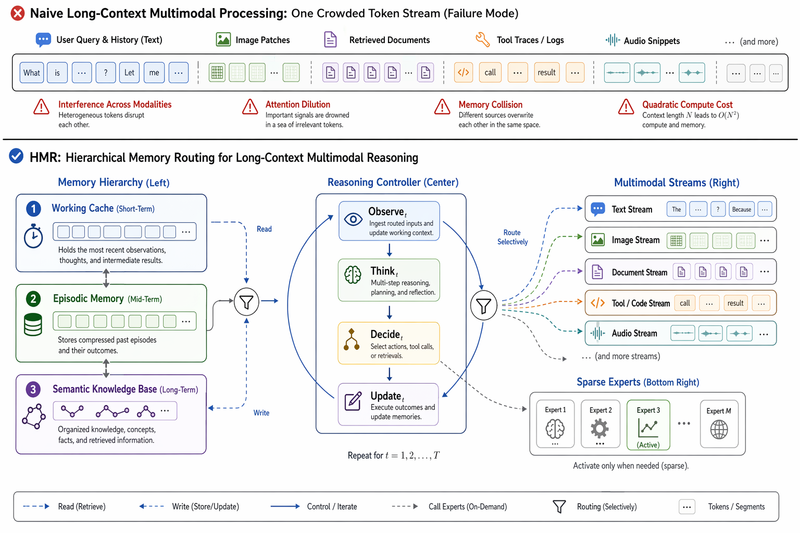
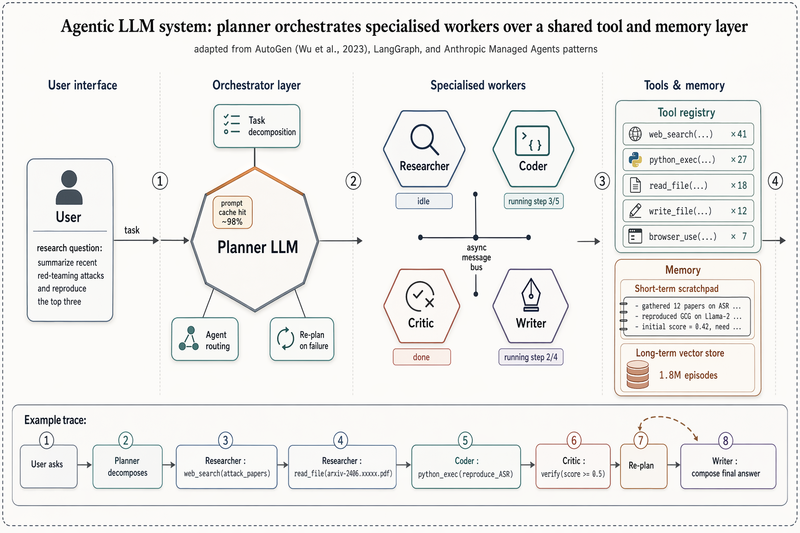
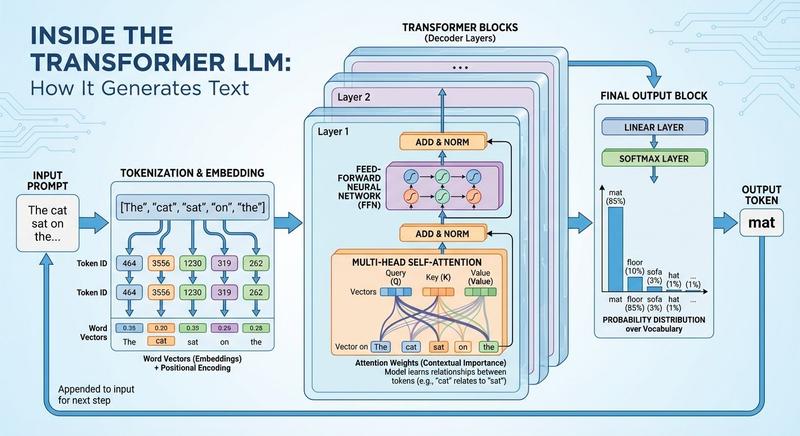
Example images

工程草图美学

Prompt
-  纯白色背景,大量留白
- 工程图纸线条风格(细腻、精确)
- 手写体标题(深灰色)
- 工程标注方式展示步骤
- 淡蓝色、淡绿色、淡橙色水彩点缀(高透明度)
- 类似苹果/特斯拉产品设计手稿的现代感
- 简洁图标配合步骤说明
- 清爽、专业、科技感
Category
Products & E-commerce
Model
GPT Image 2
Creator
Nicolechan
Views5
Source ID
16525
Published
Apr 27, 2026

Guide

About "工程草图美学"

What is this prompt for?

"工程草图美学" AI image prompt for GPT Image 2 (Products & E-commerce). 一套用于创作简洁、专业且具有现代 Apple 风格的工程类产品设计草图的提示词。 Copy it on Picva and recreate the look in one click.

The full copyable prompt and example visuals above are ready for AI image generation or one-click recreate in Picva.

How to use this prompt

  1. Step 1

    Open the prompt detail

    Review the example visuals, category, and full prompt text for "工程草图美学".

  2. Step 2

    Copy the prompt

    Copy the prompt body from this page, or load it directly in Studio.

  3. Step 3

    Pick a model (GPT Image 2)

    Prefer GPT Image 2. If you switch models, keep subject and composition and tweak style terms.

  4. Step 4

    Generate and export

    Recreate the look in Picva, or export into your workflow for editing and publishing.

FAQ

What is the "工程草图美学" prompt?
It is an AI image-generation prompt for GPT Image 2 in the Products & E-commerce category. This page includes the full prompt text, example visuals, and a one-click recreate path in Picva.
How do I use this prompt to generate an image?
Copy the prompt from this page, or use Generate / Studio. Paste it into a compatible image model, or recreate the look in Picva with optional reference images.
Which model is this prompt for?
This page lists GPT Image 2. Most descriptive prompts also transfer to nearby image models such as GPT Image, Flux, or Midjourney with light style tweaks.
Can I use the result commercially?
You can usually copy the prompt for creation, but commercial use of the final image depends on the model terms, reference-image rights, and the generated content. Follow the source author and platform rules.