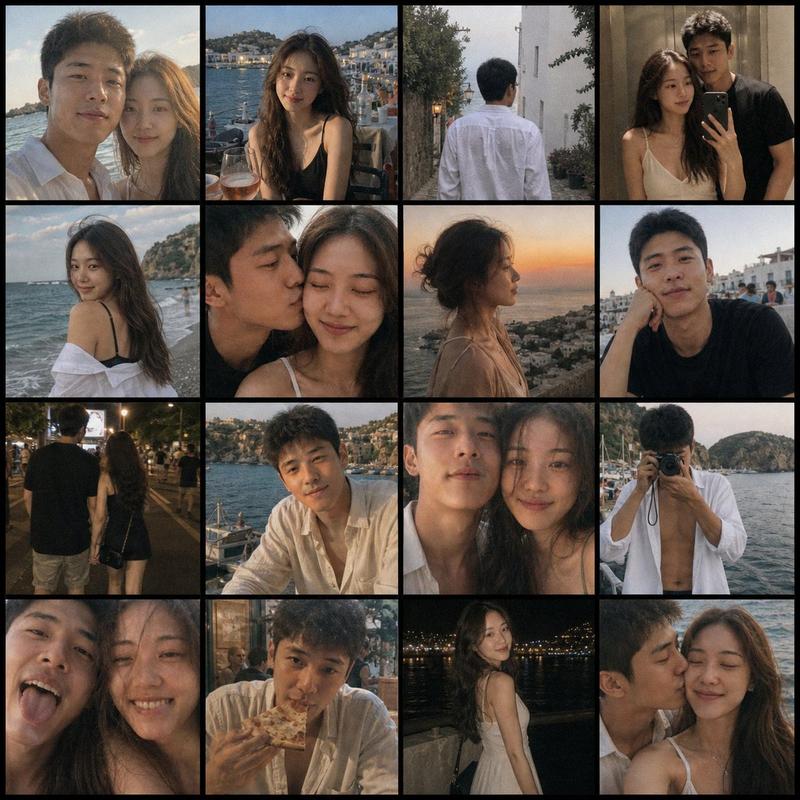
怀旧度假 iPhone 快照网格
Prompt
4x4 网格,由 iPhone 拍摄的一对{argument name="主体" default="年轻情侣"}在度假时的抓拍怀旧照片,包含彼此自拍和一起自拍。大量镜头抖动、业余构图,以及充满情绪感的复古氛围。- Category
- Photography & Realism
- Model
- GPT Image 2
- Creator
- AI Will
- Source ID
- 16532
- Published
- Apr 27, 2026
Views2
14

4x4 网格,由 iPhone 拍摄的一对{argument name="主体" default="年轻情侣"}在度假时的抓拍怀旧照片,包含彼此自拍和一起自拍。大量镜头抖动、业余构图,以及充满情绪感的复古氛围。Guide
"怀旧度假 iPhone 快照网格" AI image prompt for GPT Image 2 (Photography & Realism). 一个旨在模仿业余 iPhone 摄影风格的提示词,可创建 4x4 的怀旧度假快照网格,并带有逼真的镜头抖动和抓拍构图。 Copy it on Picva and re…
The full copyable prompt and example visuals above are ready for AI image generation or one-click recreate in Picva.
Step 1
Review the example visuals, category, and full prompt text for "怀旧度假 iPhone 快照网格".
Step 2
Copy the prompt body from this page, or load it directly in Studio.
Step 3
Prefer GPT Image 2. If you switch models, keep subject and composition and tweak style terms.
Step 4
Recreate the look in Picva, or export into your workflow for editing and publishing.