20

电影感排版海报
Enlarge

电影感排版海报

Prompt
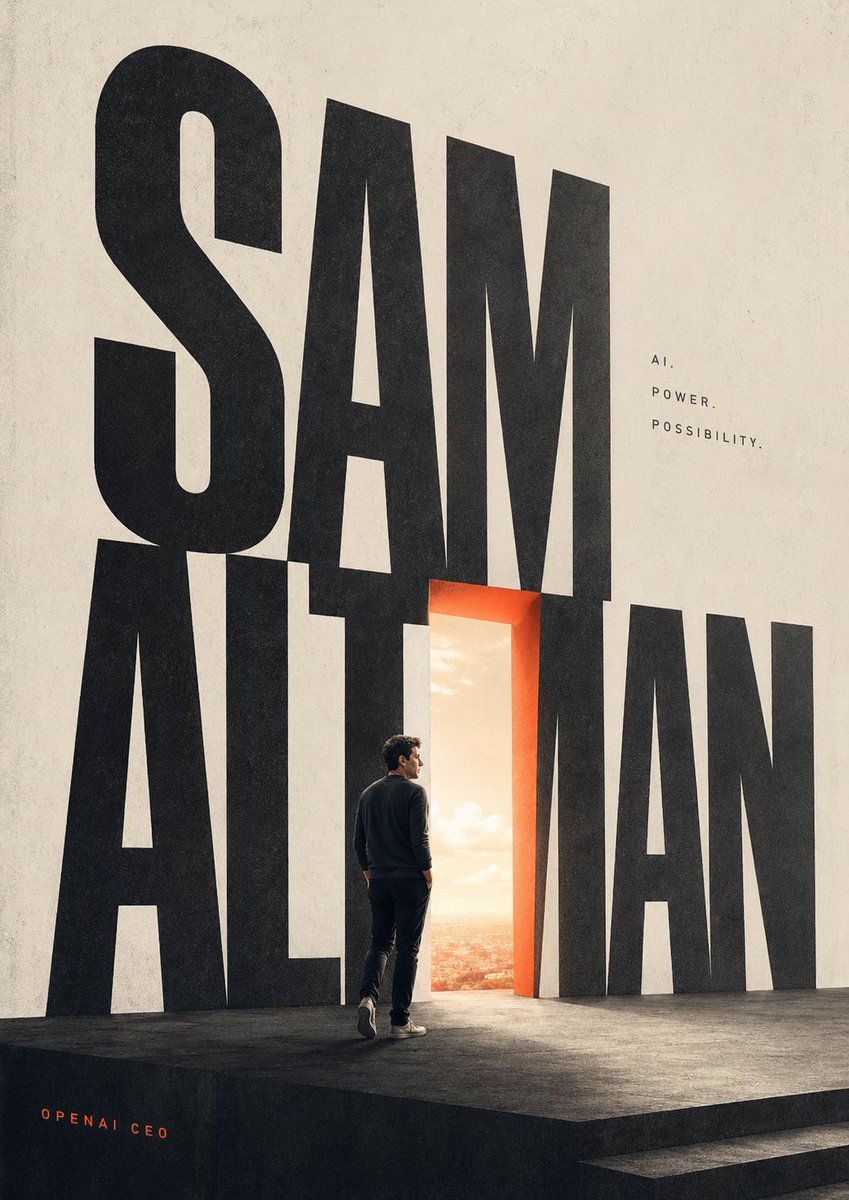
A minimalist cinematic poster on a tall vertical canvas with an off-white textured paper background and a dark matte stage platform at the bottom, dominated by giant condensed black sans-serif letters spelling {argument name="main title" default="SAM ALTMAN"} across nearly the full height of the composition, with the first word stacked above and overlapping the second. Replace one central vertical letterform with a glowing open doorway, outlined in warm orange-red light, revealing a bright sunrise sky and a distant cityscape beyond. On the stage, place 1 lone adult man seen from behind in three-quarter profile, walking toward the doorway, wearing a dark crewneck sweater, dark pants, and light sneakers, with realistic proportions and subtle dramatic rim lighting. To the upper right of the typography, add 3 small lines of spaced uppercase text reading {argument name="tagline line 1" default="AI."}, {argument name="tagline line 2" default="POWER."}, and {argument name="tagline line 3" default="POSSIBILITY."}. In the lower left corner, add 1 small orange credit line reading {argument name="credit text" default="OPENAI CEO"}. Use strong scale contrast, lots of negative space, editorial magazine-cover styling, clean modern layout, muted neutral tones with one warm orange accent, realistic lighting, subtle film grain, and a sophisticated futuristic mood.
Category
Charts & Infographics
Model
GPT Image 2
Creator
Eric Wang
Views2
Source ID
16696
Published
Apr 27, 2026

Guide

About "电影感排版海报"

What is this prompt for?

"电影感排版海报" AI image prompt for GPT Image 2 (Charts & Infographics). 此提示词可生成一张大胆的编辑风格海报,包含巨型排版、发光的门廊以及一个孤独的人物,非常适合杂志封面、主题演讲视觉图或科技人物艺术创作。 Copy it on Picva and rec…

The full copyable prompt and example visuals above are ready for AI image generation or one-click recreate in Picva.

How to use this prompt

  1. Step 1

    Open the prompt detail

    Review the example visuals, category, and full prompt text for "电影感排版海报".

  2. Step 2

    Copy the prompt

    Copy the prompt body from this page, or load it directly in Studio.

  3. Step 3

    Pick a model (GPT Image 2)

    Prefer GPT Image 2. If you switch models, keep subject and composition and tweak style terms.

  4. Step 4

    Generate and export

    Recreate the look in Picva, or export into your workflow for editing and publishing.

FAQ

What is the "电影感排版海报" prompt?
It is an AI image-generation prompt for GPT Image 2 in the Charts & Infographics category. This page includes the full prompt text, example visuals, and a one-click recreate path in Picva.
How do I use this prompt to generate an image?
Copy the prompt from this page, or use Generate / Studio. Paste it into a compatible image model, or recreate the look in Picva with optional reference images.
Which model is this prompt for?
This page lists GPT Image 2. Most descriptive prompts also transfer to nearby image models such as GPT Image, Flux, or Midjourney with light style tweaks.
Can I use the result commercially?
You can usually copy the prompt for creation, but commercial use of the final image depends on the model terms, reference-image rights, and the generated content. Follow the source author and platform rules.