五月励志欢迎海报
Prompt
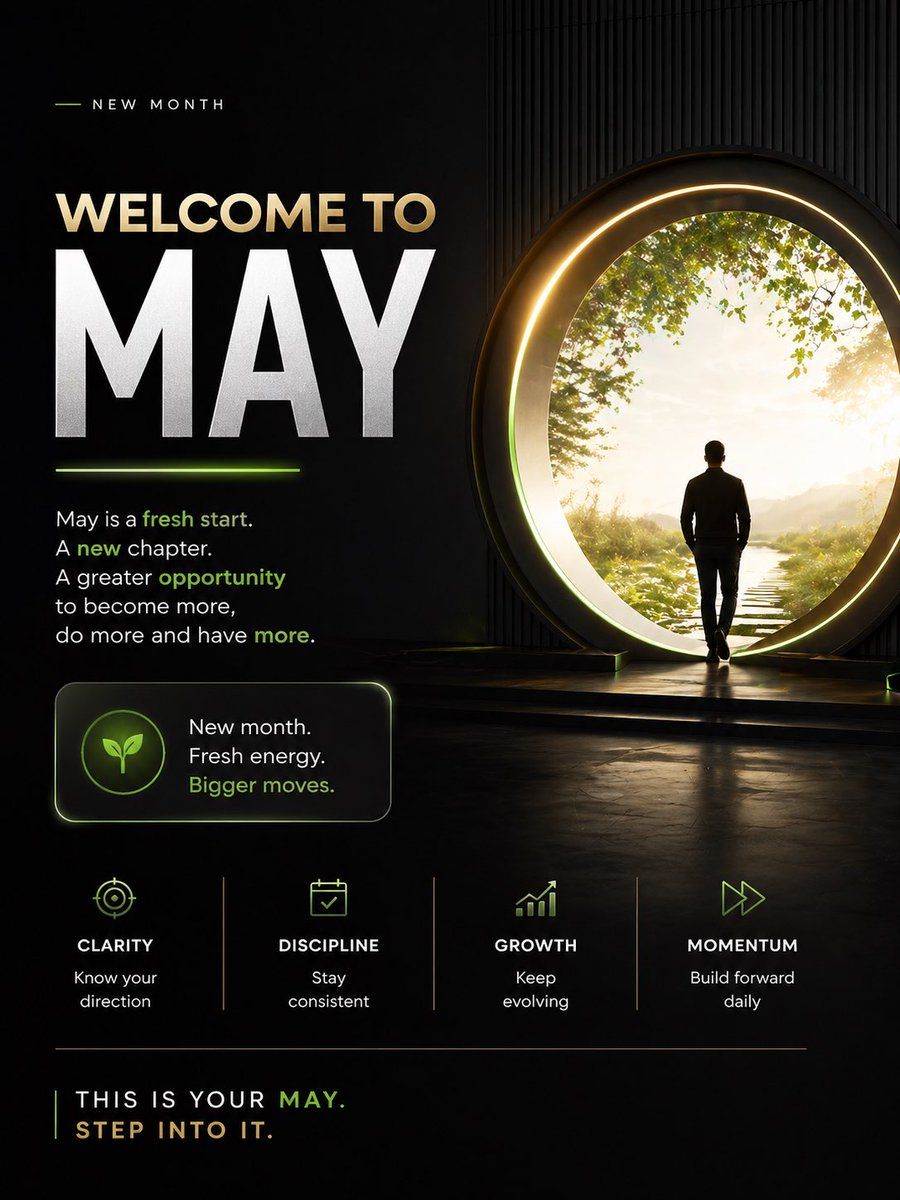
Design a premium motivational social media poster in a dark cinematic editorial style, vertical 4:5 format. The composition is split into 2 main zones: a left text-heavy layout and a right aspirational visual scene. Use a black to deep charcoal background with subtle texture, faint vertical ribbed wall detail on the right, glossy floor reflections, and elegant neon-lime accent lighting mixed with warm gold highlights.

On the right side, show 1 human figure: a man in silhouette from behind, wearing a fitted dark jacket and pants, walking toward a giant circular portal doorway. The portal should be large, glowing with a warm golden ring and soft inner halo, positioned slightly right of center. Beyond the portal is a bright peaceful nature scene with 1 narrow stepping-stone path leading forward through grass, soft sunlight, distant haze, and leafy green tree branches framing the upper edge. The figure should feel purposeful and contemplative, stepping into a new beginning.

On the left side, create a clean motivational typography layout. At the top, include a small header reading "NEW MONTH" in spaced uppercase sans serif, with a short thin lime line to its left. Below it, place the main headline in 2 lines: "WELCOME TO" in large warm beige uppercase, and "{argument name="headline text" default="MAY"}" in extremely large bold white uppercase, dominating the left half. Add a short glowing lime underline beneath the large month word.

Under the headline, add a motivational paragraph in white sans serif with selected words highlighted in lime green: "May is a fresh start. A new chapter. A greater opportunity to become more, do more and have more." Highlight the words "fresh start," "new," "opportunity," and "more" in lime green.

Below that, place 1 rounded rectangular callout card with a subtle border glow. Inside the card, put 1 circular icon badge containing a simple leaf symbol in lime green. To the right of the icon, add 3 stacked lines of text: "New month.", "Fresh energy.", and "Bigger moves." with the last line in lime green.

Across the lower middle, create 4 evenly spaced value pillars separated by thin vertical dividers. Each pillar contains 1 minimalist lime icon, 1 uppercase title, and 1 short caption. Use these exact 4 items from left to right: 1) target icon, title "CLARITY", caption "Know your direction". 2) calendar icon, title "DISCIPLINE", caption "Stay consistent". 3) upward bar chart icon, title "GROWTH", caption "Keep evolving". 4) fast-forward arrows icon, title "MOMENTUM", caption "Build forward daily".

At the bottom, add a thin horizontal divider line. Under it, place a closing statement in uppercase: "THIS IS YOUR {argument name="month name" default="MAY"}." on one line and "{argument name="closing line" default="STEP INTO IT."}" on the next line. Render most text in white or warm beige, with "MAY" and select accents in lime green.

Overall mood: inspirational, modern, luxurious, focused, forward-moving, social-media-ready, with crisp sans serif typography, high contrast, cinematic glow, and a polished personal development brand aesthetic.- Category
- Charts & Infographics
- Model
- GPT Image 2
- Creator
- Adebayo
- Source ID
- 17607
- Published
- May 1, 2026
Views11