17

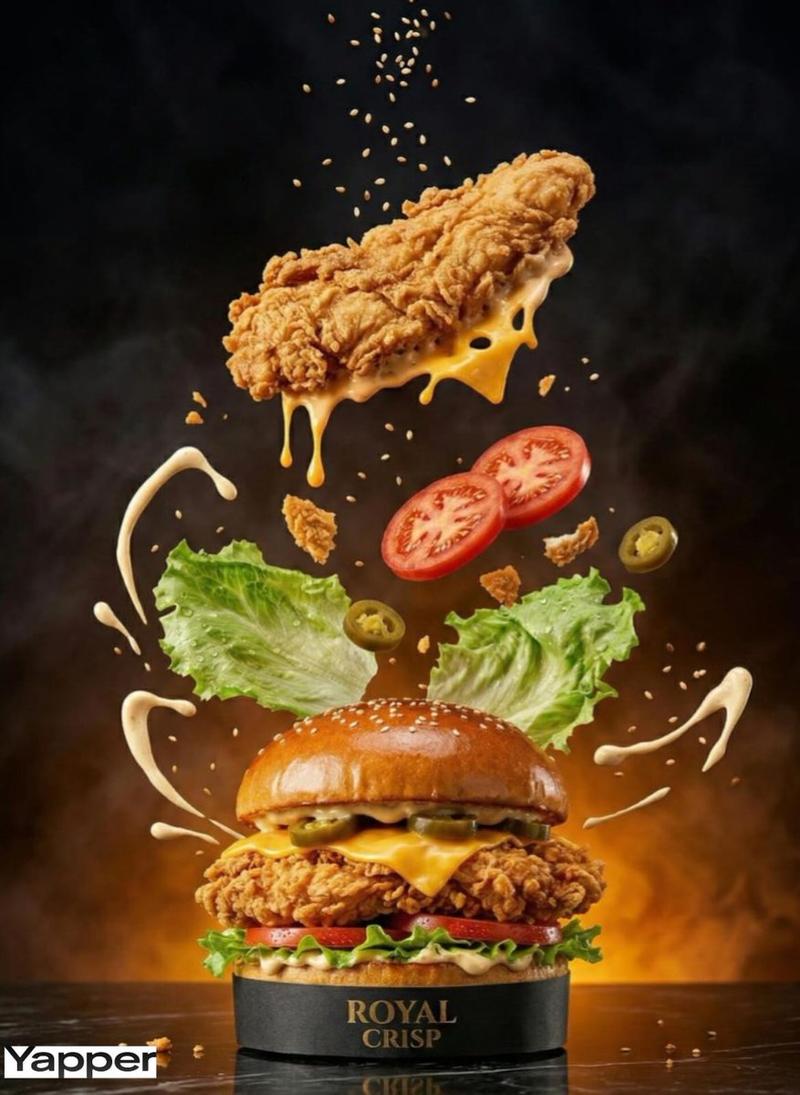
电影级酥脆汉堡美食摄影
Enlarge

电影级酥脆汉堡美食摄影

Prompt
A high-quality cinematic food commercial showcasing a {argument name="food item" default="crispy fried chicken burger"} inspired by {argument name="brand" default="KFC"}. Close-up shot of golden crunchy fried chicken fillet being placed inside a soft sesame bun, layered with fresh lettuce, creamy mayonnaise, melted cheese, and pickles. Slow-motion burger assembly with dramatic lighting, steam rising from hot chicken, crispy texture details, and sauce dripping. The camera rotates around the burger on a dark premium background. Fast cuts of fries and cold soda splashing with ice cubes. Bold red and white branding-inspired colours, energetic commercial vibe, ultra-realistic 4K, shallow depth of field, food photography style, appetizing, and luxurious atmosphere.
Category
Charts & Infographics
Model
GPT Image 2
Creator
Ur Meer
Views2
Source ID
17845
Published
May 2, 2026

Guide

About "电影级酥脆汉堡美食摄影"

What is this prompt for?

"电影级酥脆汉堡美食摄影" AI image prompt for GPT Image 2 (Charts & Infographics). 一个用于生成令人垂涎、逼真的酥脆汉堡美食摄影的高质量提示词,包含电影级灯光和微距细节。 Copy it on Picva and recreate the look in on…

The full copyable prompt and example visuals above are ready for AI image generation or one-click recreate in Picva.

How to use this prompt

  1. Step 1

    Open the prompt detail

    Review the example visuals, category, and full prompt text for "电影级酥脆汉堡美食摄影".

  2. Step 2

    Copy the prompt

    Copy the prompt body from this page, or load it directly in Studio.

  3. Step 3

    Pick a model (GPT Image 2)

    Prefer GPT Image 2. If you switch models, keep subject and composition and tweak style terms.

  4. Step 4

    Generate and export

    Recreate the look in Picva, or export into your workflow for editing and publishing.

FAQ

What is the "电影级酥脆汉堡美食摄影" prompt?
It is an AI image-generation prompt for GPT Image 2 in the Charts & Infographics category. This page includes the full prompt text, example visuals, and a one-click recreate path in Picva.
How do I use this prompt to generate an image?
Copy the prompt from this page, or use Generate / Studio. Paste it into a compatible image model, or recreate the look in Picva with optional reference images.
Which model is this prompt for?
This page lists GPT Image 2. Most descriptive prompts also transfer to nearby image models such as GPT Image, Flux, or Midjourney with light style tweaks.
Can I use the result commercially?
You can usually copy the prompt for creation, but commercial use of the final image depends on the model terms, reference-image rights, and the generated content. Follow the source author and platform rules.