20

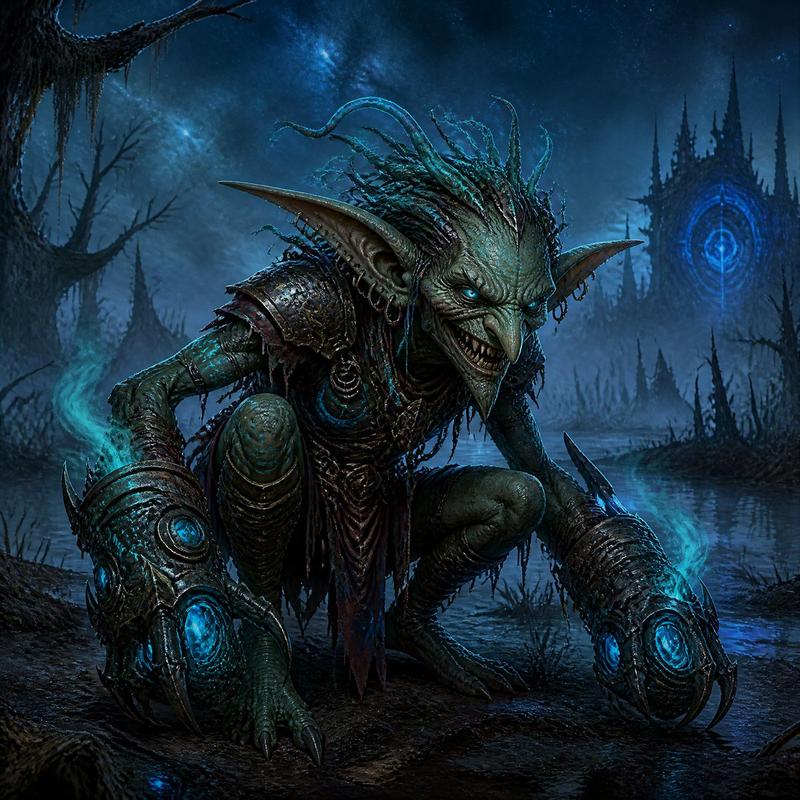
沼泽中发光的哥布林萨满
Enlarge

沼泽中发光的哥布林萨满

Prompt
Create a cinematic dark-fantasy 3D character portrait of a feral {argument name="creature type" default="goblin shaman"} crouching low in a swamp at night, lunging toward the viewer with a malicious grin. The creature has mottled green skin, a narrow wrinkled face, sharp fangs, long pointed ears with multiple silver hoop piercings, glowing icy-blue eyes, and wild spiky {argument name="hair color" default="turquoise and magenta"} hair swept upward. Add luminous cyan tribal markings on the forehead, chest, and arms, with the brightest sigil centered above the brow. Dress the goblin in rugged fantasy armor: one large weathered brass shoulder pauldron with rivets, dark leather straps, a circular metal chest device, a tattered red loincloth, and red leather forearm bracers painted with black occult symbols. Both clawed hands should be extended forward, wreathed in smoky orange magical fire, with glowing runes on the wrists and fingertips. Set the scene in a murky marsh with shallow reflective water, mist, reeds, scattered bones, ribs, and skulls, plus clusters of bioluminescent cyan mushrooms and tiny green firefly-like lights. Use a low camera angle, dramatic depth of field, high-detail creature sculpting, wet skin and armor textures, volumetric blue fog, starry night bokeh in the background, and strong contrast between cold cyan magical glow and hot orange hand-fire. Make it a square, ultra-detailed, cinematic fantasy render with an aggressive, menacing mood.
Category
Posters & Typography
Model
GPT Image 2
Views7
Source ID
18406
Published
May 4, 2026

Guide

About "沼泽中发光的哥布林萨满"

What is this prompt for?

"沼泽中发光的哥布林萨满" AI image prompt for GPT Image 2 (Posters & Typography). 为生物设计、游戏美术或概念插画生成电影级暗黑奇幻风格的哥布林萨满角色艺术作品。 Copy it on Picva and recreate the look in one cli…

The full copyable prompt and example visuals above are ready for AI image generation or one-click recreate in Picva.

How to use this prompt

  1. Step 1

    Open the prompt detail

    Review the example visuals, category, and full prompt text for "沼泽中发光的哥布林萨满".

  2. Step 2

    Copy the prompt

    Copy the prompt body from this page, or load it directly in Studio.

  3. Step 3

    Pick a model (GPT Image 2)

    Prefer GPT Image 2. If you switch models, keep subject and composition and tweak style terms.

  4. Step 4

    Generate and export

    Recreate the look in Picva, or export into your workflow for editing and publishing.

FAQ

What is the "沼泽中发光的哥布林萨满" prompt?
It is an AI image-generation prompt for GPT Image 2 in the Posters & Typography category. This page includes the full prompt text, example visuals, and a one-click recreate path in Picva.
How do I use this prompt to generate an image?
Copy the prompt from this page, or use Generate / Studio. Paste it into a compatible image model, or recreate the look in Picva with optional reference images.
Which model is this prompt for?
This page lists GPT Image 2. Most descriptive prompts also transfer to nearby image models such as GPT Image, Flux, or Midjourney with light style tweaks.
Can I use the result commercially?
You can usually copy the prompt for creation, but commercial use of the final image depends on the model terms, reference-image rights, and the generated content. Follow the source author and platform rules.