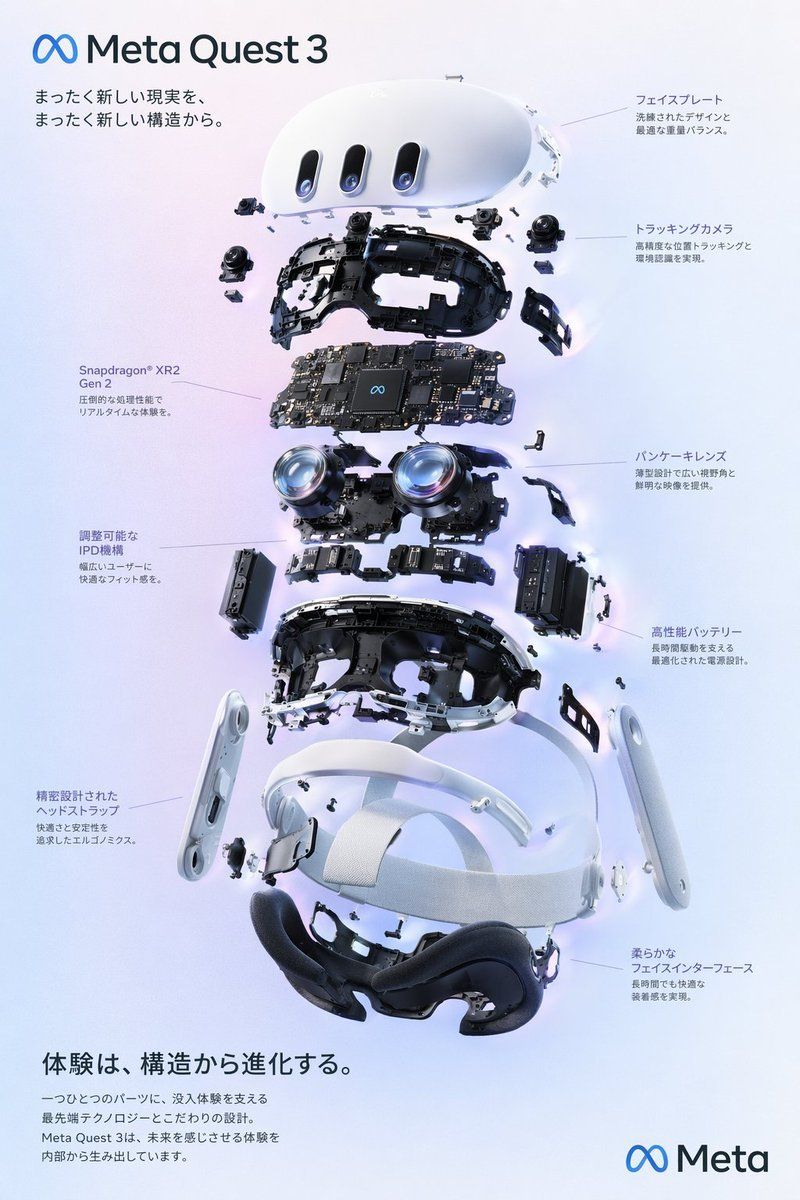
Meta Quest 3 爆炸图信息图
Prompt
{"type":"premium exploded-view product infographic poster","format":"vertical 2:3 advertising layout","brand":"{argument name=\"brand name\" default=\"Meta\"}","product":"{argument name=\"product name\" default=\"Meta Quest 3\"}","language":"Japanese visible typography","style":"clean high-end technology marketing, photorealistic 3D render, soft studio lighting, pale lavender to ice-blue gradient background, subtle glow around components, crisp shadows, precise engineering detail, minimal corporate design","main_visual":{"subject":"exploded 3D view of a white VR headset suspended in midair, every internal layer separated vertically along a central axis","position":"center","composition":"front face plate at the top, internal tracking cameras and black structural frame below, main circuit board layer, dual pancake lens modules, battery and side modules, lower chassis, white ergonomic head strap, black soft facial interface cushion at the bottom; small screws, brackets, ribbon cables, sensors and plastic clips floating around each layer","materials":"matte white outer shell, black molded plastic interior, glossy glass lenses with blue reflections, detailed black printed circuit board, fabric-textured white strap, soft black foam padding"},"layout":{"top_left":{"logo":"Meta infinity symbol plus text Meta Quest 3","headline":"まったく新しい現実を、\nまったく新しい構造から。"},"centerpiece":"large exploded Meta Quest 3 headset technical breakdown, vertically stacked, occupying most of the page","callouts":{"count":8,"style":"thin gray leader lines with small Japanese labels and two-line descriptions","items":[{"position":"upper right","label":"フェイスプレート","description":"洗練されたデザインと最適な重量バランス。"},{"position":"right upper middle","label":"トラッキングカメラ","description":"高精度な位置トラッキングと環境認識を実現。"},{"position":"right middle","label":"パンケーキレンズ","description":"薄型設計で広い視野角と鮮明な映像を提供。"},{"position":"right lower middle","label":"高性能バッテリー","description":"長時間駆動を支える最適化された電源設計。"},{"position":"bottom right","label":"柔らかなフェイスインターフェース","description":"長時間でも快適な装着感を実現。"},{"position":"left middle","label":"Snapdragon® XR2\nGen 2","description":"圧倒的な処理性能でリアルタイムな体験を。"},{"position":"left lower middle","label":"調整可能なIPD機構","description":"幅広いユーザーに快適なフィット感を。"},{"position":"bottom left","label":"精密設計されたヘッドストラップ","description":"快適さと安定性を追求したエルゴノミクス。"}]},"bottom_left":{"headline":"{argument name=\"bottom headline\" default=\"体験は、構造から進化する。\"}","body":"一つひとつのパーツに、没入体験を支える最先端テクノロジーとこだわりの設計。\nMeta Quest 3は、未来を感じさせる体験を内部から生み出しています。"},"bottom_right":{"logo":"Meta infinity symbol plus Meta wordmark"}},"typography":"modern rounded sans-serif similar to Meta brand typography, dark navy text, small callout captions, generous spacing","rendering_instructions":"ultra-sharp product render, engineering accuracy, floating components aligned cleanly, no clutter, no people, no extra products, realistic reflections on lenses, subtle ambient occlusion, polished official-brand advertisement feel","parameters":{"background color":"{argument name=\"background color\" default=\"pale lavender and ice blue gradient\"}","visual detail level":"{argument name=\"visual detail level\" default=\"highly detailed photorealistic exploded assembly\"}"}}- Category
- Charts & Infographics
- Model
- GPT Image 2
- Creator
- Jack Vĩ
- Source ID
- 18705
- Published
- May 6, 2026
Views6







