14

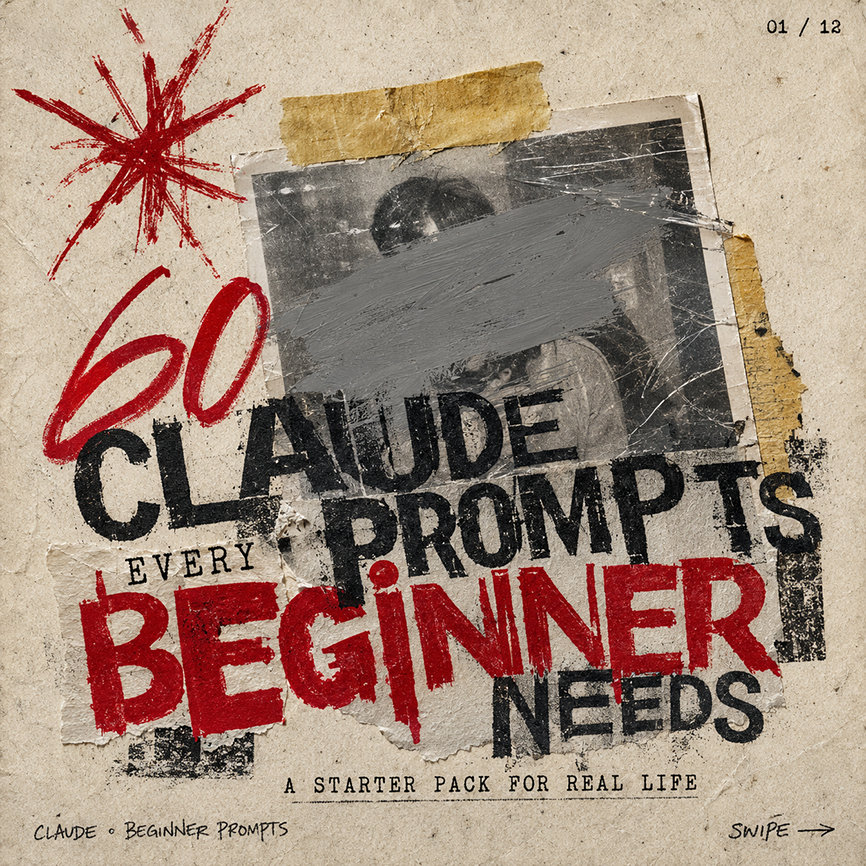
Gritty Claude Prompts 轮播图封面
Enlarge

Gritty Claude Prompts 轮播图封面

Prompt
Create a square gritty social media carousel cover poster on aged beige paper with a distressed photocopy/zine aesthetic. The composition has 1 central black-and-white taped photograph, scratched and worn, with a wide gray paint smear obscuring the face; 2 pieces of yellowed masking tape hold it down, one horizontal strip at the top and one torn vertical strip on the right edge. Add 1 large hand-drawn red starburst scribble in the upper left, and use rough stamped typography layered over torn paper scraps. The main headline reads “{argument name="headline text" default="CLAUDE PROMPTS"}” in huge distressed black uppercase letters across the center, partially overlapping the photo. Add the small word “EVERY” above the bottom headline, then a massive red stamped word “{argument name="emphasis word" default="BEGINNER"}” across the lower middle, followed by “NEEDS” in black on the lower right. Include the subtitle “{argument name="subtitle text" default="A STARTER PACK FOR REAL LIFE"}” centered near the bottom in small typewriter-style uppercase letters. Add tiny handwritten footer text “{argument name="footer label" default="CLAUDE • BEGINNER PROMPTS"}” at bottom left, “SWIPE →” at bottom right, and a small page indicator “{argument name="page indicator" default="01 / 12"}” in the top right. Use a limited palette of dirty beige, black ink, gray paint, and deep red, with torn edges, ink smudges, rough halftone texture, scratches, tape shadows, and imperfect alignment; make it feel like an underground punk flyer repurposed as a bold AI prompt carousel thumbnail.
Category
Charts & Infographics
Model
GPT Image 2
Creator
EPIX
Views3
Source ID
18855
Published
May 7, 2026

Guide

About "Gritty Claude Prompts 轮播图封面"

What is this prompt for?

"Gritty Claude Prompts 轮播图封面" AI image prompt for GPT Image 2 (Charts & Infographics). 为 Claude 初学者提示词内容生成一种具有颓废朋克杂志风格的社交媒体轮播图封面。 Copy it on Picva and recreate…

The full copyable prompt and example visuals above are ready for AI image generation or one-click recreate in Picva.

How to use this prompt

  1. Step 1

    Open the prompt detail

    Review the example visuals, category, and full prompt text for "Gritty Claude Prompts 轮播图封面".

  2. Step 2

    Copy the prompt

    Copy the prompt body from this page, or load it directly in Studio.

  3. Step 3

    Pick a model (GPT Image 2)

    Prefer GPT Image 2. If you switch models, keep subject and composition and tweak style terms.

  4. Step 4

    Generate and export

    Recreate the look in Picva, or export into your workflow for editing and publishing.

FAQ

What is the "Gritty Claude Prompts 轮播图封面" prompt?
It is an AI image-generation prompt for GPT Image 2 in the Charts & Infographics category. This page includes the full prompt text, example visuals, and a one-click recreate path in Picva.
How do I use this prompt to generate an image?
Copy the prompt from this page, or use Generate / Studio. Paste it into a compatible image model, or recreate the look in Picva with optional reference images.
Which model is this prompt for?
This page lists GPT Image 2. Most descriptive prompts also transfer to nearby image models such as GPT Image, Flux, or Midjourney with light style tweaks.
Can I use the result commercially?
You can usually copy the prompt for creation, but commercial use of the final image depends on the model terms, reference-image rights, and the generated content. Follow the source author and platform rules.