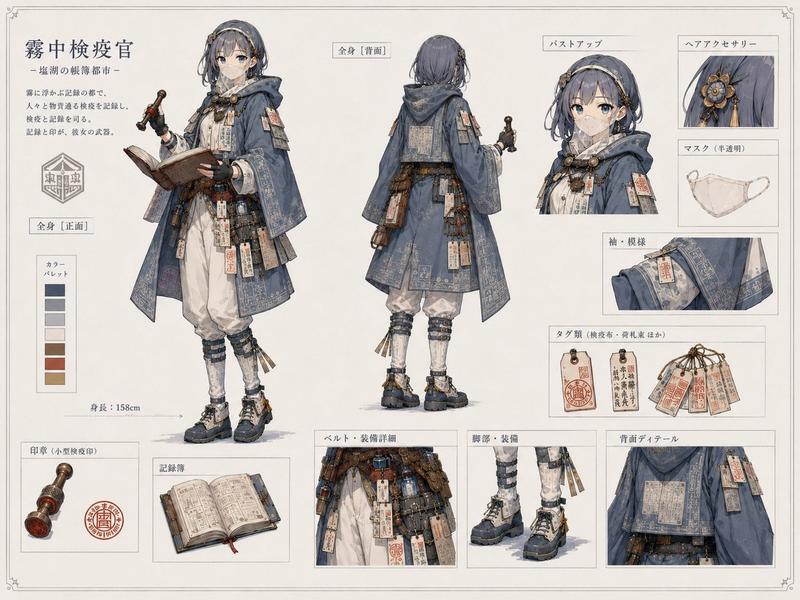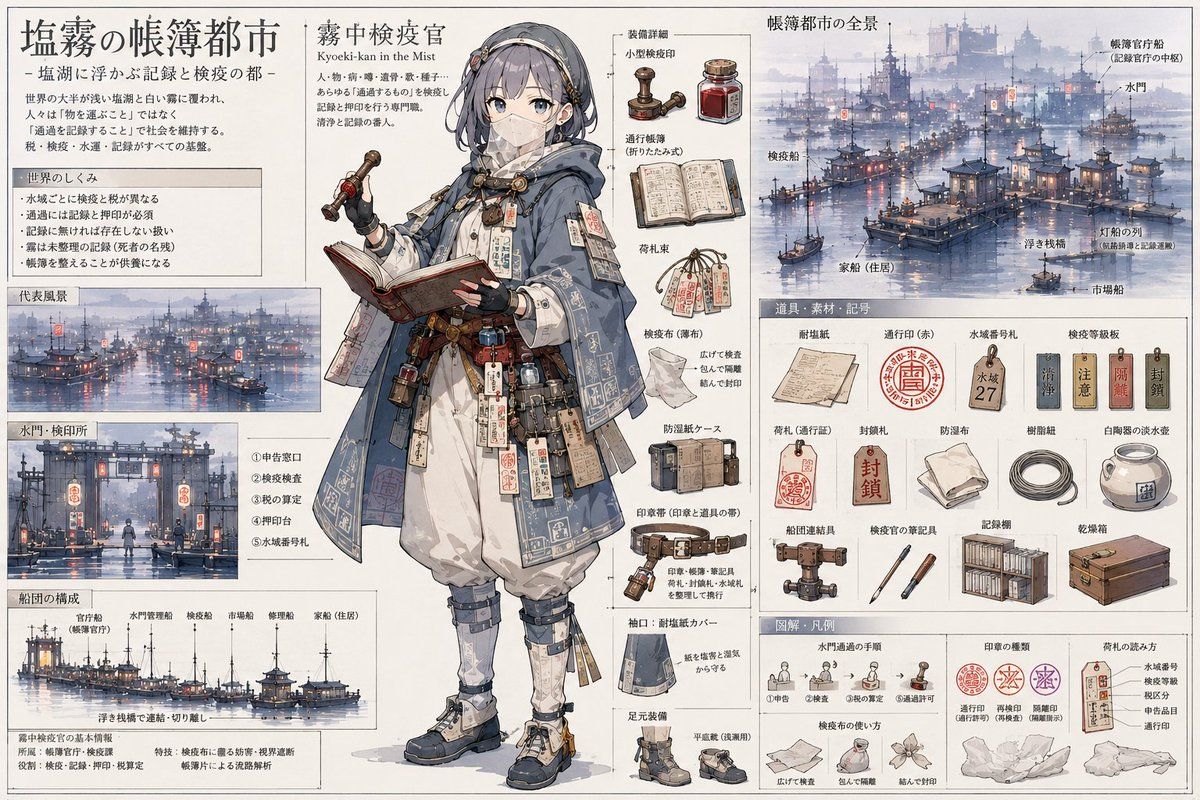
盐雾账簿之城参考图谱
Prompt
{"type":"information-dense anime fantasy reference sheet and worldbuilding infographic","language_and_text":"Use fine Japanese-style printed typography throughout, but describe all labels in English. Create a parchment-white archival page with thin gray panel borders, dense annotations, arrows, item callouts, and watercolor ink rendering.","main_title":"{argument name=\"main title\" default=\"塩霧の帳簿都市\"}","subtitle":"A salt-lake ledger city and quarantine-record bureaucracy, shown as a detailed character-and-setting design sheet.","central_character":{"position":"center, occupying the full height of the page","role":"{argument name=\"character role\" default=\"mist quarantine officer\"}","name":"{argument name=\"character name\" default=\"Kyoeki-kan in the Mist\"}","appearance":"young anime woman with shoulder-length dark blue-gray hair, hairband and small ornaments, face intentionally covered by a soft rectangular gray blur with no facial features, calm scholarly posture","clothing":"layered blue-gray hooded cloak covered in pale geometric border patterns, white robe and loose white trousers, belts, pouches, document tags, wooden seals, red stamps, straps, protective cuffs, knee guards, gaiters, heavy walking shoes","held_objects":"open ledger book in the left hand and a red-handled inspection stamp or seal tool in the right hand","palette":"{argument name=\"color palette\" default=\"misty blue gray, cream parchment, faded red seals, dark ink, warm brown leather\"}","style":"delicate Japanese anime concept art mixed with historical field-guide illustration, watercolor wash, precise linework, soft fog, high detail"},"layout":{"page_orientation":"wide landscape reference sheet","overall_structure":"one large central character with surrounding labeled diagrams, city views, equipment grids, and process illustrations","sections":[{"title":"City overview and concept text","position":"top left","count":3,"items":["large title block","short explanatory paragraph","boxed rules of the world with 5 bullet-like lines"]},{"title":"Representative scenery","position":"middle left","count":1,"items":["panoramic misty canal harbor filled with boats, lamps, bridges, towers, and floating inspection markers"]},{"title":"Water gate and inspection station","position":"lower left","count":1,"items":["front-view canal checkpoint with lanterns, piers, boats, inspectors, and numbered callouts"]},{"title":"Fleet composition","position":"bottom left","count":6,"items":["official inspection boat","water-gate management boat","inspection boat","market boat","repair boat","residential house boat"]},{"title":"Character tool callouts","position":"upper center-right beside character","count":5,"items":["small wooden inspection stamp","red ink bottle","opened registry ledger","bundle of hanging cargo tags","transparent inspection cloth"]},{"title":"Belt and clothing callouts","position":"center-right beside character","count":5,"items":["waterproof document case","wooden crate-like protective case","belt with stamps and small tools","hem cover fabric sample","footwear and sole-detail samples"]},{"title":"Full city panorama","position":"top right","count":1,"items":["large mist-covered floating city on a salt lake with many docks, canals, lanterns, houseboats, towers, cranes, and distant fortress silhouettes"]},{"title":"Tools, materials, and symbols grid","position":"middle right","count":15,"items":["shipping form document","red circular transit seal","blue-gray water-number tag marked 27","inspection school plaque","cargo tag","red sealing tag","folded waterproof cloth","coiled mooring rope","white saltwater jar","rolled permit belt","inspection officer seal tool","two inspection writing instruments","record shelf filled with ledgers","wooden drying box","small label plaques"]},{"title":"Diagrams and legend","position":"bottom right","count":6,"items":["waterway transit procedure with 5 small steps","three seal types in red and purple","cargo tag reading method","inspection cloth folding and wrapping method","knotted cloth examples","small paper-tag examples"]}]},"environment_details":"The harbor scenes should show a foggy salt-lake metropolis built on docks and floating platforms, with hundreds of tiny boats, red lanterns reflected in water, pagoda-like roofs, bureaucratic signs, numbered markers, and pale blue morning haze.","composition_rules":"Keep the sheet organized and readable: central character dominates, left side explains the city and boats, right side explains equipment and procedures, with fine callout lines connecting objects. Use a handmade illustrated encyclopedia aesthetic rather than a modern UI.","image_quality":"high-resolution concept art, crisp miniature details, soft watercolor shadows, parchment background, balanced margins, no photorealism, no 3D render"}- Category
- Charts & Infographics
- Model
- GPT Image 2
- Creator
- 無関係者
- Source ID
- 18890
- Published
- May 7, 2026
Views3