19

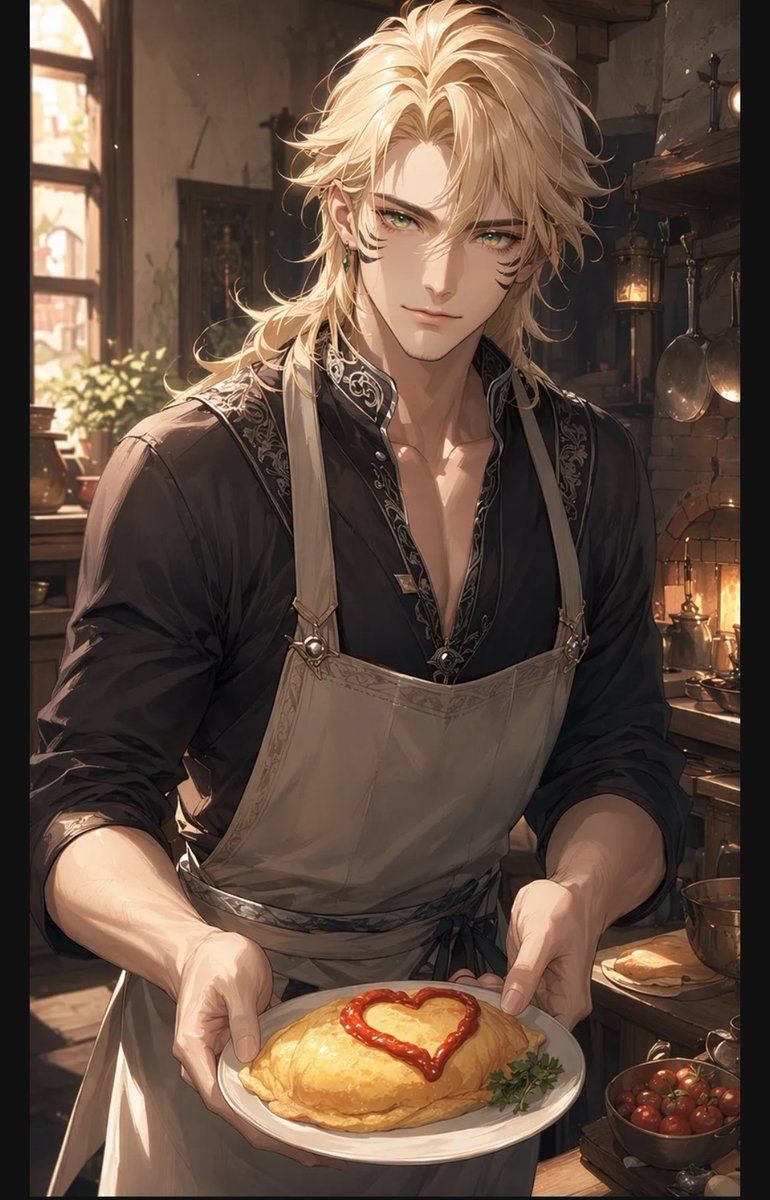
系着围裙的金发男子呈上爱心蛋包饭
Enlarge

Example images

系着围裙的金发男子呈上爱心蛋包饭

Prompt
Create a warm, romantic anime-style vertical illustration of {argument name="character name" default="a tall handsome blond man"} welcoming the viewer in a rustic fantasy kitchen, shown from mid-torso up and holding out a white plate with both hands. His face is covered by a plain centered square censor block in a skin-tone brown, while his long tousled {argument name="hair color" default="golden blond"} hair frames the block and catches the sunlight. He wears a black open-collar shirt with ornate silver embroidery along the collar and placket, sleeves rolled to the forearms, plus a beige apron with shoulder straps, metal rings, and a tied waist. On the plate is exactly one golden folded omurice, glossy and soft, decorated with exactly one red ketchup heart on top and a small green herb garnish at the side. The background is a cozy old-world kitchen with warm afternoon light streaming through one arched window on the left, potted greenery on the sill, a brick hearth glowing on the right, one hanging lantern, exactly two hanging metal pans, wooden shelves, bowls, copper cookware, and a bowl of small red tomatoes near the lower right. Use soft cinematic lighting, detailed painterly linework, delicate highlights, warm amber shadows, shallow depth of field, intimate welcoming composition, high-detail anime illustration, fantasy domestic atmosphere, vertical portrait aspect ratio.
Category
Posters & Typography
Model
GPT Image 2
Creator
美和
Views2
Source ID
19939
Published
May 12, 2026

Guide

About "系着围裙的金发男子呈上爱心蛋包饭"

What is this prompt for?

"系着围裙的金发男子呈上爱心蛋包饭" AI image prompt for GPT Image 2 (Posters & Typography). 生成一幅温馨的动漫奇幻厨房肖像,描绘了一位系着围裙的金发男子为浪漫角色艺术呈现装饰有爱心的蛋包饭。 Copy it on Picva and recreate the…

The full copyable prompt and example visuals above are ready for AI image generation or one-click recreate in Picva.

How to use this prompt

  1. Step 1

    Open the prompt detail

    Review the example visuals, category, and full prompt text for "系着围裙的金发男子呈上爱心蛋包饭".

  2. Step 2

    Copy the prompt

    Copy the prompt body from this page, or load it directly in Studio.

  3. Step 3

    Pick a model (GPT Image 2)

    Prefer GPT Image 2. If you switch models, keep subject and composition and tweak style terms.

  4. Step 4

    Generate and export

    Recreate the look in Picva, or export into your workflow for editing and publishing.

FAQ

What is the "系着围裙的金发男子呈上爱心蛋包饭" prompt?
It is an AI image-generation prompt for GPT Image 2 in the Posters & Typography category. This page includes the full prompt text, example visuals, and a one-click recreate path in Picva.
How do I use this prompt to generate an image?
Copy the prompt from this page, or use Generate / Studio. Paste it into a compatible image model, or recreate the look in Picva with optional reference images.
Which model is this prompt for?
This page lists GPT Image 2. Most descriptive prompts also transfer to nearby image models such as GPT Image, Flux, or Midjourney with light style tweaks.
Can I use the result commercially?
You can usually copy the prompt for creation, but commercial use of the final image depends on the model terms, reference-image rights, and the generated content. Follow the source author and platform rules.