19

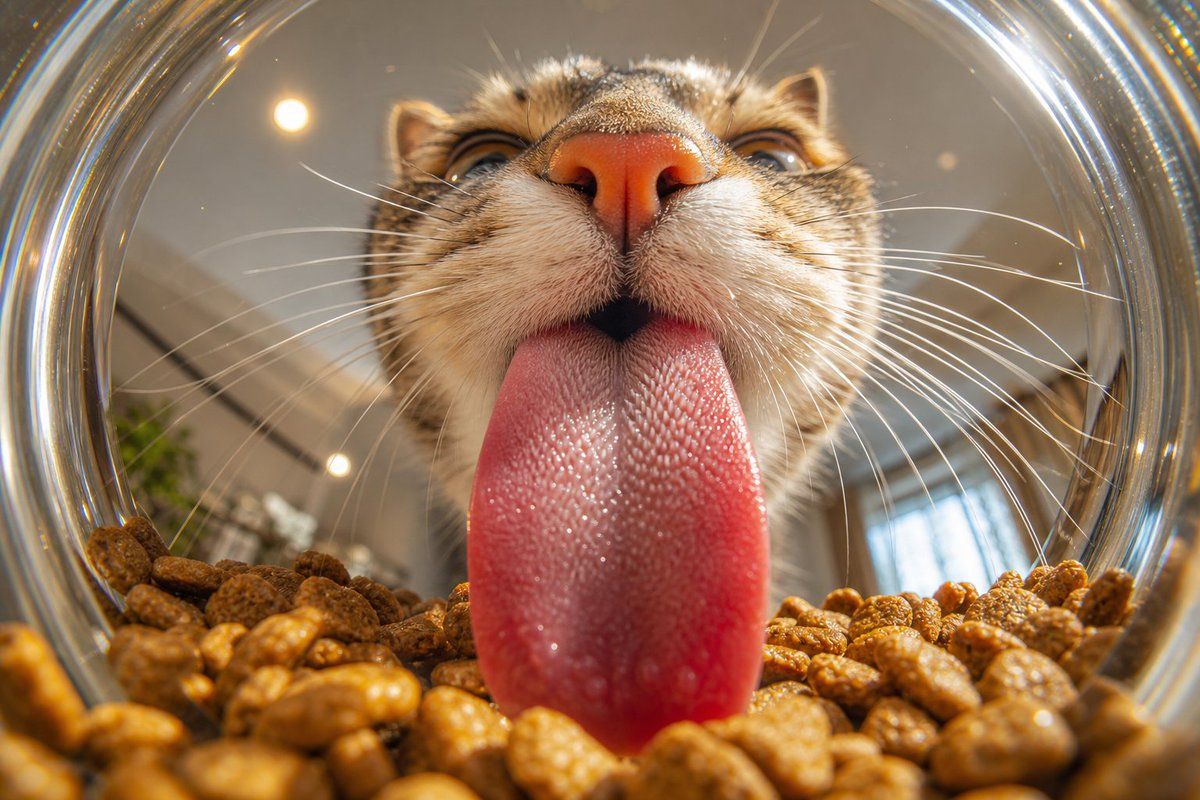
猫咪食盆内的微距舌头特写
Enlarge

猫咪食盆内的微距舌头特写

Prompt
Create an ultra-realistic macro photograph from inside a transparent glass cat food bowl looking outward at a {argument name="cat type" default="brown tabby cat"} licking the food. Use an extreme wide-angle fisheye perspective with the circular glass rim forming a bright distorted ring around the frame. The cat’s face fills the upper center: pink nose close to camera, striped tabby muzzle, sharp white whiskers radiating left and right, partially visible eyes above the nose, ears near the top edge. The cat’s {argument name="tongue color" default="wet pink"} tongue is extended straight down into the bowl and dominates the center foreground, showing highly detailed rough papillae texture, moisture, tiny glossy highlights, and a realistic damp surface. The bottom third of the image is filled with {argument name="food type" default="brown dry cat kibble"}, individual pellets large in the foreground with shallow depth of field and warm golden-brown texture. Background beyond the bowl is softly blurred indoor space with warm ceiling lights, subtle plant shapes, and window reflections. Lighting is warm natural indoor daylight with specular reflections on the glass rim and tongue, crisp macro detail on the tongue and muzzle, cinematic realism, 16:9 horizontal composition, no text, no watermark.
Category
Charts & Infographics
Model
GPT Image 2
Creator
ヤマ
Views4
Source ID
20109
Published
May 13, 2026

Guide

About "猫咪食盆内的微距舌头特写"

What is this prompt for?

"猫咪食盆内的微距舌头特写" AI image prompt for GPT Image 2 (Charts & Infographics). 从猫咪食盆内部拍摄的超写实鱼眼微距视角,非常适合展示动物极具质感的纹理和湿润细节。 Copy it on Picva and recreate the look in one…

The full copyable prompt and example visuals above are ready for AI image generation or one-click recreate in Picva.

How to use this prompt

  1. Step 1

    Open the prompt detail

    Review the example visuals, category, and full prompt text for "猫咪食盆内的微距舌头特写".

  2. Step 2

    Copy the prompt

    Copy the prompt body from this page, or load it directly in Studio.

  3. Step 3

    Pick a model (GPT Image 2)

    Prefer GPT Image 2. If you switch models, keep subject and composition and tweak style terms.

  4. Step 4

    Generate and export

    Recreate the look in Picva, or export into your workflow for editing and publishing.

FAQ

What is the "猫咪食盆内的微距舌头特写" prompt?
It is an AI image-generation prompt for GPT Image 2 in the Charts & Infographics category. This page includes the full prompt text, example visuals, and a one-click recreate path in Picva.
How do I use this prompt to generate an image?
Copy the prompt from this page, or use Generate / Studio. Paste it into a compatible image model, or recreate the look in Picva with optional reference images.
Which model is this prompt for?
This page lists GPT Image 2. Most descriptive prompts also transfer to nearby image models such as GPT Image, Flux, or Midjourney with light style tweaks.
Can I use the result commercially?
You can usually copy the prompt for creation, but commercial use of the final image depends on the model terms, reference-image rights, and the generated content. Follow the source author and platform rules.