迷你世界美食景观网格
Prompt
Goal: Create a 2x2 grid of four surreal miniature edible city foodscapes, each city rising from a vast desert of fine golden cane sugar, photographed like a premium macro diorama with cinematic lighting. Use {argument name="overall theme" default="Universal Mini World Foodscape"} as the concept: iconic landmarks and skyscrapers are meticulously crafted from colorful candies, pastries, vegetables, spices, biscuits, sugar glass, jellies, and confectionery materials.

Canvas: Square image, four equal panels separated by thick black gutters, each panel a polished miniature scene with shallow depth of field, glowing city lights, sparkling sugar grains, tiny trees, and dreamy atmospheric haze. High-detail macro photography look, saturated jewel tones, warm highlights, dark vignette edges, no people except miniature statues or landmark replicas.

Layout: Exactly 4 labeled panels in a 2x2 arrangement. Count and labels: 1) top-left: “MINI NYC”; 2) top-right: “MINI LONDON”; 3) bottom-left: “MINI BEIJING”; 4) bottom-right: “MINI TOKYO”. Each title appears in elegant white serif uppercase lettering near the upper-left of its panel, with “MINI” smaller where appropriate. Keep the labels readable and spelled exactly.

Panel details: Top-left “MINI NYC” shows a miniature New York skyline beside a turquoise lake, with a tiny Statue of Liberty on a small island in the foreground, an Empire State Building-like candy skyscraper, Chrysler Building-like spire, assorted cylindrical candy towers, palm-like edible plants, broccoli-like trees, glowing windows, and rolling sugar dunes behind the skyline. Use {argument name="first city label" default="MINI NYC"} for the visible title.

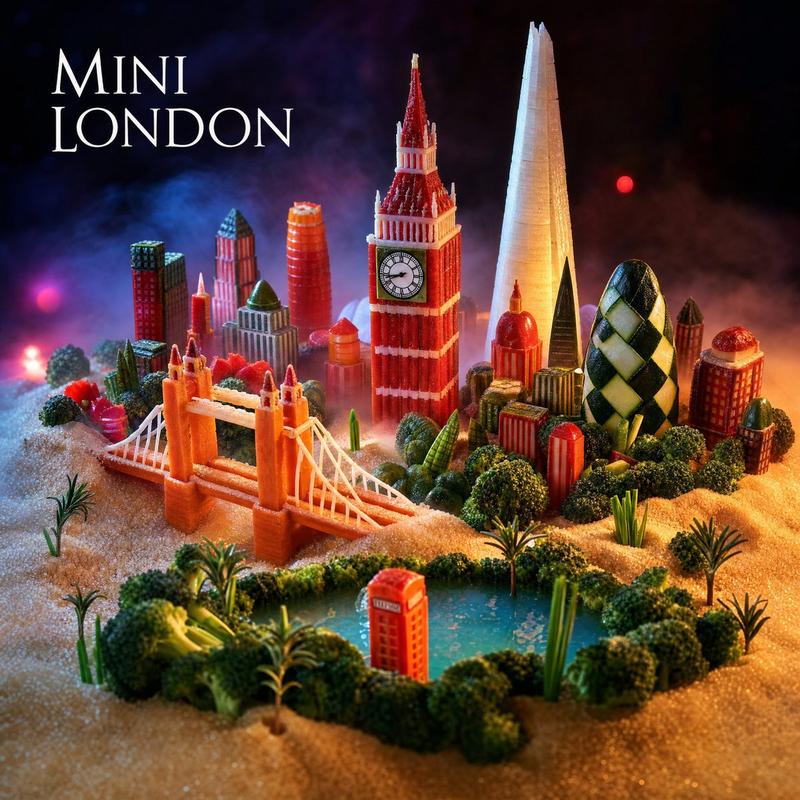
Top-right “MINI LONDON” shows edible London landmarks on golden sugar terrain with a small river or lagoon in front: Tower Bridge made from orange biscuit/candy, a Big Ben/Elizabeth Tower-style clock tower, the tall Shard-shaped sugar-glass tower, the Gherkin with diamond icing pattern, red-orange skyscrapers, tiny trees, and moody night sky with pink and red bokeh lights. Use {argument name="second city label" default="MINI LONDON"} for the visible title.

Bottom-left “MINI BEIJING” shows a miniature Beijing foodscape with a grand circular Temple of Heaven-style structure, ornate red-and-gold palace roofs, pagoda-like towers, a CCTV Headquarters-style angular building in the background, a red Chinese gate bridge over blue water in the foreground, lush edible greenery, sugar dunes, mist, and warm lantern-like glow. Use {argument name="third city label" default="MINI BEIJING"} for the visible title.

Bottom-right “MINI TOKYO” shows a miniature Tokyo foodscape at dusk with a vivid red Tokyo Tower at center, a pale Tokyo Skytree-like tower to the right, dense candy skyscrapers, a red torii gate over dark blue water in the foreground, koi fish-shaped sweets, pink blossom-like candy flowers, manicured edible shrubs, and a purple-blue neon skyline glow. Use {argument name="fourth city label" default="MINI TOKYO"} for the visible title.

Visual style: Ultra-detailed macro diorama, whimsical surreal food art, photorealistic textures, edible architecture, sparkling granulated sugar sand, dramatic studio lighting, soft fog, miniature scale, tilt-shift depth of field, rich contrast, high saturation, crisp landmarks, fantasy travel-poster mood.

Constraints: Use exactly 4 panels and exactly the 4 city titles listed. Do not add extra panels, captions, logos, watermarks, UI elements, or real humans. Preserve black borders between panels. Make every city visually distinct and recognizable through its landmarks while keeping all structures edible and miniature.- Category
- Charts & Infographics
- Model
- GPT Image 2
- Creator
- George Won
- Source ID
- 20340
- Published
- May 14, 2026
Views3