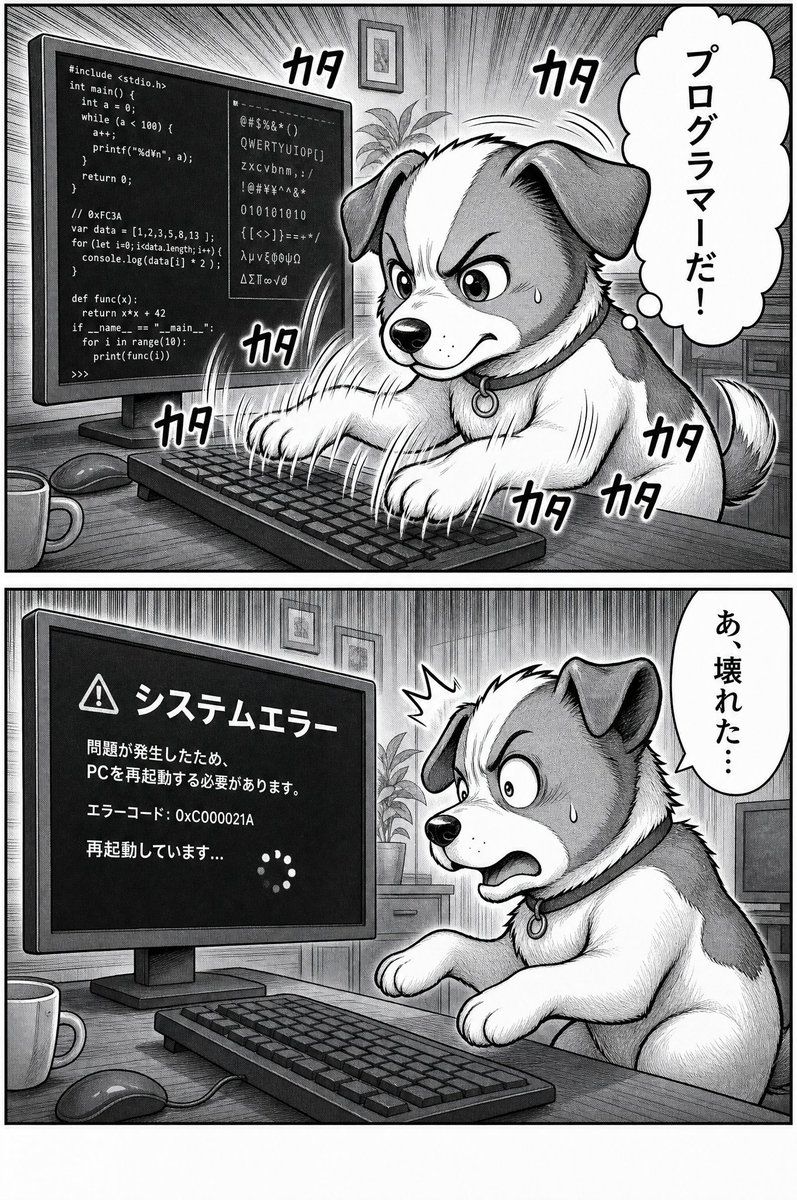
程序员狗狗漫画
Prompt
Goal: Create a black-and-white manga comic page about a dog frantically programming on a desktop computer, then causing a system error.

Canvas: Vertical comic page in grayscale, traditional manga ink-and-screentone style, with heavy panel borders and detailed hatching. Use exactly 2 horizontal panels stacked vertically, separated by a thick white gutter.

Layout: Panel 1 occupies the top half. Panel 2 occupies the bottom half. Both panels show the same home office desk from a slightly angled side view: a large desktop monitor on the left, keyboard in the foreground, mouse and mug on the desk, a plant and framed wall art in the background.

Panel 1: A fluffy medium-sized dog with floppy ears, white muzzle and chest, darker ears and patches, sits at the desk and types furiously with both front paws on the keyboard. The dog’s head area is largely covered by a plain vertical gray rectangle censor block in the center of the panel, obscuring most of the face while leaving ears, paws, body, and tail visible. The monitor displays mixed programming code and gibberish symbols, including C-like code, JavaScript-like lines, Python-like lines, binary digits, and random characters. Add dramatic manga speed lines radiating from the monitor and typing action. Include exactly 7 visible Japanese typing sound effects reading 「カタ」: one near the upper left of the dog/monitor area, one near the top center-right, one near the lower monitor/keyboard area, one near the left keyboard edge, and three clustered around the dog’s lower right body and tail. Add one vertical cloud-shaped thought bubble on the right with Japanese text: 「プログラマーだ!」.

Panel 2: The same dog is startled and panicking, leaning back from the keyboard with wide eyes, open mouth, raised paws, a sweat drop on the cheek, and a small shock burst near the head. The monitor now shows a dark system error screen with a warning triangle icon and Japanese text. Use exactly this monitor text: 「システムエラー」, 「問題が発生したため、PCを再起動する必要があります。」, 「エラーコード: 0xC000021A」, 「再起動しています...」, plus a circular loading spinner made of small dots. Add one vertical speech bubble on the right with Japanese text: 「あ、壊れた…」.

Visual style: High-detail monochrome manga, expressive animal character acting like a human, dense cross-hatching, screentone shading, strong motion lines, bold hand-lettered Japanese sound effects, slightly comedic tone, clean readable text on the monitor and bubbles.

Customizable subject: The dog should be {argument name="animal character" default="a fluffy floppy-eared dog"}. The comic’s first thought bubble should say {argument name="first bubble text" default="プログラマーだ!"}. The second speech bubble should say {argument name="second bubble text" default="あ、壊れた…"}. The monitor error headline should be {argument name="error headline" default="システムエラー"}. The error code should be {argument name="error code" default="0xC000021A"}.

Constraints: Keep the image black and white only, preserve the two-panel layout, use exactly 2 speech/thought bubbles total, exactly 7 typing sound effects in the top panel, no extra panels, no color, no watermark.- Category
- UI & Interfaces
- Model
- GPT Image 2
- Creator
- ふったん@副業とAIと漫画大好き
- Source ID
- 20401
- Published
- May 14, 2026
Views1